
Unlock Your 2020 Dodge Challenger Radio in Minutes - How It Works
- Skip long troubleshooting discussions or service visits - you can generate the code online using the radio serial number.
- Start by finding the serial number. It is always present on the unit itself, and in some cases it can be visible on the Challenger's radio screen.
- Type it into the form above, and our system will retrieve the correct 2020 Challenger unlock code.
- When you receive the code, input it using Challenger's radio controls to unlock the system successfully.
- The entire process takes less than a minute for most users and requires minimal effort.
Can't Locate Your Radio Serial Number? Follow The Steps Below for Dodge Challenger 2020
The starting step is finding the radio serial.
Most people assume the code depends on the Dodge model or year, but in reality, the whole process relies on the unique radio unit's serial number.
This number identifies the exact head unit installed in your Dodge Challenger.
This is even better, because if you have a used radio, the VIN or other Dodge-specific data wouldn't help.
Depending on the radio version used, you can see the serial directly from the display or by looking at the label on the radio chassis.
2020 Challenger - Which Radio Did You Get?
For 2020 the Challenger keeps the same Uconnect 4 line-up as 2019 - one 7-inch unit and two 8.4-inch units that look almost identical but differ in built-in navigation.
Uconnect 4 (UAG) is the 7-inch base radio fitted to SXT and base R/T cars. Visual ID: a smaller 7-inch screen sat inside the central dash opening with thick bezel material around it; Apple CarPlay and Android Auto are supported but there is no factory navigation app and no GPS arrow icon. This is the most common radio on 2020 Challengers.
Uconnect 4 (UCQ) is the 8.4-inch non-NAV upgrade. The screen fills almost the entire dash opening, Apple CarPlay and Android Auto are present, but the home screen has no NAV/Map tile because GPS navigation is not built in. This was a common option on R/T and Scat Pack.
Uconnect 4C NAV (UAQ) is the 8.4-inch with built-in GPS. Bezel and screen size are identical to UCQ; the way to tell them apart is the dedicated NAV/Map tile on the home screen and the SRT Performance Pages app being unlocked. UAQ was standard on SRT Hellcat and a common option on R/T Scat Pack.
Quick test: if your 8.4-inch unit shows a Map/NAV tile on the home screen, you have UAQ - if it does not, you have UCQ.
Display-Based Serial Number Retrieval
Try the following for your 2020 Dodge Challenger:
The 2020 Dodge Challenger's final Uconnect 4C (RA4) 8.4" touchscreen is mounted in the retro-styled muscle coupe's wide center console. Finding the serial number on screen uses Dealer Mode:
- Turn ignition to ACC or ON.
- Press the bottom-left and bottom-right corners of the physical screen bezel (the plastic frame around the glass) simultaneously for 5 seconds.
- Dealer Mode appears on the display.
- Navigate to: System Info → Radio Part Info → Serial Number.
Note On some 2020 Challenger units, Dealer Mode could be disabled after a software update. If the bezel press fails, physical removal is the fallback.
Display-Based Serial Number Retrieval
The 2020 Challenger continued with the Uconnect 4 line-up - 7-inch UAG, 8.4-inch UCQ, and 8.4-inch UAQ 4C NAV - and all of them respond to the same hidden climate-button shortcut that brings up the engineering/dealer screen.
Uconnect 4 (UAG / UCQ / UAQ)
- Turn the ignition to RUN and let the radio finish booting.
- On the driver side of the climate panel, press and hold the front defrost button, the temperature UP button, and the temperature DOWN button at the same time.
- Keep all three pressed for around 5 to 7 seconds until the diagnostic interface replaces the normal home screen.
- Locate the radio identification entry - the serial number is a 14-character alphanumeric string used by Mopar for code lookup.
- Note the value exactly, then exit the menu or cycle the ignition to return to normal mode.
If the unit does not enter the diagnostic screen on multiple tries, your software build may have removed it and you should use the physical removal method.
View the Serial by Pulling Out the Radio Unit
If the serial does not appear in menu, the next step is checking the radio itself.
Many Dodge radios require physical access to the ID label attached to the unit.
Common approach:
- Start by completely turning off the engine - pull the key out.
- Then detach the dashboard bezel.
- Next, unscrew the mounting points and move the radio forward.
- Look for a factory sticker showing the serial number.
Should Dealer Mode be blocked on your 2020 Challenger, removing the RA4 radio gives access to the serial label. The Challenger's wide, retro-style center console has distinctive trim:
- Remove the center stack bezel – The Challenger's bezel covers the 8.4" screen and HVAC controls. Work a plastic pry tool around the edges – the panel releases from the bottom corners first.
- Unscrew the 4 Torx T20 bolts – Securing the radio mount to the dash.
- Ease the radio forward – Pull the unit out far enough to read the serial label on the side or top.
The 14-character serial is on a barcode sticker. Cables can remain connected.
Releasing the Unit to Access the S/N on the Tag
The serial is printed on a factory label on the chassis. The 2020 Challenger keeps the same one-piece center bezel design used in 2019, so you will need to release the bezel before the radio screws are exposed.
Safety preparation
- Place the ignition in OFF and remove the key fob from the cabin.
- Disconnect the negative battery terminal and wait 10 to 15 minutes for the SRS/airbag capacitors to discharge.
- Avoid pulling on yellow airbag connectors during the work.
- Make sure the dash is at room temperature so the soft-touch surface is less prone to scuffing.
Tools you will want
- A set of plastic trim/panel removal tools.
- A Phillips #2 screwdriver or 1/4-inch driver for the four retaining screws.
- A clean cloth or microfibre to rest the bezel on once removed.
Removal overview
- Start at the bottom edge of the center stack bezel and use a trim tool to release the spring clips.
- Work around the perimeter until the bezel pops free, then pull it straight back as one unit.
- Disconnect the wiring on the rear of the bezel (Start/Stop, hazard, climate switches) before setting it aside.
- Remove the 4 Phillips screws holding the radio cage in the dash.
- Slide the radio out, then disconnect the antenna and main connectors from the back.
Where the serial label sits
- Inspect the top and sides of the metal housing for a barcode label.
- The serial line is the longer alphanumeric string on the sticker, distinct from the part number.
- Take a clear photo so you have a record before refitting the unit.
If your trim is glossy piano-black, expect very fine swirl marks if you use anything but plastic tools - replacement bezels are easy to scratch.
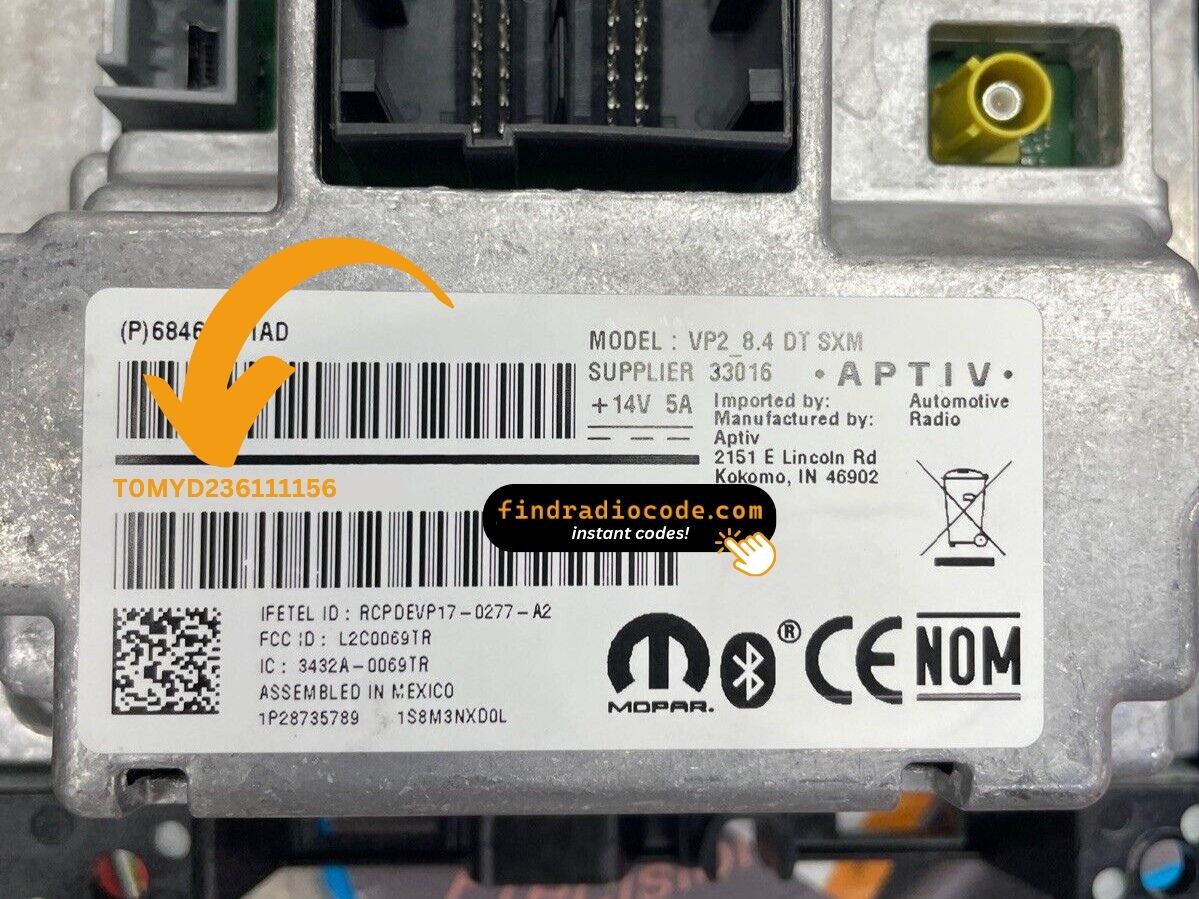
Example: Dodge Challenger serial number label location
These are the Common Serial Formats
The 2020 Dodge Challenger Uconnect 4C (RA4) serial number uses these formats:
T00AM– Standard Harman prefix for this platformT00BE– Continental-manufactured version
Radio designation: RA4 (Uconnect 4C). Serial: 14 characters. The Challenger shared this platform with the Charger in its final production years through 2024.
The serial number is distinct from the part number (P... or 68...) on the same label. Only the serial is used for the unlock code.
Common Serial Number Structures
For 2020 Challenger units, the serial format depends on which supplier built the radio - Uconnect 4 was sourced from more than one vendor during this generation.
- A common pattern starts with T00 and continues with two letters and a numeric tail, often described as roughly 14 characters in total - this is associated with Mitsubishi Electric-built Uconnect modules.
- Other 8.4-inch 4C NAV (UAQ) units may follow a Harman-style alphanumeric block instead of the T00 prefix.
- The serial shown via the dealer-mode menu and the serial on the chassis label should match exactly.
- Trim away any leading
S/Ntext, dashes, or spaces before submitting the value to a code lookup service.
Patterns can vary inside the same model year, so use the actual reading from your radio rather than assumed examples.
Entering Your Unlock Code
Now that you've found the S/N and generated the unlock code, the last part is entering it into your radio.
Dodge original head units display a CODE prompt when ready for input.
The process is straightforward, but button layouts and confirmation methods may change depending on the radio version installed in your Challenger.
Detailed Entering Instructions for Challenger 2020
Code entry on the 2020 Challenger with Uconnect 4C:
- Ignition ON. The Challenger's 8.4" screen presents "ENTER CODE".
- Tap each digit on the on-screen keypad to enter your 4-digit code.
- The radio auto-unlocks after the 4th digit — no extra step needed.
Lockout Warning: 3 wrong entries = 60-minute lockout. Leave the Challenger's ignition ON. Turning it off restarts the wait.
The Correct Way to Enter It
Once you have the anti-theft code, the 2020 Challenger Uconnect 4 unit accepts it through the audio preset buttons.
Limited Attempt Warning
- The radio allows only a small number of attempts (commonly 3) before entering a lockout.
- When the lockout is active, the radio must remain powered with the ignition in RUN for 30 continuous minutes before another try is permitted.
- Repeated lockouts extend the wait, so verify every digit before pressing a preset.
Entry sequence
- Turn the ignition to RUN so the radio is powered.
- Wait for the on-screen anti-theft prompt - typically a CODE message or an Enter Anti-Theft Code dialog.
- Use radio presets 1 to 0 to enter each digit of your code in order. For 1234 you press preset 1, then 2, then 3, then 4.
- Confirm via the OK/Enter soft key if the screen asks for it.
- The radio returns to its normal source once the sequence is accepted.
If a correct-looking code is rejected, double-check the radio serial and that the VIN tied to the code matches the vehicle the radio currently sits in.
Why Did the Radio Lock and Ask for a Code?
Challenger owners encounter this more than some other models because:
- Seasonal storage and battery drain — The Challenger is often a weekend or summer car, and months without use drains the battery enough to lock the radio.
- Battery replacement — any battery swap activates the code screen on any model year.
- Performance electrical work — owners working on the electrical system will encounter this.
- Used purchase — second-hand purchase without the prior owner's code means the code is needed right away.
The unlock code is tied to the serial number and does not change.
Understanding Unlock Issues with Your Challenger
When no "ENTER CODE" appears after a battery event:
- Ensure the key is in ON (not ACC) and allow 15–20 seconds for the Uconnect system to initialize.
- Check the fuse box for the Challenger's radio fuse — a blown fuse stops the radio.
- Try pressing the screen once to trigger the code entry prompt if it doesn't show automatically.
If the display stays dark, a blown fuse is the most likely culprit.
The Challenger's Uconnect 4C uses touchscreen-only input for code entry — no physical preset buttons are used. When "ENTER CODE" is on screen:
- Tap each digit on the virtual keypad on the 8.4" screen.
- The Challenger's Uconnect unlocks after the final digit — no confirmation button needed.
If taps don't register, cycle the ignition and wait 30 seconds.
Code rejection on the Challenger's RA4 usually traces to the wrong serial was submitted. The label has the serial (T00AM or T00BE, 14 characters) and the part number (P... or 68...) — the part number does not generate a code.
Check the serial on screen or from the label and reach out for a free re-check if needed.
After 3 wrong attempts on the Challenger's Uconnect 4C, a 60-minute lockout engages. The screen displays "WAIT":
- Keep the ignition in the ON position — car can be off but key cannot be cycled.
- Wait the entire 60 minutes.
- Cycling the ignition restarts the 60-minute wait.
Once the lockout clears, try again with the verified code.
The RA4 label on the Challenger carries multiple numbers:
- Serial number — 14 characters, beginning with
T00AMorT00BE. This is what you need. - Part number — starts with
P05or68. Not the serial.
The on-screen Dealer Mode is most reliable method: System Info → Radio Part Info → Serial Number. No tools required.