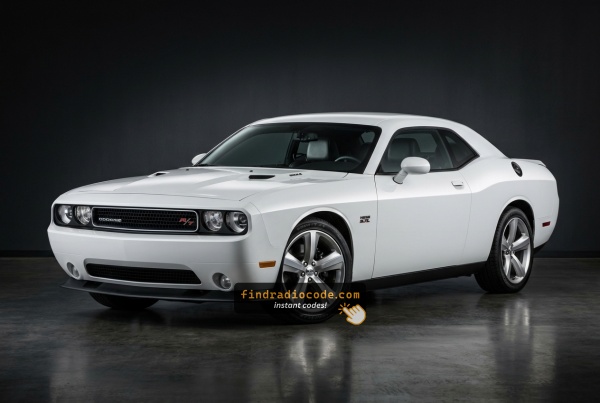
How to Get Your 2012 Dodge Challenger Radio Code
Getting your radio code takes only a few simple steps.
- Locate your radio's serial number - this is the only information required by our side.
Unlike dealership lookup, no VIN is needed. - Enter the serial number into our generator above.
The system checks it against a database of supported units and automatically catches the matching security code. - In most cases, the code appears instantly on the screen after you pay and is also sent to your email , just in case.
If we need to check it manually, you'll be notified before checkout. - When you receive the code, just enter it into the radio to restore full functionality.
Where to Find the Serial Number on your Challenger
The initial step is writing down the radio serial.
Most drivers assume the code depends on the Dodge model or year, but actually, the whole process depends on the unique radio's serial number.
This number identifies the exact head unit installed in your Dodge Challenger.
This is even better, because if you have a used radio, the VIN or other vehicle-specific data wouldn't be of much use.
Based on the radio used, you may be able to see the serial directly from the screen or by looking at the label on the radio chassis.
2012 Challenger - Which Radio Did You Get?
The 2012 Challenger carried over the same MyGIG-era factory lineup as 2011, with the anti-theft feature now active by default on Mopar radios. Three sales codes cover almost every car.
- RES (Media Center 130) - base AM/FM/CD. Standard fit on 2012 SE Challengers. Visual ID: small monochrome segmented display, hard buttons and rotary knobs, single CD slot, no touchscreen, no USB on the faceplate. The simplest of the three head units and the easiest to recognise at a glance.
- RBZ (Media Center 430) - MyGIG, no navigation. The most common factory MyGIG on 2012 SXT and many R/T Challengers. Visual ID: 6.5-inch color touchscreen, MyGIG boot splash, hard NAV / MEDIA / MORE buttons around the screen, USB port on the face, CD/DVD slot. Tapping NAV brings up a placeholder screen because there is no GPS receiver fitted.
- RHB (Media Center 430N) - MyGIG with Garmin navigation. The top-tier factory radio, typical on R/T Plus and SRT8 cars optioned with nav. Visual ID: identical 6.5-inch touchscreen bezel as RBZ, but on power-up you see a Garmin logo, and the NAV button opens a real Garmin moving map. Some faceplates carry a small NAV legend.
- How to tell at a glance: no touchscreen at all = RES; touchscreen with MyGIG splash and a 'no nav available' message = RBZ; touchscreen with a Garmin boot logo and full moving map = RHB.
- Note for 2012: starting this model year these radios shipped with the anti-theft code feature on by default, so identifying the exact unit also tells you which serial-prefix family to expect on the chassis label.
Screen-Based Serial Lookup Method
Try the following for your 2012 Dodge Challenger:
The 2012 Dodge Challenger of this generation features a MyGIG radio (RER 730N) or an first-generation Uconnect system mounted in the muscle car's center stack. These older head units do not support on-screen serial display.
The serial number is available only by pulling the radio from the Challenger's center console and reading the barcode label on the unit casing.
Find it by Pulling Out the Unit
If the serial does not appear on screen, the next step is checking the radio itself.
Many Dodge radios require physical access to the serial tag attached to the unit.
Usual approach:
- Start by completely turning off the engine - pull the key out.
- Then remove the trim panel.
- Next, release the mounting points and pull the radio forward.
- Look for a printed tag showing the serial number.
To access the serial number on the 2012 Challenger's radio, you'll need to remove it:
- Turn off the vehicle.
- Remove the center stack bezel using a plastic trim tool. The Challenger's wide, retro-style center console has a broad bezel that releases from the lower edge.
- Unscrew the four Torx T20 mounting screws securing the radio.
- Pull the unit out and read the serial label on the back or side of the chassis.
Be careful with the wiring harness. No need to disconnect it unless absolutely necessary.
Find the S/N by Pulling Out the Unit
- The 2012 Dodge Challenger places its serial number on a printed label affixed to the radio chassis, which is only visible after the unit is partially removed from the dash. There is no widely documented on-screen menu on the factory RES, RBZ, or RHB radios that exposes this number.
Safety Notice
- Switch the ignition fully off and remove the key before starting work near the dashboard.
- Disconnect the negative battery terminal and let the vehicle sit for several minutes so SRS-related capacitors discharge before you put hands behind the panel.
- Stay clear of the airbag and steering column area while levering the bezel free.
- Use plastic interior trim tools and avoid metal screwdrivers against the dash, which can crack or scratch the trim around the radio.
Tools You Will Need
- A small set of plastic trim or panel removal tools.
- A Phillips head screwdriver of medium size.
- A soft cloth or padded surface to rest the unit on while the label is read or photographed.
Removal Overview
- Carefully release the snap clips that hold the center stack bezel to the dash by pulling outward at multiple points around its edge.
- Once the bezel is loose, ease it out enough to access the radio without forcing it; on this generation the bezel is retained by clips, not visible bolts.
- Remove the four Phillips screws that secure the head unit to the cage behind the dash.
- Slide the head unit forward, then disconnect the antenna lead and the multi-pin connector at the rear before pulling the radio fully out.
Where the Serial Number Is Located
- Look on the top or side of the metal chassis for a printed sticker, which is the same label that carries the Mopar part number and a barcode.
- The serial value is typically printed below or next to the words Serial No or S/N on that label.
- Capture a clear, well-lit photo so you can read the characters without reinstalling the radio.
Helpful Tips
- Mark or note where each clip is located so you do not over-pry adjacent panels by mistake.
- Tape the screws to the bezel or store them in a small container so they are not lost while the radio is out.
- Reconnect the harness firmly before pushing the unit back, since a loose plug is a common cause of a radio that will not power up after reinstallation.
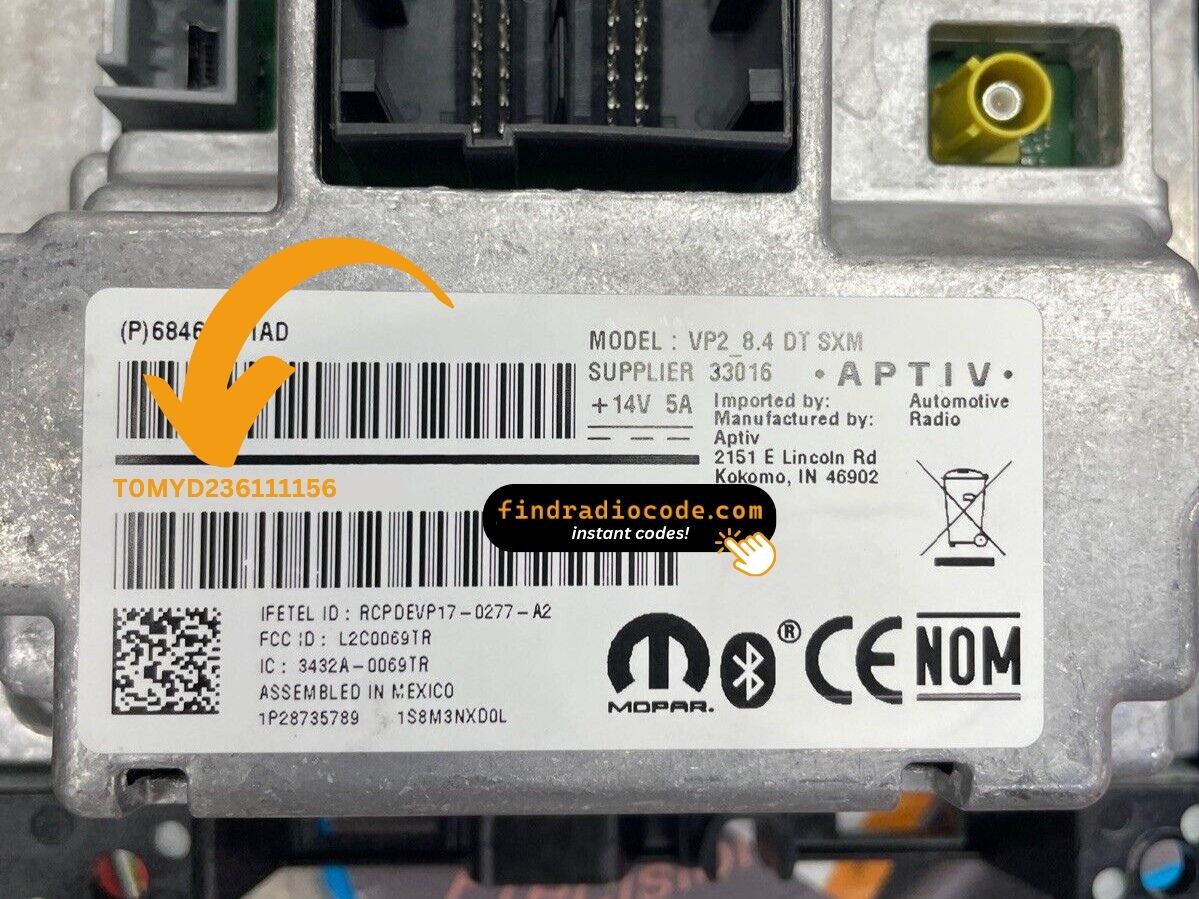
Example: Dodge Challenger serial number label location
Typical Radio Serial Prefixes and Formats
Typical radio models in the 2012 Dodge Challenger and their serial formats:
- MyGIG REP 430 (non-nav touchscreen) – Serial prefix:
TM9 - MyGIG RBZ 430 (6.5" touchscreen) – Serial prefix:
TM9orT00AM - MyGIG RER 730N (navigation) – Serial prefix:
TM9 - RES 130 (base CD/MP3) – Serial prefix:
TM9orT00AM
All serials are 14 characters. Be sure to use the serial number, not the part number (P05064... or 68...).
Common S/N Formats Used on 2012 Challenger Units
- For 2012 Dodge Challenger models, the factory head units are typically the RES base CD/MP3 receiver, the RBZ MyGIG 430 (no navigation), or the RHB MyGIG 430N (with Garmin navigation). Each carries its own printed serial on a label affixed to the chassis.
RBZ and RHB MyGIG Units
- MyGIG serials are commonly seen as a string starting with the letter T followed by alphanumeric characters, often around fourteen characters in total length.
- A frequently observed pattern on community forums uses a T00 lead-in followed by two letters and then a mix of digits and letters.
- The serial is printed in upper case adjacent to a barcode on the metal radio casing.
RES Base CD/MP3 Receiver
- The base RES receiver also has a printed alphanumeric serial on its label, but the exact prefix used on the 2012 Challenger is not consistently documented in public sources.
- Always rely on the actual sticker rather than assuming a fixed format for the RES.
General Guidance
- The string next to Serial or S/N is the value used for code lookups, not the part number that often starts with P05 or 05.
- If the label includes both an upper barcode and a lower barcode, the radio serial is usually the one explicitly labeled as serial.
- When in doubt, photograph the entire label so the serial can be visually confirmed before submitting it.
Entering Your Unlock Code
Once the system gives you 2012 Dodge Challenger unlock code from the S/N, you're ready to reactivate the radio.
Some drivers hesitate at this stage because input methods can look different across radio versions, but it's usually simple.
When the radio shows CODE, it means the unit is waiting for the correct numbers.
Detailed Input Instructions for Challenger 2012
Entering the unlock code on the 2012 Challenger's radio:
- Turn ignition to ON. The radio shows "CODE" or "ENTER CODE".
- Touchscreen models (REP/RBZ/RER): Tap the on-screen keypad to enter each digit.
- Non-touchscreen models (RES/REF): Press preset button 1 multiple times for the first digit, button 2 for the second, 3 for the third, 4 for the fourth. Hold Enter/OK to confirm.
Warning: 3+ wrong attempts trigger a lockout. Keep the Challenger's radio powered for about 60 minutes to clear it.
Step-by-Step Code Input Guide
- Beginning with the 2012 model year, MyGIG units in the Dodge Challenger (RBZ and RHB) more strictly require a four-digit anti-theft code after a battery disconnect or when the radio is fitted to another vehicle. The base RES receiver does not normally use this prompt under typical conditions.
Limited Attempt Warning
- The radio allows only a small number of code attempts before locking out further entries.
- After three failed attempts in a row, the unit enters a wait state and ignores additional inputs until the timer expires.
- Verify the code is correct against your serial number before typing anything into the radio.
Code Entry Steps
- Place the ignition in the RUN position so that the radio receives full power and completes its boot sequence.
- Wait for the screen to show an anti-theft code prompt, which may appear as Please Enter Anti-Theft Code or simply as CODE on the display.
- Use the preset number buttons on the radio faceplate to enter each digit of the code in order, treating each preset as the corresponding numeral.
- If the entry is correct, the prompt disappears and normal audio playback resumes.
If the Code Is Rejected
- Stop after the second failed attempt and recheck the serial against the one used to obtain the code.
- If the screen shows a wait or timer message, keep the ignition on and let the countdown finish before trying again.
- An extended lockout may require the ignition to remain in RUN for up to an hour before the radio accepts further code entry.
Understanding Unlock Issues with Your Challenger
The entry method on the Challenger varies with which radio is fitted:
- Touchscreen models (MyGIG REP 430, RBZ, RER 730N) — Use the on-screen number pad. The display confirms each digit as you tap it.
- Non-touchscreen models (RES 130, REF) — Press preset button 1 cycling to set the first digit, button 2 for the second, 3 for the third, 4 for the fourth. Hold Enter/OK to submit.
Not sure of your radio: a touchscreen means touchscreen entry; a non-touch face means preset buttons.
The Challenger's MyGIG radio requires physical removal to read the serial label, as these units do not support on-screen display. On the label:
- Serial number — 14 characters, beginning with
TM9orT00AM. Use this. - Part number — starts with
P05064or68. Do not use.
Transcribe all 14 characters carefully — similar-looking characters can look identical on printed labels.
If the Challenger's radio doesn't ask for a code after a battery event:
- Confirm the ignition is in ON (not ACC) and give it a moment to power up.
- Inspect the radio fuse — a blown fuse stops the radio from displaying anything.
- On certain MyGIG models, pressing any button on the radio face activates the code prompt.
Should nothing appear, power issue is the first thing to check.
Code rejection on the Challenger's MyGIG or early Uconnect typically indicates a serial number mismatch. The label has a serial number (TM9 or T00AM, 14 characters) and a part number (P05064... or 68...) — submit only the serial.
Re-read the label and contact support for a free re-check if needed.
After three failed codes on the Challenger's MyGIG, a 60-minute lockout takes effect. The display will present "WAIT":
- Leave the radio on — key must stay in ON, engine off is fine.
- Be patient for the hour.
- Cycling the ignition restarts the lockout.
After the 60 minutes, re-enter the code carefully.
Why Did the Radio Lock and Ask for a Code?
2011–2013 Challenger owners encounter this most often because of:
- Seasonal storage — Many Challengers sit over winter, draining the battery enough to activate the anti-theft.
- Battery disconnect or replacement — the most common cause on pre-2014 Challengers.
- Blown fuse — a blown radio fuse also activates the lock.
- Used purchase — second-hand without documentation often means the code was never recorded.
Your code is permanently linked to the radio serial and never changes.