Becker Radio Code - Instant Unlock
Instant radio code retrieval for supported Becker units ⚡

Becker Vehicle Brands Supported:
Quick Answers
A 100% money-back guarantee covers all purchases. A video showing the radio serial and code entry is required for refunds. Review our Refund Policy for complete terms.
- View our demonstration video to see fully how the service works.
- Browse verified reviews from our users.
- Read our in-depth blog for service verification, video proof, and customer feedback.
Radio code is delivered immediately after payment on-screen and via email. We're available 24/7, day and night. In rare cases, delivery may take up to 24h.
You only need the radio serial number and a valid email to receive your code.
You don't need the VIN. Our system generates the unlock code using the radio's serial number.
How can I find the code for my Becker radio?
If you have not lost the Becker code yet, check these places first - many vehicles ship with the code written down somewhere in the car.
- Glovebox - Many manufacturers ship a small sticker labelled "Anti-theft unlock code" inside the glovebox door or top panel.
- Owner's manual - Often handwritten on the inside cover or stapled to the page covering the radio.
- Code card - A small slip of paper inside the original purchase pack - sometimes inside the radio sleeve itself.
- Service records - Dealers sometimes write the Becker radio code into the maintenance log after a battery service.
- Old paperwork - Previous owners often leave the code in the document folder, especially on second-hand cars.
- Dealer paperwork - The original window-sticker pack or sales folder sometimes lists the radio code.
No luck? The next section shows how to retrieve a lost Becker code without leaving the house.
How to Find the Serial Number on Your Becker Radio
By Removing the Radio Unit (Most Reliable Method)
In the majority of cases, the serial number is printed on a physical manufacturer sticker attached to the upper section of the radio unit casing.
To access it, you'll usually need to carefully remove the radio from the dashboard. Depending on the vehicle and radio model, this may require plastic trim tools:
- Most units have a manufacturer identification sticker on the metal shell
- The serial typically contains letters and digits with manufacturer-specific prefixes such as "BP" (Blaupunkt), "M" / "V" (Ford/Visteon), "BE" (Becker), or "CL" (Clarion)
- Do not confuse the serial number with the model or part number
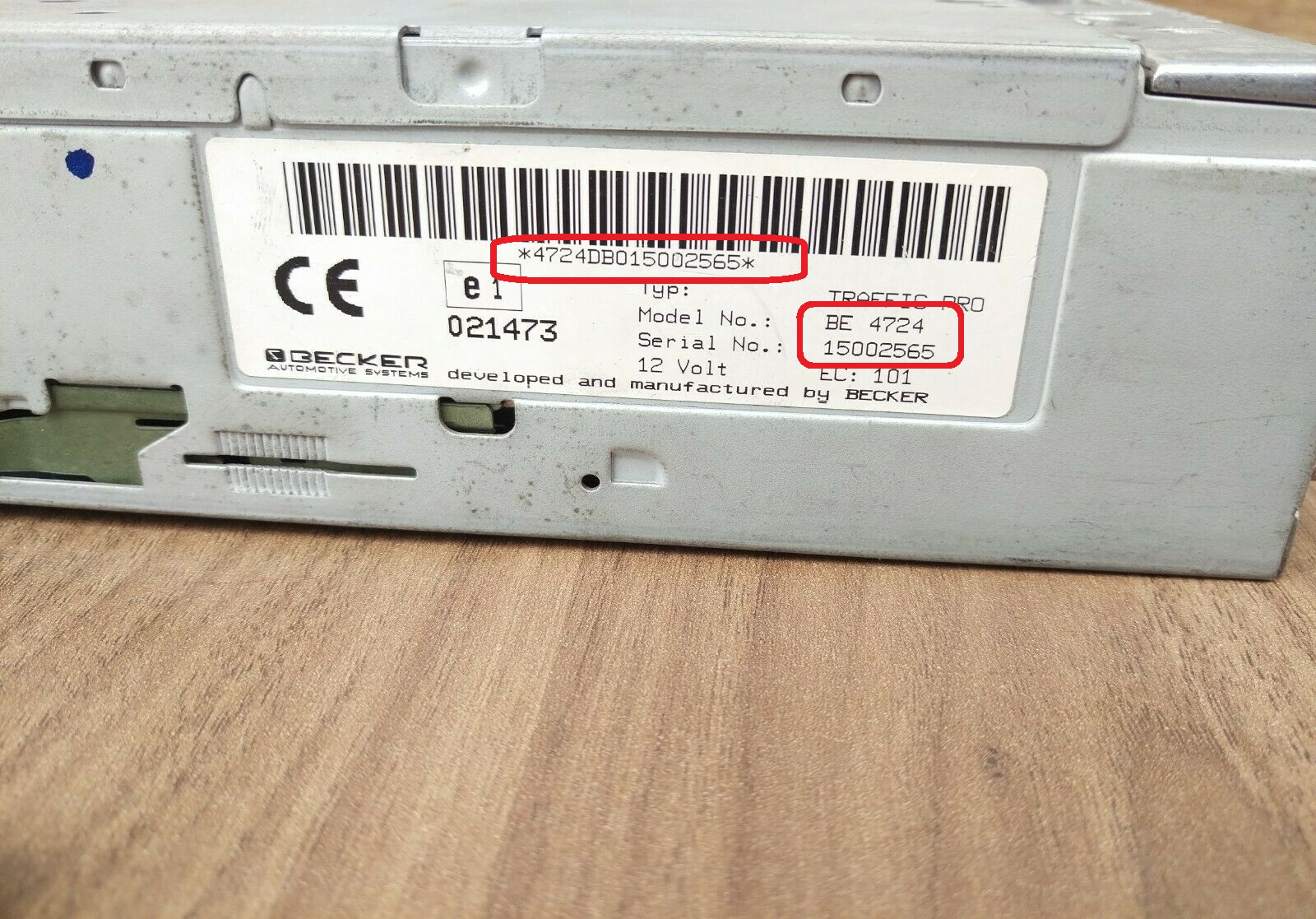
Becker Traffic Pro serial label (BE4724)
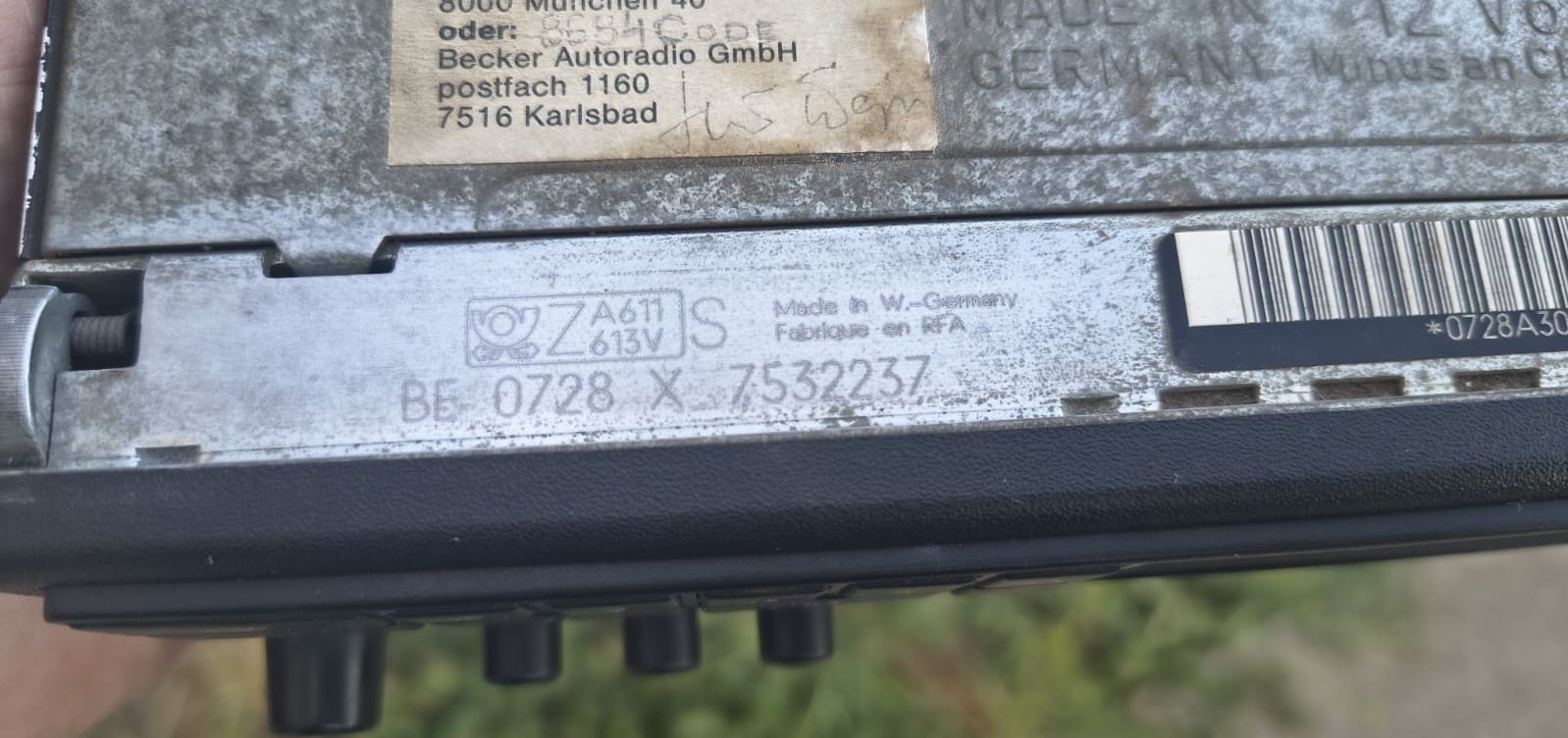
Becker BE0728 serial on BMW Bavaria C Electronic
On the Radio Display (Display Method)
Some touchscreen-based infotainment systems and specific factory units allow the serial number to be displayed directly on-screen using a hidden service menu or a specific button combination.
Becker-specific: Hold preset buttons 1 + 6 while switching the radio on. On supported models the display will briefly show the serial before the CODE prompt loads.
- Try holding preset keys 2 + 6 while switching the radio on
- The serial may briefly appear on the display
- Every manufacturer uses different key sequences
Not all units support this digital lookup option.
How to Enter the Security Code
Most factory radios can be unlocked in less than a minute after entering the correct code.
Most units automatically prompt for the security PIN after power is restored or a battery replacement occurs.
How to Type the Security PIN:
Depending on your specific Becker unit interface, use the preset buttons, touchscreen keypad, or numbered controls to input the unlock sequence:
- For radios with a standard 1-6 preset button row: Many classic radios do not let you type numbers directly if the code contains digits higher than 6 (like 7, 8, or 9). Instead, you must press a single preset button repeatedly to cycle through digits. Press button 1 multiple times to change the first character, button 2 for the second character, button 3 for the third, and button 4 for the fourth.
- Direct keypad entry method: Simply tap the corresponding numbers directly on the display screen or use the full 0-9 physical dial pad to type the sequence.
⚠️ The Security Lockout Penalty:
Depending on the manufacturer family, the unit will require a strict waiting period before allowing another entry attempt.
Need help with the specific input method for your model family? Our guides explain the layout steps across different generations.
Becker Serial Number Examples
Each manufacturer uses its own serial structure and label style.
Below are some common examples found on Becker radios:
- Many serials begin with manufacturer-specific prefixes
- The S/N usually contains a mix of letters and numbers
- Certain digital units show the S/N through a hidden menu
- Many OEM systems place the serial on the top or side of the radio housing
Becker prefix patterns
BE- Aftermarket / retail Becker head units (Traffic Pro, Grand Prix, Europa, BE2210, BE3100)BP- OEM Becker boards installed in Mercedes, BMW and similar vehicles
Real Becker serial examples
BE2210X1234567BE3100X9876543BE4724X0182634BP0526A6326431BP0728B1947582
Most Becker serials are 13-14 characters: 2-letter prefix, 4-digit family code, 1 letter and a 6-7 digit unique number.
Different radio families may use different prefixes and label layouts. Do not remove letters, spaces, or prefixes from the serial number.
About Becker Radios
Becker has produced factory-installed car radios since 1948 and is best known today as the Mercedes-Benz audio supplier behind models such as the Becker Mexico, Indianapolis and the iconic Traffic Pro navigation unit. Becker units also ship in BMW, Porsche, Smart and several heavy-truck cabins under the Truckline name. Serials almost always start with a 2-letter prefix - "BE" on consumer head units (BE2210, BE3100, BE4724) and "BP" on OEM Mercedes-fit boards (BP0526, BP0728) - followed by a 6-7 digit production number.
Factory radios produced by Becker can be found in a wide range of vehicles and infotainment systems.
The same radio family may be used across several vehicle brands, model generations, and regional markets.
Each Becker unit can usually be identified by a unique combination of letters, numbers, and production prefixes.
Serial structures are not universal and can change across different radio platforms manufactured by Becker.
Certain models include a diagnostic menu that can reveal the serial number without removing the unit.
However, many units still require checking the identification label attached to the radio chassis.
The unlock code is generated from the radio serial number, so every character matters.
Even radios that appear identical may require different codes because they belong to different production families.
Supported Becker models
Europa 2000
Instant unlock for Europa 2000
Grand Prix 2000
Grand Prix 2000 unlock service
Traffic Pro
No waiting time required
Becker Radio 480
Radio 480 instant unlock
Mercedes Becker
Mercedes audio system unlock
BE2210 / BE3100
BE2210 & BE3100 DTM unlock
Truckline CD70
Truckline CD70 CC65 unlock
All Becker Models
Better than free alternatives
Common Car Brands That Use Becker Radio
Becker is most closely associated with Mercedes-Benz - virtually every classic Mercedes head unit between 1985 and 2010 was a Becker. Becker also shipped factory radios in BMW (Bavaria C Electronic), Porsche, Smart and selected commercial trucks under the Becker Truckline series.
Many factory radios from different brands share the same Becker platform.
Common car brands that may use Becker radios include:
| Car brand | Radio model coverage | Open |
|---|---|---|

|
31 radio models indexed | Becker - Mercedes-Benz |

|
17 radio models indexed | Becker - Porsche |

|
2 radio models indexed | Becker - Renault |

|
10 radio models indexed | Becker - BMW |

|
1 radio model indexed | Becker - Maserati |
|
3 radio models indexed | Becker - Ford |
|
|
4 radio models indexed | Becker - Hyundai |
Not every model from these brands will use the same radio family.
Frequently Asked Questions
If your screen displays SAFE, WAIT, or a LOCKED status, the device has entered temporary or permanent protection mode after wrong entries.
Depending on the exact Becker model, the solution varies.
Temporary Lockout: Keep the stereo powered on for about an hour without touching any buttons. Once the waiting period ends, the display will change back to the "CODE" or "0000" input prompt.
Permanent Lockout Status: If the system reaches its maximum entry limit, it may lock completely. Holding specific key combinations might grant one last entry chance. However, if it shows "LOCKED 13", the radio is fully locked and may require professional hardware service.
Even if the original factory tag is completely damaged, you can usually still recover the serial number.
In almost all cases, the manufacturer stamps the primary serial number directly into the side or rear metal frame of the stereo housing.
Carefully check the metal surface for an engraved code. This stamped number is permanent and will work perfectly in our lookup generator even if the paper label is gone.
No, the VIN code is not used for this process because Becker codes are linked directly to the radio hardware, not the car chassis.
This is actually a major advantage:
If your radio was replaced by a previous owner, came from a second-hand car, or was upgraded later, a VIN-based code from a dealer will not work.
Our serial-based generator delivers the exact security PIN for that specific radio unit, regardless of which car it is currently installed in.
If our lookup form does not recognize your entry, it is usually due to a slight typo or confusing specific characters.
To fix this, check the following common issues:
- Confusing Letters and Numbers: Double-check that digits like 0/O or 1/I are entered correctly based on the standard Becker format.
- Using the wrong reference number: Ensure you are not typing the Part Number (P/N), Model Number, or a barcode reference. Only the Serial Number (S/N) can generate an unlock PIN.
- Incorrect formatting: Enter the serial without any separators - no dashes, no spaces, no special characters.
Yes, we provide unlock codes for the entire range of Becker audio systems, including factory warehouse models and retail units.
The only requirement is a valid, standard serial number format. If your device has that identification code, our automated lookup platform can process it instantly.