Blaupunkt Radio Code - Fast & Secure Unlock ⚡
Fast, secure, and VIN-free radio code lookup ⚡

Blaupunkt Vehicle Brands Supported:
Quick Answers
You'll receive the code right after payment, both on-screen and via email. We're available 24/7, day and night. Most manually processed requests are completed the same day.
- View our demonstration video to see in detail how the service works.
- Explore authentic reviews from our users.
- Read our comprehensive blog for service verification, video proof, and customer feedback.
If the code does not work, you're fully protected by our refund policy. Refund verification requires a quick video of the serial number and code attempt. See our Refund Policy for full details.
How can I find the code for my Blaupunkt radio?
If you have not lost the Blaupunkt code yet, check these places first - many vehicles ship with the code written down somewhere in the car.
- Glovebox - Many manufacturers ship a small sticker labelled "Anti-theft unlock code" inside the glovebox door or top panel.
- Owner's manual - Often handwritten on the inside cover or stapled to the page covering the radio.
- Code card - A small slip of paper inside the original purchase pack - sometimes inside the radio sleeve itself.
- Service records - Dealers sometimes write the Blaupunkt radio code into the maintenance log after a battery service.
- Old paperwork - Previous owners often leave the code in the document folder, especially on second-hand cars.
- Dealer paperwork - The original window-sticker pack or sales folder sometimes lists the radio code.
No luck? The next section shows how to retrieve a lost Blaupunkt code without leaving the house.
What Customers Say about our Blaupunkt Radio Code Lookup Service
Real reviews from drivers whose factory radios were unlocked through findradiocode.
È stato semplicissimo, c’è anche il video per vedere quale numero devi usare. Dopo aver fatto il pagamento tramite Paypal il codice mi è stato dato immediatamente. Ho provato e ha funzionato. Grazie infinite
Alessandro Quarta - Fiat
TOP Lancia Musa Radio Unblocked in two minutes. Thanks guys!
Artur - Fiat
Saved a lot of money an trouble. closest dealership is 2 hours away and they gave me the wrong code after being on hold for 30 mins they wanted me to leave my car there for a few days. wish i knew about this before hand...
Latif - Maserati
How to Enter the Security Code
Most factory radios can be unlocked in less than a minute after entering the correct code.
When the anti-theft system is active, the radio will lock out all audio features and ask for the unlock code immediately.
How to Type the Security PIN:
Depending on your specific Blaupunkt unit interface, use the preset buttons, touchscreen keypad, or numbered controls to enter each digit of the code:
- For radios with a standard 1-6 preset button row: Many classic radios do not let you type numbers directly if the code contains digits higher than 6 (like 7, 8, or 9). Instead, you must press a single preset button repeatedly to cycle through digits. Press button 1 multiple times to change the first character, button 2 for the second character, button 3 for the third, and button 4 for the fourth.
- Direct keypad entry method: Type the security numbers exactly as they appear in your delivery email using the integrated dashboard keypad.
⚠️ The Security Lockout Penalty:
Some systems lock out input options for 30 to 60 minutes, during which the vehicle ignition and radio power must remain continuously switched ON to let the timer count down.
If you're unsure how to confirm the code or navigate your specific hardware layout, check your original radio manual or contact our support team.
How to Find the Serial Number on Your Blaupunkt Radio
By Removing the Radio Unit (Standard Method)
In the majority of cases, the serial number is printed on a physical manufacturer sticker attached to the back or side of the radio unit casing.
To access it, you'll usually need to carefully remove the radio from the dashboard. Depending on the vehicle and radio model, this may require plastic trim tools:
- Look for a white, silver, or yellow sticker labeled "Serial," "S/N," or containing a barcode
- The serial typically contains letters and digits with manufacturer-specific prefixes such as "BP" (Blaupunkt), "M" / "V" (Ford/Visteon), "BE" (Becker), or "CL" (Clarion)
- Do not confuse the serial number with the model or part number
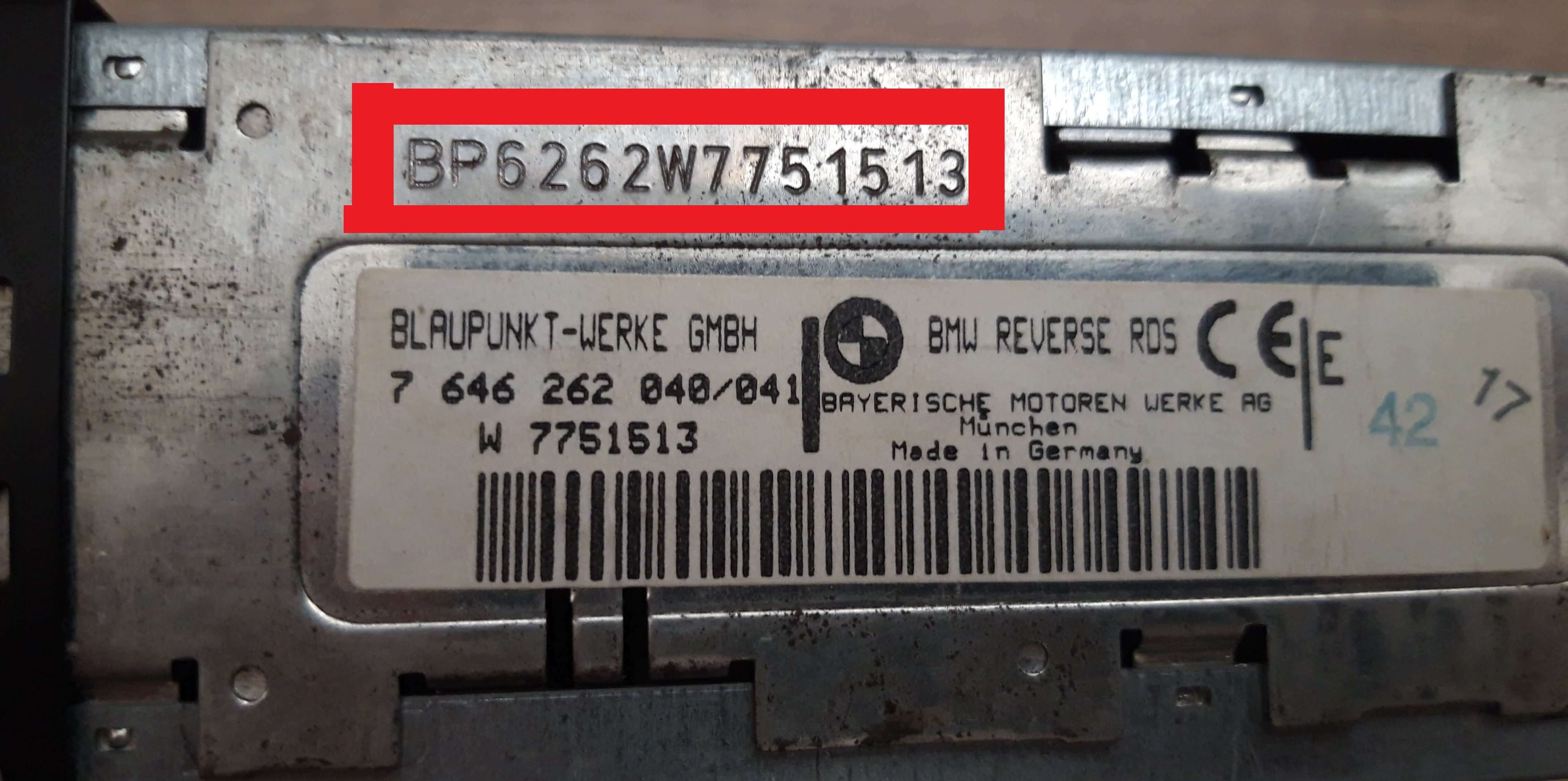
Blaupunkt serial number on label (BMW)
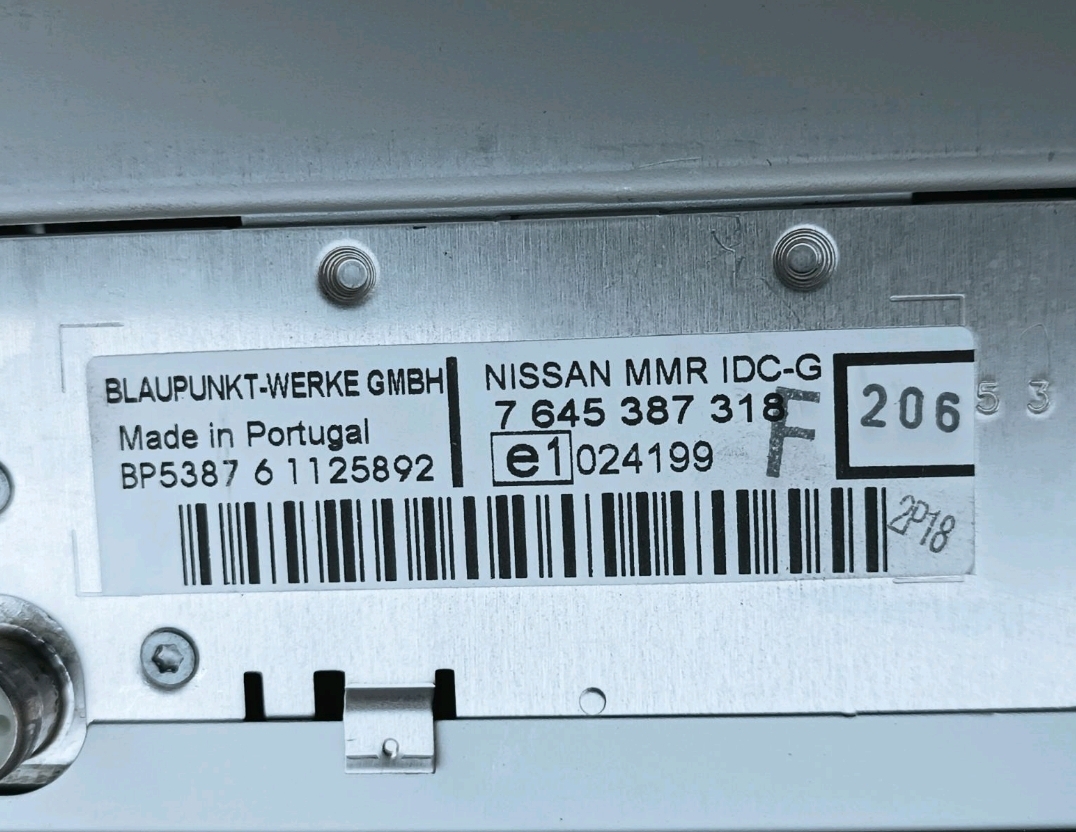
Blaupunkt radio label (Nissan)
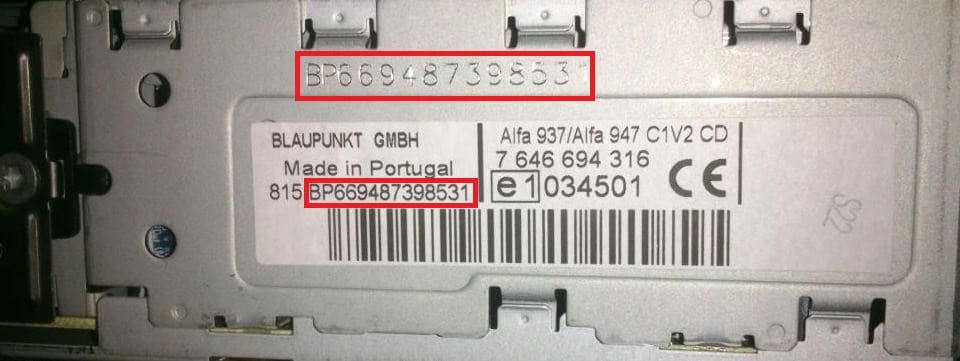
Blaupunkt BP6694 (Alfa / Lancia / Fiat)
On the Radio Display (No Removal Needed)
Some newer infotainment systems and specific factory units allow the serial number to be displayed directly on-screen using a hidden service menu or a specific button combination.
Blaupunkt-specific: A small number of Blaupunkt head units display the serial through a hidden diagnostic menu, but the vast majority of Blaupunkt-built radios still require physical removal - the BP serial is stamped on a metal label on the side or top of the chassis.
- Try holding "INFO" + "MENU" while switching the radio on
- A diagnostic screen can reveal the S/N
- Every manufacturer uses different key sequences
Not all units support this digital lookup option.
The Difference Between the Serial Number and Part Number
The Serial Number (S/N):
- This is the main code used to identify your unit
- It's used to generate the correct unlock code
- Usually located near manufacturer prefixes
The Part Number (P/N):
- This identifies the hardware version
- It's used for manufacturer reference purposes, but not for generating the unlock code
- They may look similar to the serial but cannot unlock the radio
About Blaupunkt Radios
Blaupunkt is one of the oldest names in car audio - founded in 1923 and a household OEM supplier across European vehicles for decades. Blaupunkt radios are best known for the SAFE anti-theft mode that locks the unit whenever battery power is lost, and for the iconic Travelpilot navigation series. Serials almost always start with "BP" followed by a 4-digit family code and a 7-digit production number (BP6694, BP7203, BP5001), or with the older 10-digit numeric format starting "7607" used on certain Bremen / Paris / London chassis.
Blaupunkt is one of the radio manufacturers used across numerous vehicle brands and markets.
Although the exterior design may vary between vehicles, many units share common serial number structures and security features.
One of the easiest ways to recognize a Blaupunkt radio is through its serial number structure and prefix pattern.
Serial structures are not universal and can change across different radio platforms manufactured by Blaupunkt.
Some Blaupunkt radios allow the serial number to be displayed directly on-screen.
For older systems, accessing the label on the radio housing remains the most reliable identification method.
The unlock code is generated from the radio serial number, so every character matters.
Radios with the same design may still require different unlock codes if they were produced under different platforms or serial ranges.
Supported Blaupunkt models
Model 720
Instant unlock decoder
Car 300 / Car 2003
Complete SAFE mode guide
TravelPilot EX FX NX
Navigation system decoder
Fiat Punto
Compatible with all Punto units
GmbH Autoradio
German factory units
Bremen / Paris / London
Classic 7607-format chassis
Navigation Systems
All nav units supported
All Models
Better than free alternatives
Common Car Brands That Use Blaupunkt Radio
Blaupunkt was the factory radio in dozens of European brands - most famously Fiat (Punto, Bravo, Stilo), Alfa Romeo, Lancia, BMW, Mercedes commercial vehicles, Opel, Nissan European-built models and many others. Each car brand kept the BP serial format, only the model family code (the 4 digits after BP) changed.
Many factory radios from different brands share the same Blaupunkt platform.
Common car brands that may use Blaupunkt radios include:
| Car brand | Radio model coverage | Open |
|---|---|---|
|
|
1 radio model indexed | Blaupunkt - All Vehicles |

|
136 radio models indexed | Blaupunkt - Fiat |

|
3 radio models indexed | Blaupunkt - Porsche |

|
7 radio models indexed | Blaupunkt - Ford |

|
1 radio model indexed | Blaupunkt - Alfa Romeo |

|
21 radio models indexed | Blaupunkt - Renault |

|
20 radio models indexed | Blaupunkt - Lancia |

|
16 radio models indexed | Blaupunkt - BMW |

|
4 radio models indexed | Blaupunkt - Maserati |

|
22 radio models indexed | Blaupunkt - Nissan |
Not every model from these brands will use the same radio family.
How Our Blaupunkt Radio Code Service Works
Our lookup service is designed to provide fast, accurate results without unnecessary delays.
From Serial Number to Unlock Code
Using our Blaupunkt radio code generator is simple.
Enter your radio's unique serial identifier, and our system searches for the radio security code associated with that unit.
There's no requirement to provide your VIN, and most lookups are completed through our instant lookup system.
Our code retrieval system supports thousands of factory-installed radios from multiple manufacturers, helping ensure accurate and reliable results.
How Fast Is Delivery?
- The majority of requests are processed within seconds
- Your code is displayed on-screen and sent by email
- Some radios require additional verification before a code can be generated
- Most manual requests are resolved the same day
Reliable, Secure, and Backed by a Guarantee
Thousands of drivers have successfully recovered access to their factory radios using our radio code lookup service.
Your privacy is protected throughout the process. The system is built to deliver codes quickly and accurately.
Blaupunkt Serial Number Examples
Each manufacturer uses its own serial structure and label style.
Below are some common examples found on Blaupunkt radios:
- Many serials begin with manufacturer-specific prefixes
- Most serial numbers are between 8 and 14 characters long
- Certain digital units show the S/N through a hidden menu
- Many OEM systems place the serial on the top or side of the radio housing
Blaupunkt prefix patterns
BP- Standard Blaupunkt format on modern head units (Car 300, Car 2003, TravelPilot)7607- Legacy numeric format on Bremen, Paris, London and other older chassis815 BP- Fiat-fitted Blaupunkt units sometimes prepend "815" before the BP serial
Real Blaupunkt serial examples
BP7203X1234567BP5001X9876543BP6694A182736176070050017644792360
BP-format serials are 13-14 characters; legacy 7607-format serials are 10 digits.
Different radio families may use different prefixes and label layouts. Always enter the full serial exactly as shown on the label or display.
Frequently Asked Questions
Unfortunately, the VIN will not work here. The unlock code is generated using only the unique Blaupunkt serial number found on the device itself.
Why is this better for you?
If your radio was replaced by a previous owner, came from a second-hand car, or was upgraded later, a VIN-based code from a dealer will not work.
By using the device serial number, you guarantee that you get the correct code for the exact stereo hardware you own.
If your screen displays SAFE, WAIT, or a LOCKED status, the device has entered temporary or permanent protection mode after wrong entries.
Depending on the exact Blaupunkt model, the solution varies.
Temporary Lockout: Keep the stereo powered on for about an hour without touching any buttons. Once the waiting period ends, the display will change back to the "CODE" or "0000" input prompt.
LOCKED 10 / LOCKED 13: If the system reaches its maximum entry limit, it may lock completely. For "LOCKED 10", you can often hold the preset button 6 for several seconds to get a final attempt. However, if it shows "LOCKED 13", the radio is fully locked and may require professional hardware service.
Absolutely. Our system supports original car radios built by Blaupunkt for vehicle brands, as well as aftermarket models purchased separately.
As long as the radio uses a standard factory anti-theft security system and has a valid, recognizable serial number sequence, our generator can find the matching unlock PIN.
A scratched or unreadable barcode label does not mean your radio is permanently locked.
In almost all cases, the manufacturer stamps the primary serial number directly into the side or rear metal frame of the stereo housing.
Carefully check the metal surface for an engraved code. This stamped number is permanent and will work perfectly in our lookup generator even if the paper label is gone.
If the system rejects your code, please double-check that you are reading the correct identification line on the label.
Please make sure to avoid these frequent mistakes:
- Confusing Letters and Numbers: Double-check that digits like 0/O or 1/I are entered correctly based on the standard Blaupunkt format.
- Entering the Part Number: Ensure you are not typing the Part Number (P/N), Model Number, or a barcode reference. Only the Serial Number (S/N) can generate an unlock PIN.
- Incorrect formatting: Enter the serial without any separators - no dashes, no spaces, no special characters.