Why Is the Radio Asking for a Code?
Challenger owners face this with notable frequency because:
- Seasonal storage and battery drain — The Challenger is often a weekend or summer car, and prolonged storage depletes the charge and triggers the anti-theft.
- Battery replacement — any battery swap triggers the lock on any model year.
- Performance battery work — Challenger enthusiasts working on the electrical system will trigger the lock.
- Used purchase — second-hand purchase without the prior owner's code means the code is needed right away.
The unlock code is tied to the serial number and remains valid indefinitely.
From Serial Number to Unlock Code for your Dodge Challenger - Explained
Vehicle radios use anti-theft codes dependent on the radio unit itself rather than the vehicle model or production year.
- The generator identifies your Dodge radio via serial-based verification.
- Once the serial number is submitted, the system identifies the radio family and generates the code that you need.
- You can then enter the code directly into your Dodge radio.
- This approach saves time compared to traditional methods for 2015 Dodge Challenger.
Where to Find the Serial Number on your Challenger
The first step is to find the radio's serial num.
Depending on the radio unit installed in your 2015 Challenger, the S/N can be found either through the display menu or by pulling the unit out and checking the label on the radio itself.
Below are the most common methods to identify your serial quickly.
2015 Challenger - Which Radio Did You Get?
2015 is the first year of the facelifted LD-style Challenger and the launch year of the Hellcat. Mopar dropped the MyGig family completely and moved to Uconnect 5.0 and Uconnect 8.4 (third-generation/3C) head units built by Harman.
- RA2 - Uconnect 5.0: standard on base SXT. 5-inch colour touchscreen sitting in a wide bezel with hard tuning/volume knobs on each side. AM/FM/Bluetooth, no navigation, no CarPlay/Android Auto on this generation. No NAV button on the bezel. Most common base-trim radio.
- RA3 - Uconnect 8.4A (8.4 without nav): common on R/T, R/T Plus and Scat Pack. Large 8.4-inch portrait-ish touchscreen, hard buttons across the bottom (Radio/Media/Climate/Phone/Apps/Nav). The Nav hard button is present but tapping it shows a 'navigation not enabled' or activation prompt unless dealer-activated.
- RA4 - Uconnect 8.4AN (8.4 with factory nav): standard on SRT 392 and SRT Hellcat, optional on R/T. Identical 8.4-inch bezel as RA3, but the NAV button opens a working map and the bezel/boot screen typically shows HD Radio + SiriusXM Traffic/Travel Link branding. Often paired with SRT Performance Pages on Hellcat/Scat Pack.
Quick visual check: 5-inch screen = RA2. 8.4-inch screen with no working map = RA3. 8.4-inch screen with a working factory map and HD Radio logo = RA4.
Find Your Serial Number via the Radio Screen
The method for 2015 Dodge Challenger is this:
The 2015 Dodge Challenger's retro-styled 2-door muscle coupe interior is equipped with the Uconnect 8.4" (RA3) touchscreen mounted high in the center stack. The serial number is available directly on screen via Dealer Mode.
Climate Button Method:
- Turn the ignition to ACC or ON.
- On the Challenger's wide center console, locate the Climate Up, Climate Down, and Front Defrost buttons beneath the 8.4" display. Hold all three simultaneously for 5 seconds.
- Dealer Mode opens on the display.
- Navigate to: System Info → Radio Part Info → Serial Number.
Alternative: Hold Temperature Up (red) and Temperature Down (blue) together for 5 seconds to access Engineering Mode, then follow the same path.
Find Your Serial Number on the Radio Display
2015 is the first year of the facelifted Challenger, and cars fitted with the 8.4-inch Uconnect screen expose a hidden dealer/diagnostic menu that prints the radio serial number on screen, so the head unit does not need to come out of the dash. The base 5-inch Uconnect (RA2) does not have a documented on-screen serial routine.
Uconnect 8.4 (RA3) and Uconnect 8.4N (RA4)
- Switch the ignition to RUN/ACC and wait for the Uconnect screen to finish booting.
- Press and hold the driver-side temperature UP, the driver-side temperature DOWN, and the front DEFROST buttons together.
- Keep all three buttons held for roughly 7-10 seconds until the dealer/diagnostic interface opens.
- Browse to the radio or system information section to view the serial number printed on screen.
- Photograph the screen so each character can be transcribed accurately.
Access the S/N by Pulling Out the Radio Unit
If the serial does not appear on display, the next step is checking the radio itself.
Many Dodge radios require physical access to the ID label attached to the unit.
Typical approach:
- Start by completely shutting off the engine - pull the key out.
- Then remove the radio surround.
- Next, loosen the mounting points and slide the radio forward.
- Look for a barcode label showing the serial number.
Should Dealer Mode be unavailable on your 2015 Challenger, physical removal of the RA3 radio is required. The Challenger's wide, retro-style center console has a distinctive trim layout:
- Remove the center stack bezel – The Challenger's trim panel encompasses the 8.4" screen and HVAC controls. Insert a trim tool at the lower edge – the panel typically releases from the bottom corners first.
- Unscrew the 4 Torx T20 bolts – They hold the radio mounting frame to the dash structure.
- Ease the radio forward – Slide the unit out enough to expose the serial label on the top or side of the unit.
The 14-character serial is on a barcode sticker. Wiring can remain connected.
Find the S/N by Pulling Out the Unit
If the on-screen method is unavailable - for example on the base Uconnect 5.0 (RA2) - the chassis label on the back/top of the radio is the next reliable source for the serial on a 2015 Challenger.
- Safety first: turn the ignition off, remove the key, disconnect the negative battery terminal, and wait several minutes before touching wiring; never tug on the yellow airbag/SRS connectors and stick to plastic trim tools to keep clips and metal contacts intact.
- Tools you will need: plastic trim removal kit, Phillips screwdriver, small Torx bit set, flashlight.
- Engage the parking brake and pop the centre dash bezel free with a plastic pry tool, working slowly around the panel so the hidden retaining clips release without cracking the trim.
- Disconnect the HVAC/climate control and hazard-switch connectors at the rear of the bezel, then set the trim aside on a clean cloth.
- Remove the four Phillips screws (two upper, two lower) holding the radio cage to the dash support bracket.
- Slide the radio straight rearward and unplug the antenna lead and the multi-pin power/data harness on the back of the unit.
- The serial number lives on a printed barcode/sticker label on the top, side, or rear of the radio chassis, alongside the part number and supplier markings.
- Photograph the label up close and double-check easily confused characters such as 0/O and 1/I before submitting the serial.
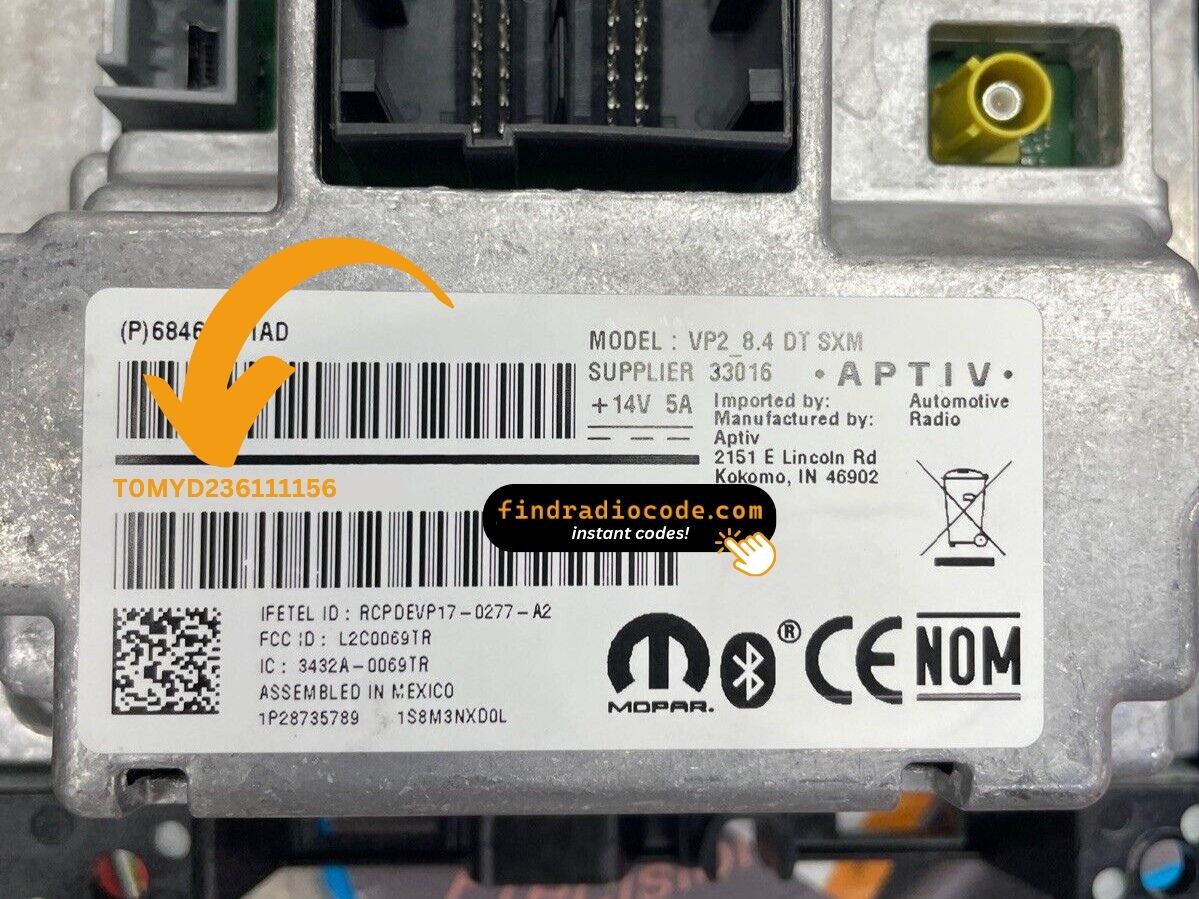
Example: Dodge Challenger serial number label location
Typical Serial Number Formats for 2015 Challenger Radios
Year Dodge Challenger Uconnect 8.4" (RA3) radios use these standard serial formats:
T00AM– Harman VP2 Uconnect 8.4" (common prefix)T00BE– Continental-manufactured variantTM9– Older Harman units
The Challenger's radio is designated RA3 (or VP2 with premium audio). Serial: 14 characters, e.g., T00AM394958584.
Note Don't confuse the serial (T00AM...) with the part number (P05064... or 68...) on the Challenger's radio label. The serial alone is used to calculate the unlock code.
Common S/N Formats Used on 2015 Challenger Units
The factory radios fitted to the 2015 Challenger use the standard Mopar/Continental head-unit serial style. The exact prefix depends on which Uconnect tier and which supplier built the unit.
Uconnect 8.4 (RA3) and Uconnect 8.4N (RA4)
- Typically printed as a 14-character alphanumeric string on the chassis label.
- Commonly begins with
T- frequent prefixes includeT00AM,TM9, andTQ1- or withA2Con Continental-built variants. - Usually a continuous run of letters and digits with no spaces or dashes.
Uconnect 5.0 (RA2)
- Typically carries a Mopar/Harman-style serial on the chassis sticker; the label printed on the unit itself is the authoritative reference.
- Copy the serial exactly as printed and avoid guessing unclear characters.
Final Step - Enter the Radio Code
Once the system gives you 2015 Dodge Challenger anti-theft code from the serial number, you're ready to reactivate the radio.
Many drivers get stuck at this stage because input process can look different across radio versions, but it's usually easy.
When the radio shows CODE, it means the unit is waiting for the correct numbers.
Step-by-Step - Correct Entering Process
To unlock the Challenger's radio Uconnect 8.4":
- With ignition ON, the screen presents "ENTER CODE" or ----.
- Tap the on-screen touchscreen keypad to enter your 4-digit code. The Challenger's large 8.4" screen makes the digits easy to press.
- The radio auto-unlocks after the 4th digit — no OK button.
Lockout Warning: 3 wrong entries cause a 60-minute lockout. Leave ignition ON for the entire hour. Turning the Challenger off resets the timer.
Step-by-Step Correct Entering Process
Once the unlock code has been retrieved, the 2015 Challenger radio is unlocked directly at the head unit - no scan tool or dealership visit is required.
- Limited attempts: Mopar/Uconnect head units only accept a small number of wrong tries (commonly three) before entering a WAIT/LOCK state, so verify every digit before pressing it.
- Place the ignition in RUN/ACC so the radio powers up but the engine stays off.
- Wait for the display to show
CODE,Enter Anti-Theft Code, or a similar prompt. - On Uconnect 8.4 (RA3/RA4) units, type each digit using the on-screen number pad; on the Uconnect 5.0 (RA2), use the on-screen number pad on the smaller touchscreen.
- Confirm the entry with the on-screen OK/Enter button.
- If
WAITappears after incorrect attempts, leave the radio powered with the ignition in RUN for the documented cool-down period (around 30 minutes of continuous run-state) before trying the correct code again.
Understanding Unlock Issues with Your Challenger
The Challenger's RA3 radio label carries two distinct numbers that are easy to mix up:
- Serial number — 14 characters, beginning with
T00AM,T00BE, orTM9. Submit this for the code. - Part number — begins with
P05064or68. Not the serial.
Using Dealer Mode is the most reliable way: System Info → Radio Part Info → Serial Number. No physical removal needed.
The 2015 Challenger's Uconnect 8.4" uses touchscreen-only input for code entry — no physical preset buttons are used. Once the locked display appears:
- Tap each digit on the on-screen number pad.
- The Challenger's Uconnect auto-confirms after the 4th digit — no separate submit is required.
Should the screen not respond, turn the ignition off and on, then allow the system to restart.
When no code prompt appears after a battery event:
- Ensure the key is in ON (not ACC) and allow 15–20 seconds for the Uconnect system to initialize.
- Inspect the fuses for the Challenger's radio fuse — fuse failure prevents the display from powering.
- Tap the touchscreen once to trigger the code entry prompt if it doesn't show automatically.
If the display stays dark, power issue is worth checking first.
After three failed code entries on the Challenger's Uconnect, a 60-minute lockout activates and the screen displays "WAIT":
- Leave the key in the ON position — car doesn't have to be running but ignition must stay ON.
- Wait for the full 60 minutes.
- Turning the Challenger off resets the timer to zero.
Once the lockout clears, re-enter the code carefully.
Code rejection on the Challenger's Uconnect 8.4" typically comes down to the wrong serial was used. The RA3 label shows both: the serial (T00AM, T00BE, or TM9, 14 characters) and the part number (P... or 68...) — the part number does not generate a code.
Confirm the serial via Dealer Mode and reach out for a free re-check if needed.