Unlock Your Uconnect Radio Using Only the Serial Number
A step-by-step guide to retrieving your Uconnect anti-theft code for Chrysler, Dodge, Jeep, and RAM vehicles - no dealership visit required.
May 18, 2025 Updated: November 15, 2025
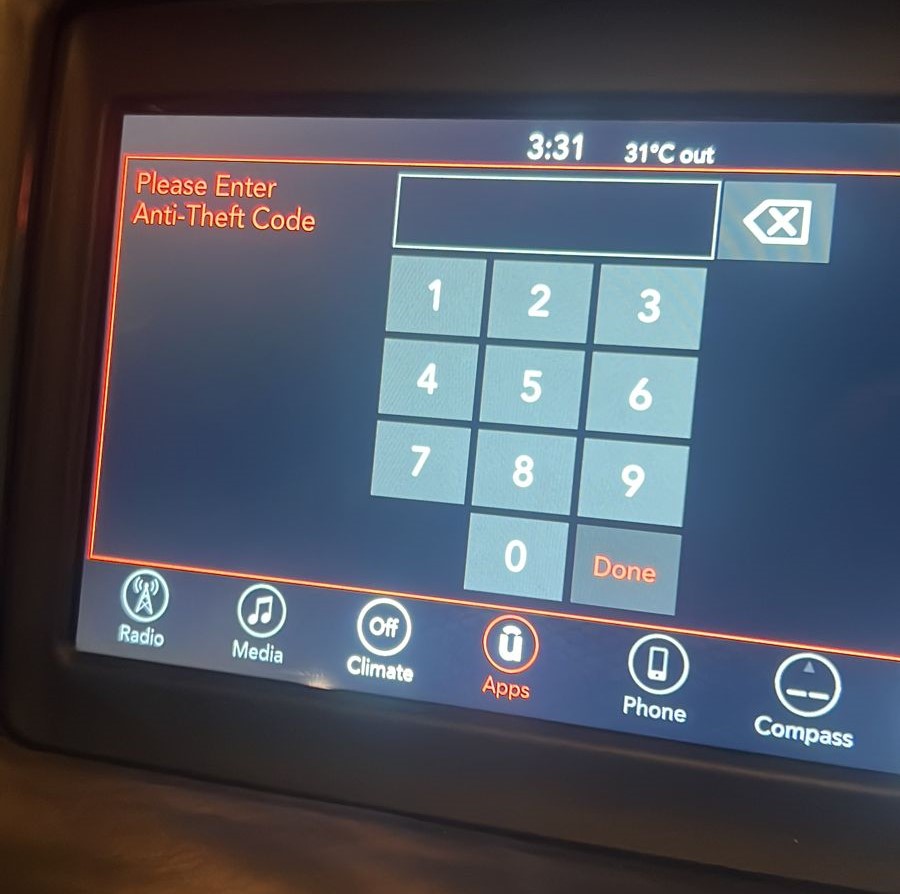
What Is the Uconnect Anti-Theft Code and Why Does It Matter?
So, your car stereo just locked itself and now it is demanding an anti-theft code like it is guarding nuclear launch keys. Welcome to the wonderful world of Uconnect security.
Vehicles from Chrysler, Dodge, Jeep, and RAM use the Uconnect infotainment system, which includes a built-in anti-theft feature designed to deter radio theft. When your vehicle loses power - whether from a dead battery, a replacement, or a system reset - the radio locks itself and demands a code before it will function again.
Think of it as a 4-digit PIN that protects your infotainment system from being reused by anyone except you. This security measure was introduced by Stellantis (formerly FCA) to make stolen radios worthless on the black market.
Here is the kicker: without that code, your radio is a stylish brick - no music, no Bluetooth, no GPS.
When Do You Need the Uconnect Anti-Theft Code?
The anti-theft system activates whenever the radio detects a power interruption. Here are the most common triggers:
Battery Disconnected or Replaced
The most common trigger. Any time the battery is disconnected - even briefly - the radio may lock itself upon reconnection.
Radio Unit Swapped or Reset
Replacing the head unit or performing a factory reset will trigger the anti-theft lock on the new or reset unit.
Theft Attempt or Wiring Tampering
If someone tampers with the wiring or attempts to remove the radio, the system locks as a protective measure.
System Glitches or Power Surges
Electrical issues, jump-starting, or power surges can sometimes cause the radio to lock unexpectedly.
How to Find or Recover Your Uconnect Anti-Theft Code
There are three main ways to retrieve your Uconnect radio code. We recommend starting with the free options first:
Watch: Unlocking a Uconnect Radio With the Serial Number
A quick walkthrough of recovering the anti-theft code from the radio serial number and entering it to unlock the system.

Uconnect unlock code retrieved from the serial number
More radio code tutorials on our YouTube channel
Check Your Owner's Manual or Glove Box
Many dealerships include a radio ID card with the vehicle paperwork at the time of purchase. This small card typically contains your radio's serial number and the corresponding anti-theft PIN printed on it.
- Look inside the owner's manual for a loose card or sticker
- Check the glove box for any dealership documentation
- Review your original purchase paperwork
Contact Official Support
You can reach out to Stellantis (the parent company of Chrysler, Dodge, Jeep, and RAM) or use the Uconnect website directly. You will need your VIN (Vehicle Identification Number) and the radio's serial number.
- Visit the official Uconnect website and use their support tools
- Call Stellantis customer support with your VIN and serial number
- Visit your local dealership - though this is typically the most expensive option ($120-$250+)
Use FindRadioCode.com - The Fastest Option
The quickest and most affordable way to get your Uconnect radio code is through FindRadioCode.com. All you need is your radio's serial number - no VIN, no dealership appointment, no waiting.
Where to Find Your Uconnect Serial Number
The serial number is displayed on the Uconnect screen when accessing Dealer Mode, or printed on a label on the radio chassis. Here are examples of what it looks like:
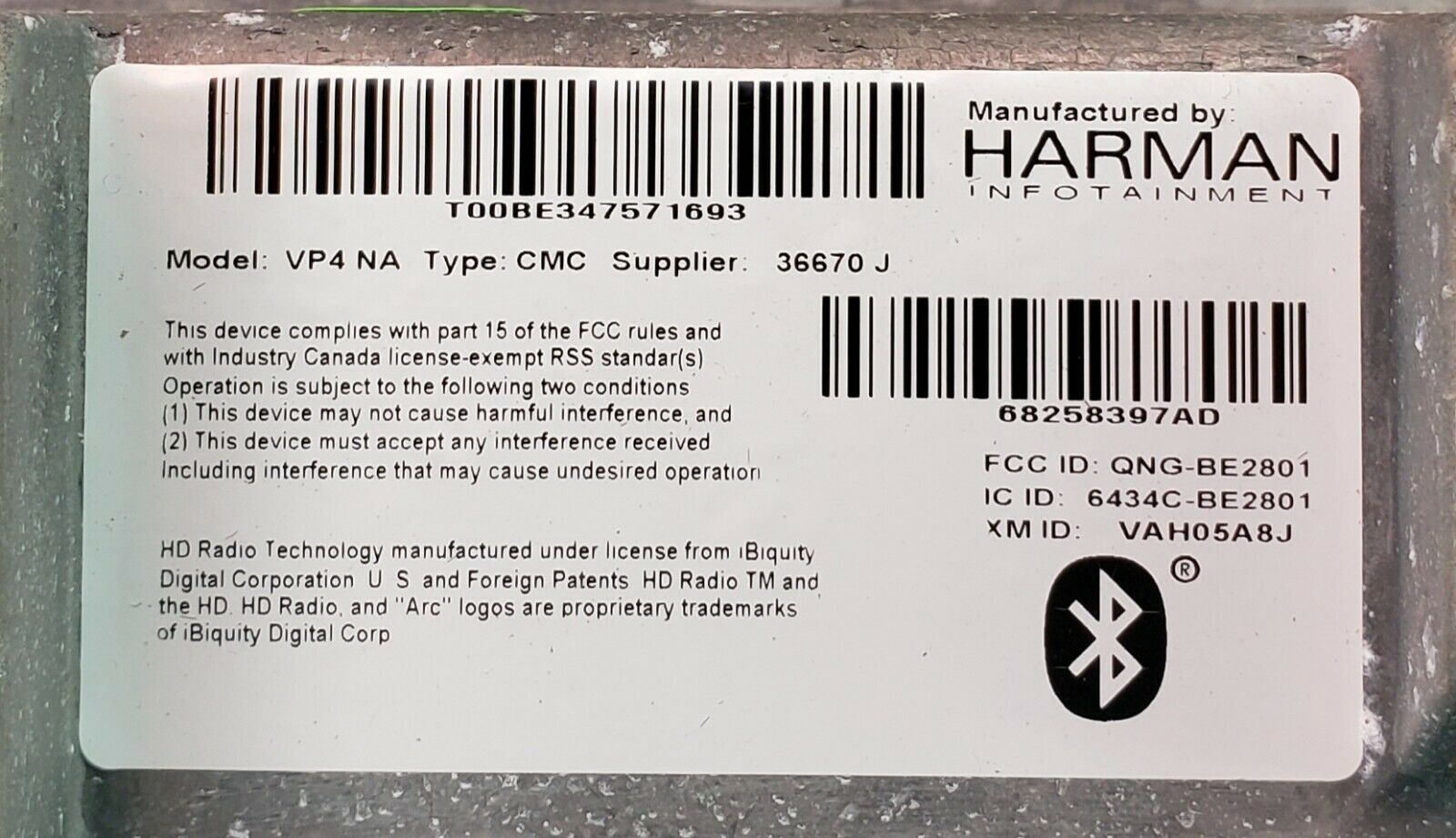
Label on the Uconnect radio with serial number
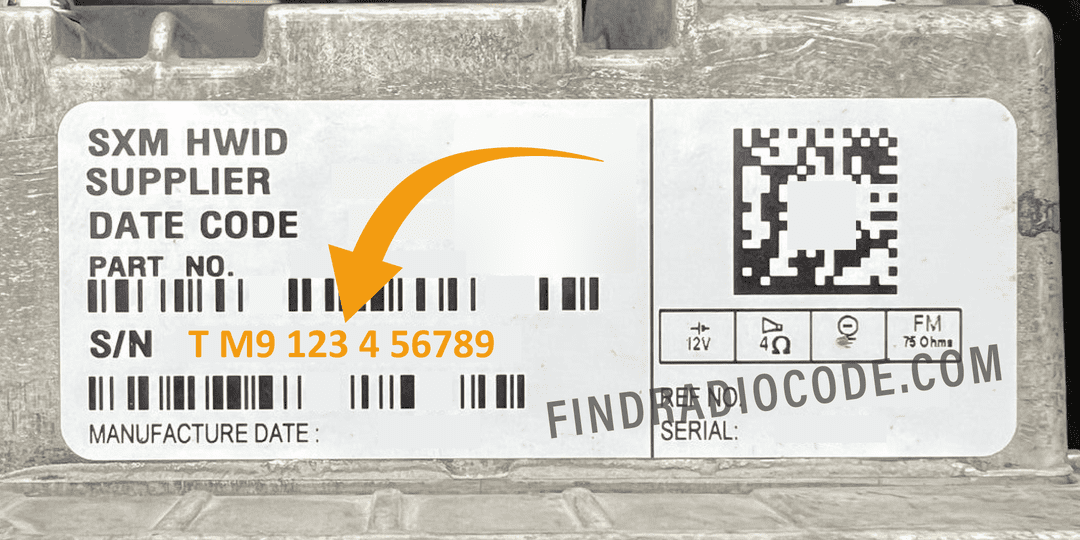
Uconnect 8.4 Panasonic label - serial number for Radio Code
Where to Find Your Uconnect Serial Number
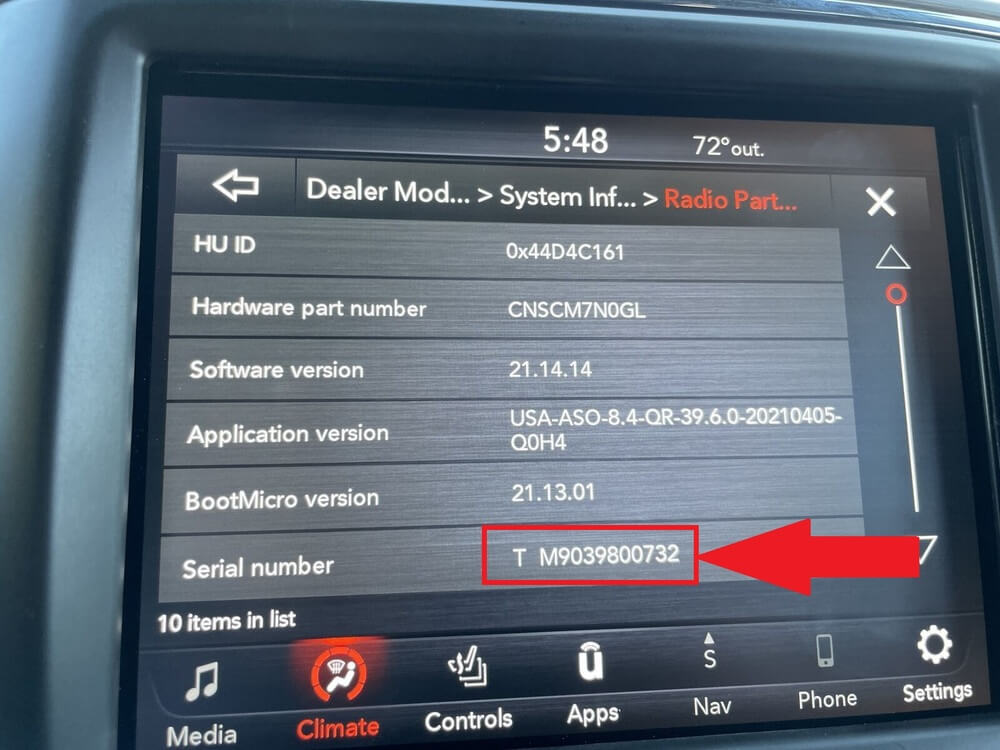
Uconnect serial number on screen - Dealer Mode
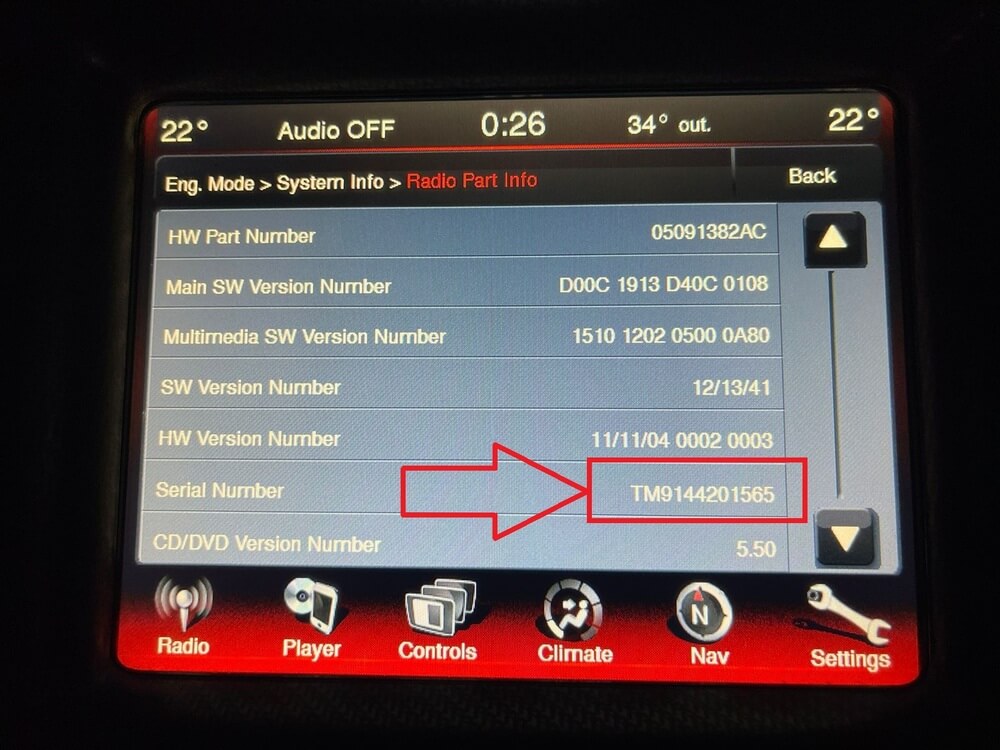
Uconnect serial number on screen - Example 2
Watch: How to read your Uconnect serial number on the screen

Can You Bypass the Uconnect Code?
You may find websites or forums claiming to offer free bypass methods, hacked firmware, or software tools that can unlock your Uconnect radio without the code. We strongly advise against attempting any of these workarounds.
Is There a Free Uconnect Code Generator?
Short answer: no. There is no safe, working free Uconnect code generator or anti-theft code generator online. Each code is mathematically tied to your radio's serial number, so a real generator would have to replicate the manufacturer's proprietary algorithm. Sites that promise a free generated code almost always deliver fake codes, endless surveys, or malware.
What is free is checking your serial number. On FindRadioCode.com you can enter your serial and confirm it is supported before paying anything. The unlock code itself is delivered instantly on screen and by email after a small charge, backed by a money-back guarantee if it does not work.
Final Advice
Let's be real - this system exists to protect you. But it can be frustrating when it works against you. Here's what we recommend:
- Write the code down and keep it in your glove box
- Save it to your phone notes
- Bookmark FindRadioCode.com in case you need it again
Because no one wants to be radio-silent on the highway.
TL;DR - Quick Checklist
Follow these five simple steps to get your Uconnect radio working again:
| Step | Action |
|---|---|
| 1 | Look in your glove box or owner's manual for a radio code card |
| 2 | Retrieve the serial number from the Uconnect screen (Dealer Mode) or the radio chassis label |
| 3 | Visit FindRadioCode.com and enter your serial number |
| 4 | Get your code instantly - no dealership appointment needed |
| 5 | Store your code somewhere safe for future reference (phone notes, photo, or printed copy) |
Frequently Asked Questions
Still Locked Out?
Head to FindRadioCode.com, enter your serial number, and unlock your Uconnect in minutes.
No stress. No calls. No overpriced dealership appointments.
Get Your Code NowRelated Articles
Uconnect Removal Guide
Step-by-step instructions for physically removing your Uconnect radio to access the serial number on the chassis label.
Read GuideScreen Serial Number Guide
How to access Dealer Mode and retrieve your Uconnect serial number directly from the screen - no tools needed.
Read GuideHow to Avoid Scams
12 steps to identify a legitimate radio code service and protect yourself from scam websites.
Learn More