
What Caused the Radio to Lock?
This vehicle sees radio lockouts in the majority of cases because of:
- Battery disconnect or replacement — the primary trigger on all Uconnect-equipped vehicles including the Dart.
- Young used-car buyers — the Dart was popular as a first car, meaning many change hands without the code.
- Dead battery — compact cars like the Dart with aging batteries can drain enough to lock the radio.
- Blown fuse — blown radio fuse also triggers the lock.
Whatever caused it, the unlock code is permanently linked to the radio serial and remains valid.
How to Unlock a Dodge Dart Radio After Power Loss
- Skip long troubleshooting discussions or service visits - you can generate the code online using the radio serial number.
- Identify your radio's serial. It is always present on the unit itself, and in some cases it can be visible on the Dart's display.
- Enter it into the generator above, and our software will retrieve the correct 2016 Dart unlock code.
- After receiving your code, input it using Dart's radio buttons to unlock the system fully.
- The entire process takes only a few minutes and requires zero paperwork and no dealer visit.
Radio Code Input Guide
Once you have the S/N and generated the unlock code, the final step is entering it into your radio.
Dodge original head units display a locked screen when ready for input.
The process is quick, but button layouts and confirmation methods may change depending on the radio version installed in your Dart.
Correct Entering Process
To input the code on the 2016 Dodge Dart's Uconnect:
- Ignition ON. Screen shows "ENTER CODE".
- Tap the touchscreen keypad to enter each digit of the 4-digit code.
- Radio restores after the 4th digit.
Lockout: 3 wrong attempts = 60-minute lockout. Keep ignition ON during the full wait period.
Detailed Entering Instructions for Dart 2016
Once the unlock code has been retrieved for a 2016 Dart radio, it can be entered straight at the head unit - no scan tool or dealer visit required.
Limited attempts. Mopar/Uconnect head units only accept a small number of incorrect tries (commonly three) before going into a WAIT/LOCK state, so confirm every digit before pressing it.
Entering the code. Place the ignition in RUN/ACC so the radio powers up but the engine stays off. Wait for the display to show CODE, Enter Anti-Theft Code, or a similar prompt. On the 8.4 Uconnect units, type each digit using the on-screen number pad; on the base Uconnect 200, press the numbered preset buttons in sequence. Confirm the entry using the on-screen OK/Enter button or with the tune/menu knob on the base unit.
If a wrong code was entered. If WAIT appears after incorrect attempts, leave the radio powered with the ignition in RUN for the documented cool-down period (typically about 30 minutes) before trying the correct code again.
Understanding the Radio Serial Number and How to Locate It on 2016 Dart
Very useful fact to know is that factory radios use a specific serial number to identify each unit.
The security system matches the code directly to the serial.
Different from car-specific data such as VIN or registration information, it is not determined by the model or production year, so you'll be able to get it even if you have a radio that you bought afterwards.
Depending on the maker and radio installed in your Dodge Dart, the access method is different.
Here are the most reliable ways to locate it.
Which Head Unit Is in Your 2016 Dart?
The 2016 model year was the final year of Dodge Dart production, and the factory radio lineup was the same three units carried throughout the run. Knowing yours helps you find the correct serial-number sticker location and follow the right code-entry steps.
Uconnect 200 (RAE) - The base radio fitted to SE and entry SXT trims. Look for a small monochrome (typically amber/white) display, a single CD slot, and a row of physical preset and tune buttons. There is no touchscreen and no Nav button. This was the highest-volume factory radio in the final year of production.
Uconnect Touch 8.4 (RE2) - Optional upgrade on SXT/Limited/GT. Identified by the large 8.4-inch glass touchscreen that nearly fills the center stack, with very few physical buttons surrounding it. The home menu shows app-style tiles but no Nav tile. Includes Bluetooth, USB, SiriusXM, and voice command.
Uconnect Touch 8.4N (RB5) - The premium option with built-in navigation. Same 8.4-inch screen and bezel as the RE2, so the only sure way to distinguish them is on the screen itself: the 8.4N shows a Nav tile on the home page and a Garmin logo at boot. Adds factory GPS, SiriusXM Travel Link, and lane-guidance navigation.
Bottom line: small non-touch display = Uconnect 200; big touchscreen without Nav = RE2; big touchscreen with Nav = RB5.
Accessing the Serial Number Through the Radio Menu
The method for 2016 Dodge Dart is this:
The 2016 Dodge Dart could feature either the Uconnect 5.0" (base trim) or Uconnect 8.4" (upper trims). If equipped with the 8.4" screen, you can access Dealer Mode:
- Turn ignition to ACC or ON.
- Press and hold Climate Up + Climate Down + Front Defrost for 5 seconds.
- Go to: System Info → Radio Part Info → Serial Number.
On base models, Dealer Mode is not supported. The radio must be pulled out to find the serial label.
Before Removing the Radio, Try This Screen Method
The 2016 Dart's 8.4-inch Uconnect head units expose a hidden dealer/diagnostic menu that displays the radio serial number on screen, which means the unit usually does not have to come out of the dash. The base Uconnect 200 unit does not offer a documented on-screen serial procedure.
Uconnect 8.4 (RE2) and Uconnect 8.4N (RB5)
Switch the ignition to RUN/ACC and wait for the Uconnect screen to finish booting. Press and hold the driver-side temperature UP, driver-side temperature DOWN, and front DEFROST buttons together for roughly 7-10 seconds until the dealer/diagnostic interface opens. Browse to the radio or system info section to view the serial on screen, and photograph it so the characters can be copied accurately.
Pulling Out the Radio to View the S/N on the Tag
If the serial number cannot be accessed on-screen, use the hardware method.
Most Dodge Dart original radios include a label with the serial number printed on the chassis.
Step-by-Step:
- Power down the vehicle.
- Remove the bezel surrounding the radio.
- Unscrew the clips.
- Pull the unit outward to access the label.
The serial number is usually located near the manufacturer sticker.
To remove the radio from the 2016 Dodge Dart:
- Power down the vehicle.
- Gently remove the trim panel around the radio. The Dart uses friction clips.
- Remove the four mounting bolts (Phillips).
- Ease the radio forward to read the serial label.
The Dart's center stack is not overly complex. The bezel clips usually pop off without much force with a plastic pry tool.
Locate Serial on Dart's Radio Chassis
If the screen-based shortcut is unavailable - for instance on the base Uconnect 200 - the printed chassis label is the next reliable source for the serial on a 2016 Dart.
Safety first. Turn the ignition off, remove the key, disconnect the negative battery terminal, and wait a few minutes before touching wiring. Avoid the yellow airbag/SRS connectors entirely and use plastic trim tools so nothing shorts or breaks.
Tools you will need. Plastic trim removal kit, Phillips screwdriver, small Torx bit set, flashlight.
Removal overview. Pry the single-piece centre dash bezel free with a plastic trim tool, starting at the lower edge and working up the sides; once the bezel is loose, unplug the hazard switch and HVAC connectors before setting it aside. Remove the four Phillips screws (two upper, two lower) that hold the radio cage to the support bracket, then pull the unit straight back and disconnect the antenna and the multi-pin power/data harness on the rear.
Where the serial sits. The serial number is printed on a barcode/sticker label on the top or side of the radio chassis, next to the part number and supplier markings.
Tips. Photograph the label up close and double-check ambiguous characters such as 0/O and 1/I before transcribing the serial.
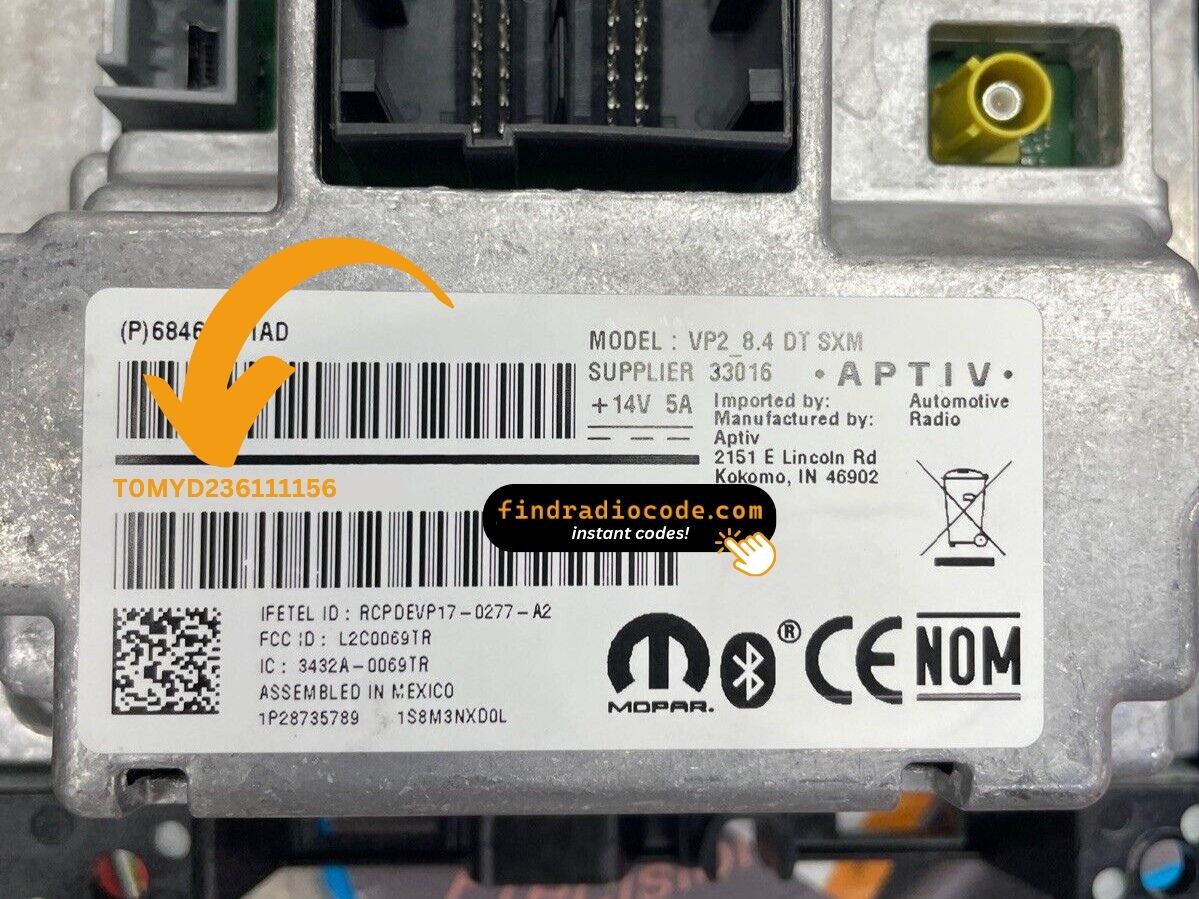
Example: Dodge Dart serial number label location
How Serial Numbers Usually Look on These Dart Radios
The 2016 Dodge Dart features Uconnect radios with these typical serial formats:
T00AM– Harman Uconnect (5.0") unitsT00BE– Continental variantsTM9– First-year production units
Radio models: RA1 (5.0" base), RA3 (8.4" with nav option). The Dart was built from 2013-2016 only and used the Fiat-derived platform, but the Uconnect system is the same as other Dodge vehicles.
Typical Serial Number Examples for 2016 Dart
The factory radios fitted to the 2016 Dart use the standard Mopar/Continental head-unit serial style; the prefix depends on which Uconnect tier and which supplier built the unit.
Uconnect 8.4 (RE2) and Uconnect 8.4N (RB5)
The serial is typically a 14-character alphanumeric string printed on the chassis label. It commonly begins with T - frequent prefixes include T00AM, TM9, and TQ1 - or with A2C on Continental-built variants. The serial is usually a continuous run of letters and digits with no dashes or spaces.
Uconnect 200 (Base CD)
The base Uconnect 200 typically carries a Mopar/Harman-style serial on the chassis sticker; the label printed on the unit itself is the authoritative reference. Copy the serial exactly as printed and avoid guessing unclear characters.
Dart 2016 Common Radio Problems
On 8.4" Dart models, Dealer Mode is available to retrieve the serial: press and hold Climate Up + Climate Down + Front Defrost for 5 seconds, then navigate to System Info → Serial Number. For 5.0" base models, pulling the radio is the only option to read the label.
- Serial number — 14 characters, starting with
T00AM,TM9, orT00BE. - Part number — starts with
Por68. Do not use this.
The Dart used the Fiat Compact Wide platform, the Uconnect serial format is the same as all other Dodge vehicles.
After 3 failed code attempts on the Dart's Uconnect causes a 60-minute lockout. The display shows "WAIT". To resolve it:
- Leave the ignition ON for the full 60 minutes — the ignition must stay ON.
- Cycling the ignition extends the wait.
Dart note: Because the Dart was popular with younger buyers who are unfamiliar with the lockout rule sometimes cycle the ignition to "fix" it. Don't do this — just be patient.
As an affordable compact, meaning a lot of buyers acquired theirs used and may have submitted incorrect information. If the code is rejected, the standard cause is using the part number instead of the serial. The Dart's Uconnect serial is 14 characters, prefixed by T00AM, T00BE, or TM9. The part number (P... or 68...) is on the same label but does not generate a code.
If rejected, re-verify the serial and contact support for a free re-check.
Both Uconnect versions in the Dart use the touchscreen exclusively for code entry. Whether you have the 5.0" and the 8.4" both use digital number pads — no hardware buttons are involved during code entry.
- Touch each digit on the touchscreen keypad.
- The radio unlocks automatically after the 4th digit.
If the screen is not responding, restart by turning the ignition off and back on for the system to restart.
When no code prompt appears after a power interruption:
- Make sure the ignition is in the ON position — not just ACC.
- Inspect the fuse panel — fuse failure prevents the display from activating.
- Give the system 10–20 seconds to boot before expecting the "ENTER CODE" screen.
On the 5.0" base Uconnect, the screen is more basic but the screen behavior is the same.