Why Did the Radio Lock and Ask for a Code?
2011–2013 Durango owners encounter radio lockouts most often because of:
- Towing-related electrical work — Durango owners who add trailer wiring or disconnect the battery for accessories will encounter this.
- Battery disconnect or replacement — the most common trigger on pre-2014 Durangos.
- Aging battery failure — vehicles of this generation are prone to dead batteries which trigger the lock without warning.
- Used purchase — second-hand without documentation often means the code was never recorded.
The unlock code is tied to the radio serial and never changes.
Can't Locate Your Radio S/N? Follow The Steps Below for Dodge Durango 2012
The starting step is locating the radio serial number.
Most drivers assume the code depends on the Dodge model or year, but actually, the unlock process relies on the unique radio unit's serial number.
Each radio has its own serial tied to the security system.
This is even better, because if you have bought a used radio, the VIN or other vehicle-specific data wouldn't be of much use.
Based on the radio used, you can retrieve the serial directly from the screen or by checking the label on the radio chassis.
2012 Durango - Which Radio Did You Get?
For 2012 the WD Durango carried over the same MyGIG-era radio lineup as 2011, but with one important change: the anti-theft security code became active by default on RBZ, RHB and RHR units, so any battery disconnect now triggers a CODE prompt. Identify your unit by the three-letter sales code in the lower right of the faceplate.
- RES (sales code
RES) - Base AM/FM/CD/MP3 with AUX input. Visual cues: small monochrome LCD, full set of hard buttons and rotary knobs, no touchscreen, no NAV button, no SD card slot on the face. Trim/option: standard on Express; common on SXT and Crew without the nav package. Commonality: the most-fitted base radio for 2012. - RBZ 430 MyGIG (sales code
RBZ) - 6.5-inch colour touchscreen without factory navigation. Visual cues: 6.5" touchscreen, hard buttons on either side of the screen, slot-load CD/DVD to the right of the screen, no NAV button on the bezel, sales codeRBZstamped in the lower-right corner of the face just below the AUX jack. Trim/option: popular Crew, R/T and Citadel option (without nav package). Commonality: the most common touchscreen unit on 2012 Durangos. - RHB 430N MyGIG with Garmin Navigation (sales code
RHB) - 6.5-inch touchscreen with integrated Garmin GPS. Visual cues: identical bezel and screen size to RBZ but a dedicated NAV button is present on the lower row of bezel keys; on-screen menus use the Garmin-styled GUI; CD/DVD load slot is on the right of the screen; sales codeRHBat the lower right of the face. Trim/option: standard on Citadel and on R/T with Nav package; optional on Crew Plus. Commonality: moderately common on 2012 nav-equipped trims. - RHR 730N MyGIG (sales code
RHR) - 6.5-inch touchscreen, top-tier MyGIG with NAVTEQ/Harman Becker GUI, 30 GB internal hard drive for music storage. Visual cues: same 6.5" footprint as RBZ/RHB but the slot-load drive sits on the left side of the screen, screen menus use the Harman GUI rather than Garmin styling, sales codeRHRat the lower right of the face. Trim/option: rare premium fitment, sometimes paired with Alpine premium audio on R/T or Citadel. Commonality: rare on 2012 Durangos.
Tip: if the bezel has no NAV button and no touchscreen, it is the RES. With a touchscreen and no NAV button, it is the RBZ. With a NAV button, the load-slot side and the three-letter code in the lower right tell RHB (right slot) from RHR (left slot).
View the Serial via the Radio Screen
These are the steps you should follow for 2012 Dodge Durango:
The 2012 Dodge Durango of this generation features a MyGIG radio (REP 430) or an first-generation Uconnect system mounted in the SUV's tall center stack. These pre-2014 head units do not support on-screen serial display.
The serial number is accessible only by pulling the radio from the Durango's tall center stack and reading the barcode label on the radio chassis.
Locate Serial on Durango's Radio Chassis
If the serial number cannot be accessed through menu, use the pull-out method.
Most Dodge Durango original radios include a sticker with the serial number printed on the housing.
Step-by-Step Approach:
- Power down the vehicle.
- Detach the bezel surrounding the radio.
- Unscrew the mounting bolts.
- Slide the unit forward to access the label.
The serial number is usually located near the printed code.
To access the serial on the 2012 Durango's radio, it must be removed from the dash:
- Power down the vehicle.
- Use a plastic trim tool to pry off the center trim panel. The Durango's tall console makes the bezel easy to approach from the driver's seat. Work from the bottom to pop off the friction clips.
- Remove the four Phillips mounting screws holding the radio.
- Slide the unit out and locate the serial label on the back or side of the unit.
Take care with the wiring harness. You don't have to disconnect it unless absolutely necessary.
Find the S/N by Pulling Out the 2012 Durango Radio
For the 2012 model year the factory head unit lineup mirrors 2011 - RES base CD, RBZ 430 MyGIG touchscreen, and the rarer RHB 730N MyGIG with navigation. The serial number lives on a printed white label on the radio chassis, so removing the unit is the dependable way to read it.
Safety Notice
- Turn the ignition fully off, remove the key, and exit the vehicle for a moment so all accessory circuits power down.
- Disconnect the negative battery terminal and wait at least a couple of minutes before touching dash components - this lets the SRS capacitors discharge.
- Keep clear of any yellow-jacketed wiring or yellow connectors behind the bezel; those carry airbag circuits and must not be probed or pinched.
- Use plastic trim tools instead of metal screwdrivers so you do not gouge the soft-touch dash trim.
Tools Required
- A 7 mm socket with a short 1/4-inch ratchet for the four radio mounting bolts.
- A nylon or plastic pry wedge for the centre bezel clips.
- A small Phillips screwdriver in case any sub-trim screws appear.
- A soft cloth to protect the centre console while you work.
Removal Steps
- Starting at a bottom corner of the radio bezel, push the trim tool behind the panel and work it along each side, popping the spring clips one section at a time.
- Tilt the freed bezel forward and unplug any switch harness on its back, then set the bezel face-down on a cloth.
- Loosen and remove the four 7 mm bolts that fasten the radio chassis to the dash cage.
- Pull the radio outwards a few inches, disconnect the antenna lead and the rectangular multi-pin connectors at the rear, and lift the unit clear.
Reading the Label
- Inspect the top, side, and rear of the chassis until you find a white printed sticker bearing a barcode.
- The serial number sits next to or directly below the barcode and is the longer alphanumeric string - not the part number that begins with
P. - Photograph the label so you have a permanent reference, then proceed with code retrieval.
Reassembly Tips
- Reconnect each plug fully and route the wiring so nothing is pinched against the dash cage.
- Slide the radio back, start all four bolts by hand before tightening, and reseat the bezel until every clip clicks home.
- Reconnect the battery, then cycle the ignition and confirm the radio prompts for its code.
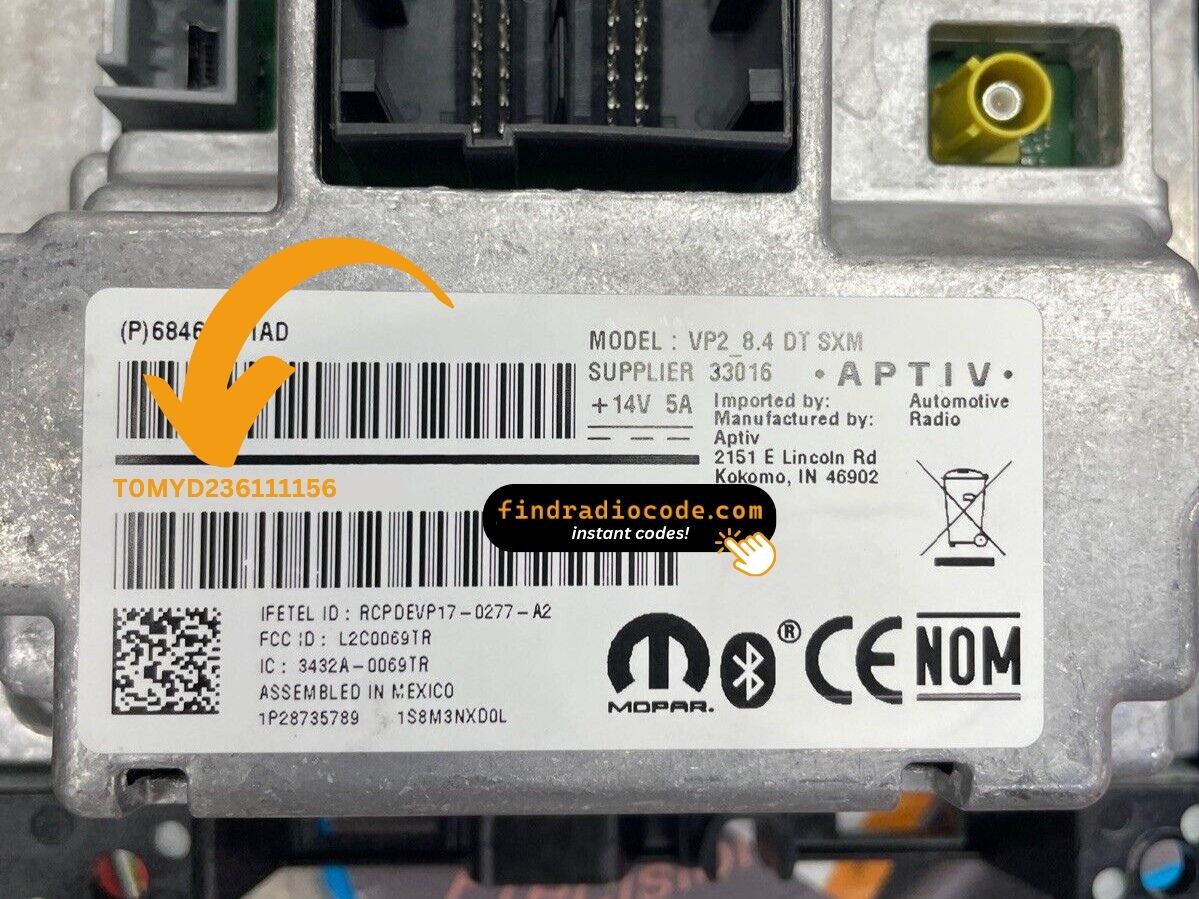
Example: Dodge Durango serial number label location
Serial Number Format Guide for 2012 Dodge Durango
Typical radio models in the 2012 Dodge Durango and their serial formats:
- MyGIG REP 430 (non-nav touchscreen) – Serial prefix:
TM9 - MyGIG RBZ 430 (6.5" touchscreen) – Serial prefix:
TM9orT00AM - MyGIG RER 730N (navigation) – Serial prefix:
TM9 - RES 130 (base CD/MP3) – Serial prefix:
TM9orT00AM
All serials are 14 characters. Be sure to use the serial number, not the part number (P05064... or 68...).
Common S/N Formats Used on 2012 Durango Units
The 2012 Durango shipped with the same Mopar/Harman radio family as 2011, so the serial number conventions are essentially identical. Serials are alphanumeric, normally start with the letter T, and run roughly 12 to 14 characters long.
RBZ 430 MyGIG (Touchscreen)
- Most RBZ 430 serials begin with
T00AMorT00BE. - The remainder of the string is usually numeric or mixed alphanumeric, e.g.
T00AM2503T0504. - The Mopar part number printed beside it commonly starts with
P05064for these touchscreen heads.
RES Base CD Radio
- RES serials likewise start with
Tand follow a similar character mix on the chassis label. - Treat any string clearly separated from the part number, near or below the barcode, as the serial.
Reading the Label Correctly
- Anything that begins with
Pis a part number, not the serial. - Anything that starts with
Tis typically the serial - copy every character exactly as printed. - Leading zeros and the difference between the digit
0and the letterOmatter - a single mistake yields a wrong unlock code.
Entering the Radio Security Code
Once you receive the correct unlock code based on the S/N, you can restore normal functionality by entering it into the unit.
The code entry process depends on the head unit design, but most 2012 Durango systems follow a similar structure using preset buttons, touch controls, or rotary knobs - depending on if it's a factory or an aftermarket unit.
You will typically see SAFE displayed on screen.
Step-by-Step Code Input Guide
Entering the unlock code on the 2012 Durango's radio:
- Turn ignition to ON. The radio shows "CODE" or "ENTER CODE".
- Touchscreen models (REP/RBZ/RER): Tap the on-screen keypad to enter each digit.
- Non-touchscreen models (RES/REF): Press preset button 1 repeatedly for the first digit, button 2 for the second, 3 for the third, 4 for the fourth. Hold Enter/OK to confirm.
Warning: 3+ wrong attempts trigger a lockout. Keep the Durango's radio powered for about 60 minutes to clear it.
Step-by-Step Correct Entering Process
From the 2012 model year onward, Mopar factory radios on the Durango ship with the anti-theft feature active out of the gate, so any battery disconnect or radio swap will trigger the CODE prompt on next power-up. Enter the code carefully - attempts are limited.
Limited Attempt Warning
- The radio allows only a small number of consecutive incorrect attempts before it enters a timed lock-out.
- Do not guess; verify each digit against your written code on the screen before submitting.
- Repeated wrong tries can extend the lock-out window or trigger a longer cool-down.
Code Entry Steps
- Turn the ignition to the ACC or RUN position so the radio powers on and shows the
CODEscreen. - Press preset button 1 the required number of times to set the first digit of the five-digit code.
- Use preset button 2 for the second digit, button 3 for the third, button 4 for the fourth, and button 5 for the fifth.
- Confirm the displayed digits match your code exactly before you submit.
- Press and hold the OK/ENTER control (or the right-most preset on RBZ touchscreen variants) for two to five seconds to validate.
If the Code Is Rejected
- Wait for any countdown shown on the screen to fully expire before retrying.
- Re-check each digit on your code sheet, then re-enter exactly as written.
- If the radio remains locked after the cool-down, contact the code provider rather than attempting more guesses.
How Serial-Based Dodge Durango Radio Unlock Works
- Skip long troubleshooting discussions or service visits - you can generate the code online with the radio serial number.
- Identify your radio's serial. The best place to search is on the unit itself, and sometimes you can see it on the Durango's radio screen.
- Type it into the field above, and the software will identify the correct 2012 Durango unlock code.
- When you receive the code, input it using Durango's radio buttons to release the blockade successfully.
- The entire process takes only a few minutes and requires zero paperwork and no dealer visit.
Understanding Unlock Issues with Your Durango
After three wrong codes on the Durango's early Uconnect, a 60-minute lockout activates. The display will show "WAIT":
- Leave the radio powered — ignition stays in ON, engine off is fine.
- Wait the full 60 minutes.
- Cycling the ignition restarts the wait.
After the 60 minutes, try the verified code again.
If the Durango's radio doesn't ask for a code after a battery event:
- Confirm the ignition is in ON (not ACC) and wait 15–20 seconds to initialize.
- Inspect the radio fuse — fuse failure stops the radio from powering on.
- On some older units, pressing the power button on the radio face activates the code prompt.
Should nothing appear, power issue is the most likely cause.
Code failure on the Durango's MyGIG or early Uconnect typically means a serial number mismatch. The label contains a serial number (TM9 or T00AM, 14 characters) and a part number (P05064... or 68...) — submit only the serial.
Re-read the label and reach out for a free re-check if needed.
The Durango's MyGIG radio requires physical removal to access the serial label. On the label:
- Serial number — 14 characters, beginning with
TM9orT00AM. Use this. - Part number — prefixed by
P05064or68. Not needed.
Copy all 14 characters carefully — digits like 0/O and 1/I can look identical on older stickers.
The entry method on the Durango depends on which radio is fitted:
- Touchscreen models (MyGIG REP 430, RBZ, RER 730N) — Use the on-screen number pad. The display accepts each digit as you tap it.
- Non-touchscreen models (RES 130, REF) — Press preset button 1 cycling to reach the first digit, button 2 for the second, 3 for the third, 4 for the fourth. Press and hold Enter/OK to confirm.
If unsure which type you have: a glass you can tap means touchscreen entry; a non-touch face means preset buttons.