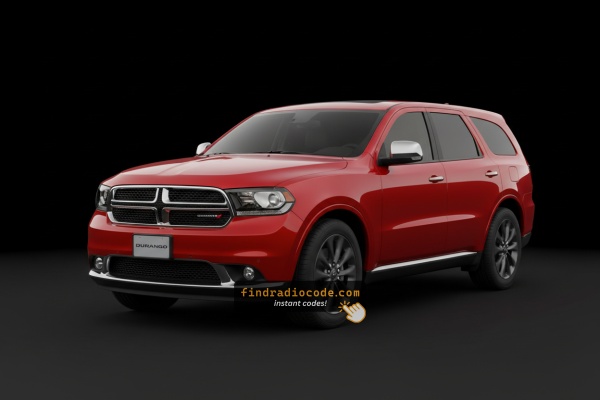
How Serial Numbers Work and Where to Find Them on 2011 Dodge Durango Radios
The initial step is to find and write down the radio's S/N.
Depending on the radio unit installed in your 2011 Durango, the serial can usually be accessed either through the screen menu or by pulling the unit out and checking the label on the radio itself.
Below are the most common methods to identify your S/N the right way.
Factory Radios on the 2011 Dodge Durango
The all-new third-generation (WD) Durango launched for 2011 with three factory head units, all built around the Mopar/Harman MyGIG family. The quickest way to tell them apart is the three-letter sales code printed in the lower right corner of the radio faceplate, just under the AUX jack.
- RES (sales code
RES) - Base AM/FM/CD/MP3 single-disc unit with AUX input. Visual cues: small monochrome LCD display, no touchscreen, conventional rotary knobs and hard buttons across the face, no NAV or PHONE button. Trim/option: standard on Express; common on Heat and Crew. Commonality: the most frequently fitted radio for 2011. - RBZ 430 MyGIG (sales code
RBZ) - 6.5-inch colour touchscreen, no factory navigation. Visual cues: large 6.5" touchscreen, hard buttons flanking the screen for MEDIA/RADIO/MORE, single-DIN slot-load CD/DVD on the right, no NAV button on the bezel, sales codeRBZat the lower right of the face. Trim/option: popular optional upgrade on Crew, Heat and R/T. Commonality: the most common touchscreen unit for 2011. - RHB 430N MyGIG with Garmin Navigation (sales code
RHB) - 6.5-inch touchscreen with integrated Garmin GPS. Visual cues: identical 6.5" touchscreen footprint to RBZ but with a clear NAV button on the lower bezel, Garmin-style menu graphics on screen, CD/DVD load slot on the right side, and sales codeRHBat the lower right. Trim/option: standard on Citadel; optional on Crew/R/T as part of navigation packages. Commonality: less common than RBZ in 2011. - RHR 730N MyGIG with Navigation (sales code
RHR) - 6.5-inch touchscreen, top-tier MyGIG with NAVTEQ/Harman GUI, 30 GB internal hard drive for music ripping. Visual cues: same 6.5" screen, but the CD/DVD load slot sits on the left of the screen (mirror of RHB), and the sales codeRHRis in the lower right of the face. Map graphics use the Harman Becker GUI rather than Garmin styling. Trim/option: rare premium option, mostly seen with Alpine premium audio on top trims. Commonality: rare on 2011 Durangos - uncommon factory pick.
Quick check: if the radio has only knobs and a small monochrome display, it is the RES. If it has a 6.5" touchscreen with no NAV button, it is the RBZ. If a NAV button is on the bezel, look at the sales code in the lower right - RHB means Garmin-based 430N, RHR means the top-tier 730N.
Find Your S/N on the Radio Screen
The method for 2011 Dodge Durango is this:
The 2011 Dodge Durango of this generation may be equipped with a MyGIG radio (REP 430) or an early Uconnect system mounted in the SUV's tall center stack. These pre-2014 head units lack on-screen serial display.
The serial number must be found by pulling the radio from the Durango's tall center stack and locating the barcode label on the unit casing.
Serial Number on the Unit
If the serial number cannot be accessed via display, use the hardware method.
Most Dodge Durango factory radios include a sticker with the serial number printed on the chassis.
Steps:
- Switch off the vehicle.
- Lift the trim surrounding the radio.
- Release the mounting bolts.
- Pull the unit outward to access the label.
The serial number is usually located near the barcode.
To find the serial on the 2011 Durango's radio, it must be removed from the dash:
- Turn off the vehicle.
- Use a plastic trim tool to pry off the center trim panel. The Durango's tall console makes the bezel accessible from the driver's seat. Work from the bottom to release the friction clips.
- Remove the 4 Torx T20 mounting screws securing the radio.
- Slide the unit out and locate the serial label on the back or side of the unit.
Be careful with the wiring harness. You don't have to disconnect it unless absolutely necessary.
View the Serial by Pulling Out the 2011 Durango Radio Unit
On the 2011 Durango (3rd-generation WD platform), the factory head unit - whether the base RES single-disc CD player or the upgraded RBZ 430 MyGIG touchscreen - carries its serial number on a white manufacturer label fixed to the chassis of the unit. Because there is no reliable in-dash menu that shows this serial on these radios, taking the unit out of the centre stack is the dependable way to read it.
Safety Notice
Switch the ignition fully off and remove the key before you start. Disconnect the negative battery terminal and let the vehicle sit for several minutes so the airbag system can fully discharge. The 2011 Durango carries an active SRS network behind the dash, so do not pull, splice, or probe any yellow-jacketed wiring or yellow connectors - those belong to the airbag circuit. Use plastic trim tools rather than metal screwdrivers against the bezel so you do not crack painted trim or scar the dash pad.
Tools You Will Need
A 7 mm socket with a short extension handles the radio mounting bolts. A plastic dash trim removal tool (or a wide nylon pry wedge) is needed to release the centre bezel clips. Keep a small Phillips screwdriver, a soft cloth to lay on the console, and a phone camera handy to photograph connectors before you unplug them.
Removal Overview
Begin at the lower edge of the radio bezel and work the trim tool around the perimeter, releasing the spring clips a section at a time. Once the bezel pops free, ease it forward and disconnect any switch harnesses on its back, then set it aside. With the radio face exposed, remove the four 7 mm bolts that hold the chassis to the dash cage. Pull the unit straight out only as far as the harness allows, then disconnect the antenna lead and the multi-pin connectors on the rear panel.
Where the Serial Is Printed
Look at the top, side, or rear face of the metal chassis for a white printed label. The serial number is the alphanumeric string near or directly under the barcode and is normally preceded by a part number such as P05064xxxAx. On a MyGIG RBZ the label can sit on the upper face of the chassis, while on the RES base unit it is more often on the side or rear panel.
Reinstallation Tips
Write down or photograph the serial before refitting. Reconnect each plug fully so it clicks home, slide the radio back into its cage, and start the four 7 mm bolts by hand to avoid cross-threading. Press the bezel back on so each clip seats audibly, reconnect the battery, and cycle the ignition.
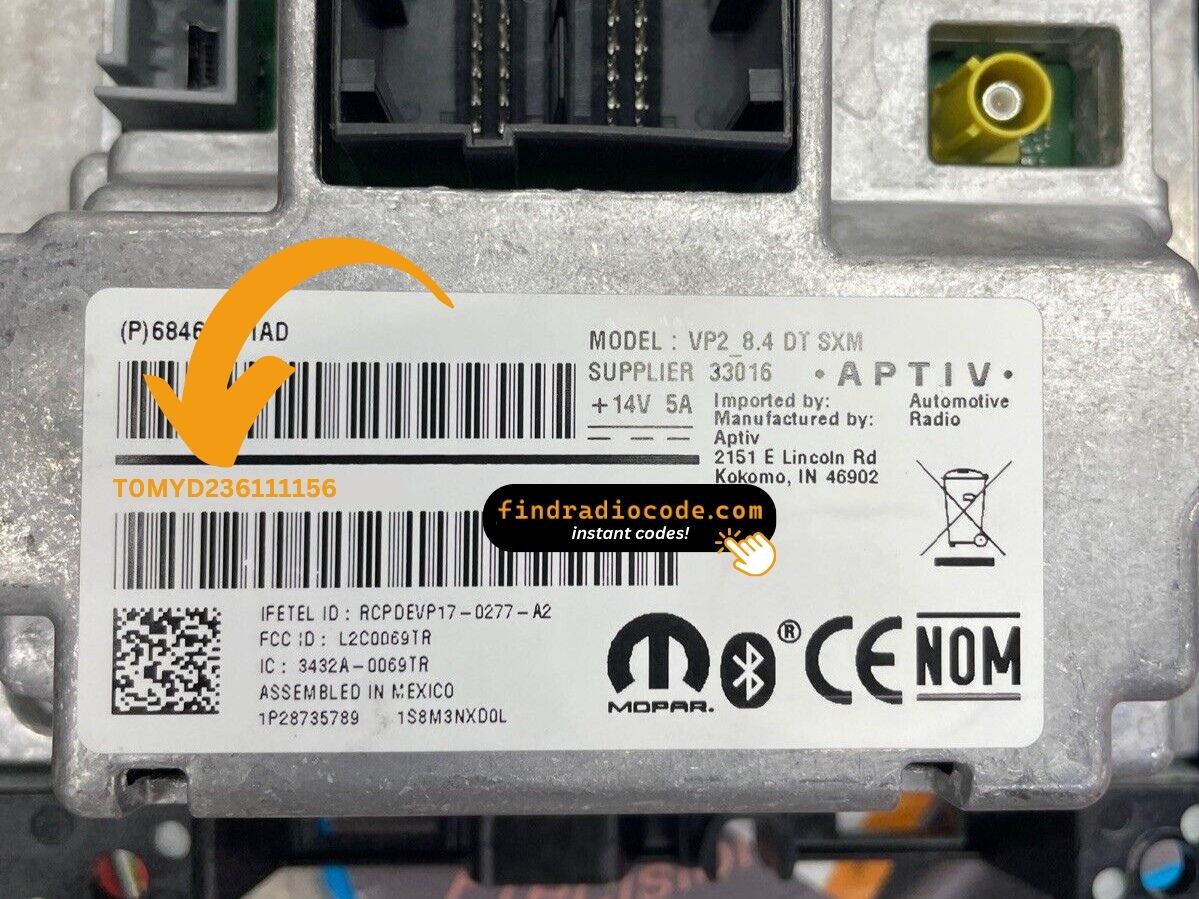
Example: Dodge Durango serial number label location
Common Serial Number Structures
Common radio models in the 2011 Dodge Durango and their serial formats:
- MyGIG REP 430 (non-nav touchscreen) – Serial prefix:
TM9 - MyGIG RBZ 430 (6.5" touchscreen) – Serial prefix:
TM9orT00AM - MyGIG RER 730N (navigation) – Serial prefix:
TM9 - RES 130 (base CD/MP3) – Serial prefix:
TM9orT00AM
All serials are 14 characters. Be sure to use the serial number, not the part number (P05064... or 68...).
Typical Serial Number Formats for 2011 Durango Radios
Serial numbers on the factory radios fitted to the 2011 Durango are alphanumeric strings printed on the chassis label. They typically begin with the letter T and run between roughly 12 and 14 characters in total, although small variations exist between production batches and supplier runs.
RBZ 430 MyGIG Touchscreen
On RBZ 430 MyGIG units, serials commonly start with prefixes such as T00AM or T00BE, followed by a numeric (sometimes mixed) tail. A serial typically looks similar to T00AM1234567890 or T00BE233270741. The chassis sticker also lists a Mopar part number that often begins with P05064.
RES Base CD Radio
The non-touchscreen RES tends to carry shorter serials in the same T family, again printed below the barcode and beside the part number. Treat any string on the white label that is clearly separated from the part number as the serial.
Quick Sanity Check
If the printed string starts with P, that is the part number rather than the serial. The serial almost always begins with T on these Mopar/Harman-built radios. Copy every character exactly as printed - including any leading zeros - because a single wrong character will produce a wrong unlock code.
How the Code Retrieval Process Works for Dodge Durango 2011
- Instead of contacting Dodge dealer or searching forums you can find the code online with the radio serial number.
- Identify your radio's serial. The best place to search is on the unit itself, and sometimes it can be visible on the Durango's radio screen.
- Type it into the form above, and our software will identify the correct 2011 Durango unlock code.
- After getting it, type it in using Durango's radio controls to unlock the system successfully.
- The entire process takes less than a minute for most users and requires zero paperwork and no dealer visit.
How Code Entry Works on Your Dodge Radio
Once you receive the correct unlock code based on the S/N, you can restore default functionality by entering it into the unit.
The code entry process depends on the radio interface, but most 2011 Durango systems follow a similar structure using preset buttons, touch controls, or rotary knobs - depending on if it's a factory or an aftermarket unit.
You will typically see CODE displayed on screen.
In-depth Entering Instructions for Durango 2011
Entering the unlock code on the 2011 Durango's radio:
- Turn ignition to ON. The radio shows "CODE" or "ENTER CODE".
- Touchscreen models (REP/RBZ/RER): Use the on-screen keypad to enter each digit.
- Non-touchscreen models (RES/REF): Press preset button 1 repeatedly for the first digit, button 2 for the second, 3 for the third, 4 for the fourth. Press and hold Enter/OK to confirm.
Warning: 3+ wrong attempts trigger a lockout. Keep the Durango's radio powered for about 60 minutes to reset it.
Correct Entering Process
Once you have the unlock code for your 2011 Durango radio, the entry happens through the radio's preset buttons. Treat each attempt with care - the unit limits how many tries you have before it locks out for a cool-down period.
Limited Attempt Warning
Mopar radios from this era allow only a small number of code attempts before they enter a timed lock-out. Do not guess. Type the digits exactly as they were issued, and verify each digit against your code sheet on the screen before you confirm.
Step-by-Step Code Input
Turn the ignition to the ACC or RUN position so the radio powers up. The display should read CODE or prompt for the security code. Use preset button 1 to dial in the first digit by pressing it the required number of times, preset button 2 for the second digit, and so on across presets 1 through 5 for the five-digit code. Pause briefly between presses so each digit registers cleanly. When all five digits are showing, press and hold the OK/ENTER button (or the rightmost preset on touchscreen RBZ units) for two to five seconds to submit.
If the Code Is Rejected
If the radio rejects the entry, do not immediately try again - leave the ignition on and wait for any timer that appears on the screen to count down before you re-enter. Repeated wrong attempts in quick succession will extend the lock-out and may eventually require dealer-side intervention. Once the correct code is accepted, the radio resumes normal operation immediately.
Fixing Common Code Entry Problems for 2011 Durango
The entry method on the Durango varies with which radio is fitted:
- Touchscreen models (MyGIG REP 430, RBZ, RER 730N) — Use the on-screen number pad. The display accepts each digit as you enter it.
- Non-touchscreen models (RES 130, REF) — Press preset button 1 cycling to set the first digit, button 2 for the second, 3 for the third, 4 for the fourth. Press and hold Enter/OK to confirm.
If unsure which type you have: a touchscreen means touchscreen entry; a black physical display means preset buttons.
After 3 failed entries on the Durango's early Uconnect, a 60-minute lockout activates. The display will present "WAIT":
- Keep the radio powered — ignition stays in ON, engine off is fine.
- Allow the full 60 minutes.
- Cycling the ignition resets the timer.
After the 60 minutes, re-enter carefully.
The Durango's MyGIG radio requires physical removal to access the serial label. On the label:
- Serial number — 14 characters, starts with
TM9orT00AM. Use this. - Part number — prefixed by
P05064or68. Not needed.
Transcribe all 14 characters carefully — digits like 0/O and 1/I are easy to mix up on printed labels.
Code failure on the Durango's MyGIG or early Uconnect typically means a serial number mismatch. The label shows both a serial number (TM9 or T00AM, 14 characters) and a part number (P05064... or 68...) — submit only the serial.
Re-read the label and reach out for a free re-check if needed.
When no "CODE" screen appears after a battery event:
- Ensure the ignition is in ON (not ACC) and wait 15–20 seconds to initialize.
- Inspect the radio fuse — fuse failure prevents the radio from powering on.
- On some older units, pressing the power button on the radio face can wake the code prompt.
Should nothing appear, a blown fuse is the most likely cause.
Why Is the Radio Asking for a Code?
Durango owners from this era face this most often because of:
- Towing-related electrical work — those installing tow packages or work on the electrical system for accessories will encounter this.
- Battery disconnect or replacement — the primary cause on pre-2014 Durangos.
- Aging battery failure — older Durango models are prone to dead batteries which cut power suddenly.
- Used purchase — second-hand without documentation often means the code was never recorded.
The unlock code is permanently linked to the radio serial and never changes.