From Serial Number to Unlock Code for your Honda Accord - Explained
Car radios use anti-theft codes tied to the radio unit itself instead of the vehicle model or production year.
- The generator identifies your Honda radio via serial-based verification.
- When you input the serial into the generator, the system identifies the radio unit and generates the code that you need.
- Use the code to unlock the radio immediately.
- Compared to Honda dealer retrieval, this method is faster and more convenient.
How Serial Numbers Work and Where to Find Them on 2014 Honda Accord Radios
The useful thing to know is that factory radios use a specific S/N to identify each unitindividually.
The anti-theft system links the code directly to the serial.
Different from car-specific data such as VIN or registration information, it is not determined by the model or production year, so you'll be able to retrieve it even if you have an aftermarket radio.
Depending on the manufacturer and radio installed in your Honda Accord, the access method is different.
These are the most reliable ways to locate it.
2014 Honda Accord factory radio options
- LX (sedan) / LX-S (coupe): 160-watt AM/FM/CD with four speakers (six on LX-S), USB and Bluetooth, paired with the standard non-touch 8-inch upper i-MID display.
- Sport (sedan, new for 2014): Same CD-based head unit as LX with additional speakers and exterior styling upgrades; no in-dash touchscreen.
- EX: Adds a 7-inch Display Audio (HDA) capacitive touchscreen below the i-MID for media, phone and settings; no factory navigation.
- EX-L: 360-watt premium audio with subwoofer, HD Radio, Pandora and SiriusXM, plus the 7-inch Display Audio touchscreen; navigation optional.
- EX-L V6 with Navigation: Adds the 8-inch Display Audio with factory Honda Satellite-Linked Navigation and voice recognition.
- Touring (sedan): 8-inch Display Audio with navigation, voice recognition, HondaLink and the full Honda Sensing safety suite; flagship audio configuration for 2014.
Fast Serial Lookup Using Radio Controls
Try the following for your 2014 Honda Accord:
The 2014 Honda Accord may be equipped with Honda's Display Audio touchscreen (7" depending on trim) or a standard non-touchscreen radio. Either type support serial number display via the 1+6 button method:
- Turn ignition to ON. Wait for the radio to power up. The screen shows "CODE" when locked.
- Hold down preset buttons 1 and 6 for about 5 seconds.
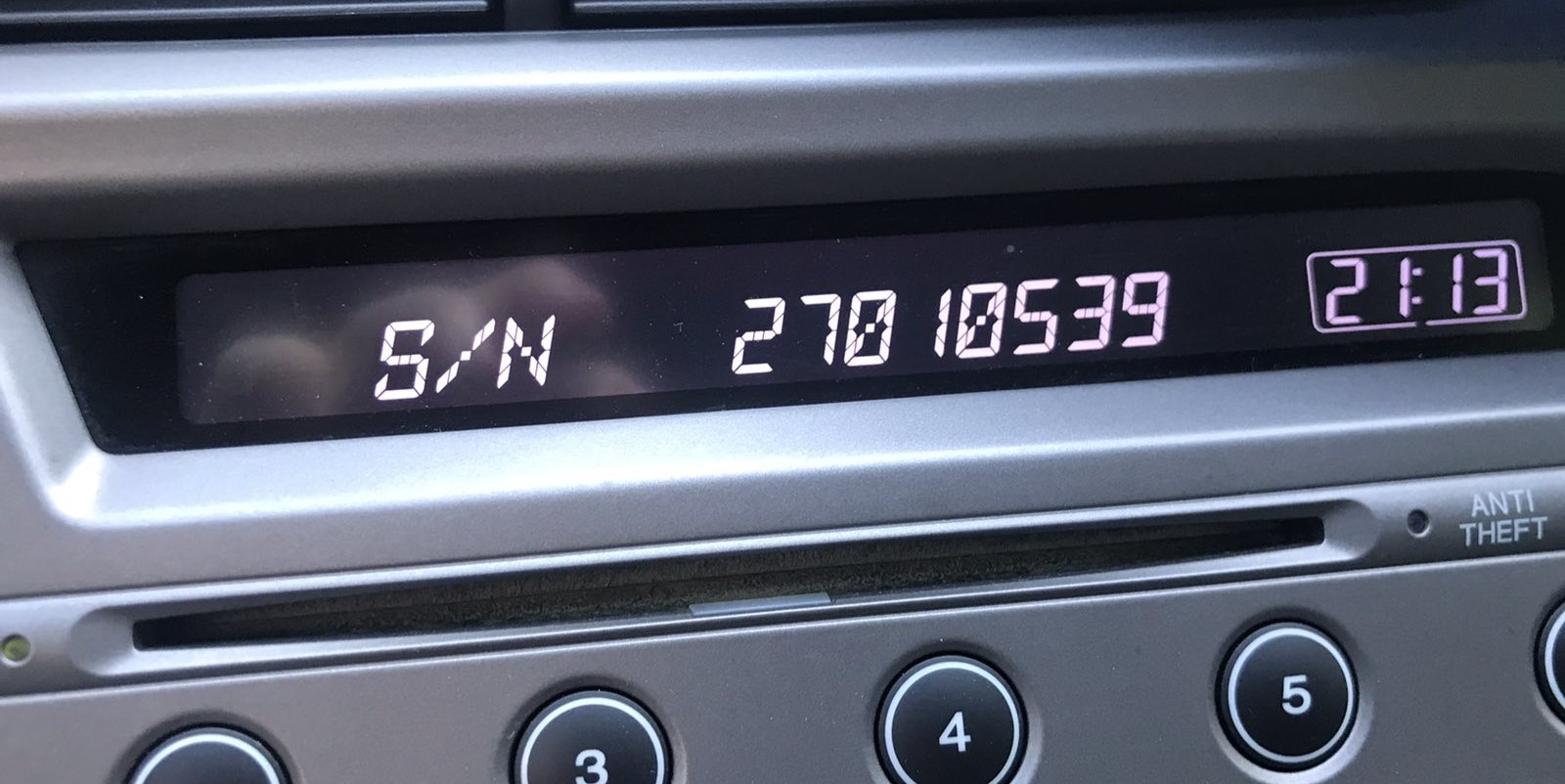
- The serial number displays in two halves (e.g.,
U3210+L0482).
Also: On 2014 Accord with the Display Audio touchscreen, look in Settings → System → Device Information – the serial may be shown there without needing the button combination.
Displaying the radio serial on a 2014 Accord
- LX / Sport with CD head unit: Ignition to ACC, radio off. Press and hold preset buttons 1 and 6 simultaneously while pressing the power button. The display cycles between U-prefix and L-prefix 4-digit pairs (for example
U1234/L5678) which combine into the 8-digit serial 12345678. - EX with 7-inch Display Audio: Power the unit on, tap Settings (or Home then Settings), select System or System Settings, then System Information / Device Info. The serial is listed on this page.
- EX-L / EX-L V6 Nav / Touring with 8-inch Display Audio + Nav: Same Settings > System > System Information path on the touchscreen.
- Dealer-mode "DISP + MODE" hold: Reported in some Honda service literature but not independently confirmed for every 2014 unit - use the Settings menu or remove the unit and read the sticker if the menu is unavailable.
- If the unit is locked on CODE and the menu cannot be reached: remove the head unit (see removal block) and read the 8-character serial from the chassis label.
Taking Out the Radio to See the S/N on the Tag
If the serial does not appear on display, the next step is checking the radio itself.
Many Honda radios require physical access to the serial tag attached to the unit.
Usual approach:
- Start by completely powering down the engine - pull the key out.
- Then detach the radio surround.
- Next, unscrew the mounting points and slide the radio forward.
- Look for a barcode label showing the serial number.
If neither methods display the serial on the 2014 Honda Accord:
- Power down the vehicle.
- Detach the dashboard trim. The 2014 Accord's modern dashboard uses friction clips.
- For Display Audio models: Remove the mounting screws (Phillips) securing the screen unit.
- On base trims: Unscrew the 4 Phillips screws holding the head unit.
- Pull the unit forward and find the serial on the label on the back or side.
Note: The touchscreen unit is wider and more tightly fitted than the base radio. Take care when extracting it.
Removing the radio on a 2014 Honda Accord
- Safety first: Engage the parking brake, switch off the ignition, disconnect the negative battery cable and wait three minutes for the airbag capacitor to discharge. The 9th gen Accord routes SRS wiring near the dash trim and centre console.
- Upper bezel: Starting at the rear edge nearest the windscreen, pry up the upper receiver trim panel using a plastic panel tool. Release all ten retaining clips and lift the panel free, disconnecting any hazard-switch or sensor harness.
- Top fasteners: Remove the two Phillips screws now exposed at the top of the receiver bezel.
- Console side panels: Pry out each console side trim panel (five clips per side) starting at the rear.
- Console pocket: Remove the two Phillips screws securing the console pocket and lift the pocket out.
- Lower brackets: Unscrew the two 8 mm bolts holding the lower receiver brackets to the dash structure.
- Head unit: Pull the integrated head-unit assembly forward, releasing the six final retaining clips, then disconnect the wiring harnesses, antenna lead, USB extension, and (on EX-L Nav / Touring) the GPS and external amplifier connectors before removing the unit.
Example: Honda Accord serial number label location
S/N Patterns and Prefixes
Depending on which radio equipped in the 2014 Honda Accord:
U1234L5678– Classic Honda OEM formatHBM####– Used in Display Audio and nav-equipped units913A####– Certain Alpine-manufactured units
The 2014 Accord may have: base CD radio (U/L format), Display Audio 5"/7" (HBM format), or navigation unit (HBM format). All require a 5-digit unlock code.
Important Make sure you read the serial number, not the part number (which starts with 39100, 39101, or similar Honda part coding).
2014 Accord radio serial format
- Honda 8-character alphanumeric serial.
- HDA 7-inch and 8-inch Navi units typically print a single string on the chassis label, often beginning with U or M; copy it exactly as shown.
- Ignore spaces or dashes in printed labels - only the alphanumeric sequence is needed.
Radio Code Input Guide
After receiving 2014 Honda Accord unlock code from the S/N, you're ready to reactivate the radio.
Many drivers get stuck at this stage because input process can look different across radio versions, but it's usually simple.
When the radio shows dashed lines, it means the unit is waiting for the correct numbers.
In-depth Input Instructions for Accord 2014
To input the code on the 2014 Honda Accord:
- Ignition ON. Radio displays "CODE" or "ENTER CODE".
- Non-touchscreen models: Press preset buttons 1-5 to cycle to each digit, then press and hold button 6 to confirm.
- Display Audio touchscreen: An on-screen keypad appears. Tap each digit and press "Enter" or "OK".
Lockout: Three wrong attempts activate a 60-minute lockout. Keep ignition ON. Do not cycle the key or the timer resets.
Entering the unlock code on a 2014 Accord
- LX / Sport (CD units): With CODE on screen, press preset buttons 1, 2, 3, 4 and 5 to enter each digit in turn, then press preset 6 or the ENTER button to confirm.
- EX with 7-inch Display Audio: A numeric keypad is shown on the touchscreen at the CODE prompt - tap the digits in order, then tap Enter.
- EX-L Nav / Touring with 8-inch Display Audio + Nav: Same touchscreen keypad; tap the five digits then Done or OK.
- If the code is rejected, the radio may pause input for ten minutes - leave it powered on in ACC and try again after the timer.
Why Is the Radio Asking for a Code?
Honda's Display Audio system uses the same anti-theft architecture as earlier radios: losing battery power causes a code request at next startup. Applies to both the base radio and the Display Audio touchscreen.
- Battery replacement — the most common trigger.
- Battery disconnect during repairs — service that cuts battery power will re-engage the lock.
- Completely dead battery — a fully discharged battery has the same result.
Worth knowing: many higher-trim Display Audio models from the 2014–2021 period might not use a traditional code-based lock — if the radio never showed "CODE" after a battery change, it could have a different anti-theft method linked to the vehicle VIN.
Understanding Unlock Issues with Your Accord
Entry method depends on the exact radio variant in the 2014–2021 Accord:
- Non-touchscreen base radio: Press preset buttons 1–5 to scroll to each digit, then hold button 6 to confirm — same as older Honda platforms.
- Display Audio 5" or 7" touchscreen: An on-screen numeric keypad appears when the code prompt is active. Tap each digit and press OK or Enter on screen.
Should the touch input not work, try the physical preset buttons — some units accept both input method. Ensure the screen is fully booted before starting entry.
The Display Audio platform uses the same 3-attempt lockout as earlier Honda radios. To exit lockout:
- Leave the ignition in ON or ACC — avoid turning it off.
- Allow the full 60-minute period. The touchscreen may go to sleep during this time — that's normal.
- After 60 minutes, the radio re-displays "CODE" and another attempt is possible.
For touchscreen units, the lockout countdown operates even when the screen is off. Simply leave the vehicle running or the ignition on ACC until the timer expires.
If the Display Audio screen comes on but shows the home screen without any "CODE" display, check the following:
- The radio may not be locked — some battery changes don't trigger the lock if power was restored fast.
- On some Display Audio units, the code prompt appears only on the audio portion of the screen, not the navigation display — give it a moment after startup.
- Try the Settings → System → Device Information route; if the serial is visible there, the unit may still be functional without a code.
If none of these apply, a fuse check is the next step — a failed fuse prevents the radio from powering on at all.
The Display Audio era spans radios using multiple serial prefixes depending on the trim level:
U####L####— base CD radio serial (10 characters, two halves).HBM####— Display Audio 5"/7" and navigation modules.913A####— certain Alpine OEM units.
Part numbers printed nearby start with 39100 or 39101 — do not submit these. When in doubt, use the Settings → Device Information menu or the 1+6 button method to pull the serial directly from the radio.
For Display Audio-era Honda radios, a rejected code is typically caused by the serial was misread. Both the button method and the settings menu can produce the correct serial — double-check that the serial you submitted was read off the radio unit and not from an online database.
If the code was already entered once and rejected, stop and reach out before trying again — a second wrong attempt gets you one step closer to the 60-minute lockout. A free serial reverification is available on request.