
Why Is the Radio Asking for a Code?
Mid-era Honda radios have the same anti-theft logic as earlier models: any loss in battery power causes the code prompt on the next startup. Frequent reasons include:
- Battery replacement or disconnect — the most frequent cause.
- Battery drain — a completely discharged battery also activates the lock.
- Fuse replacement — replacing the radio fuse block can briefly interrupt power and activate the lock.
- Workshop electrical work — repairs that involves disconnecting the battery will produce this.
Supplying the correct code removes the lock and the radio resumes normal operation immediately. The lock only re-activates if power is disconnected again.
How to Find the Serial Number on Your 2013 Honda Accord Radio?
The initial step is locating the radio S/N.
Many people assume the code depends on the Honda model or year, but actually, the whole process relies on the unique radio's serial number.
This number identifies the exact head unit installed in your Honda Accord.
This is even better, because if you have bought an aftermarket radio, the VIN or other vehicle-specific data wouldn't be of much use.
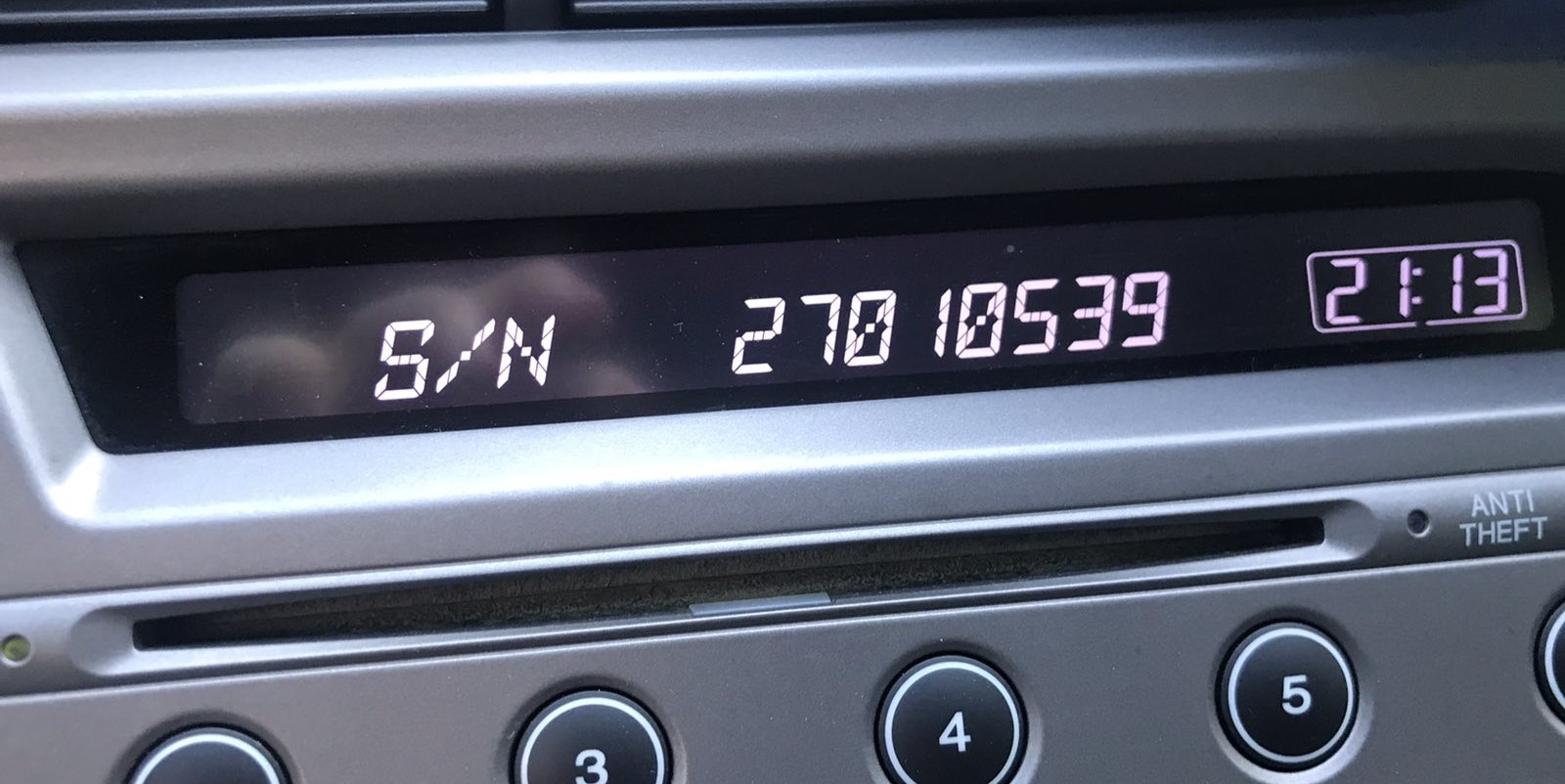
Depending on the radio used, you may be able to retrieve the serial directly from the display or by looking at the label on the radio chassis.
2013 Honda Accord factory radio options
- LX (sedan) / LX-S (coupe): 160-watt AM/FM/CD head unit with four speakers (six on LX-S coupe), USB and Bluetooth audio streaming, paired with a non-touch 8-inch upper i-MID display controlled by a console knob and steering-wheel buttons.
- Sport (coupe) / EX: Same 160W CD-based head unit architecture as LX, with additional speakers and steering-wheel controls; no in-dash touchscreen on the EX of this model year.
- EX-L: Adds a 360-watt premium audio system with subwoofer and the available touchscreen audio interface paired with the 8-inch i-MID, plus HD Radio, Pandora and SiriusXM.
- EX-L V6 with Navigation: Adds the 8-inch Display Audio with factory Honda Satellite-Linked Navigation and voice recognition.
- Touring (sedan): Flagship trim with the 8-inch Display Audio, factory navigation, voice recognition and HondaLink as standard.
Access the S/N via the Radio Display
The method for 2013 Honda Accord is this:
The 2013 Honda Accord is equipped with a double-DIN radio featuring a small LCD display. The serial number can be displayed using the preset button method:
- Turn ignition to ON or ACC. The radio shows "CODE" or "ENTER CODE".
- Hold down buttons 1 and 6 simultaneously for 3-5 seconds.
- The display cycles through the serial number in two segments: first half (e.g.,
U3210) then second half (e.g.,L0482).
Tip: On certain 2013 Accord radios with navigation, the serial may also appear in the Settings → System Information menu. Try this first if your model has a navigation unit.
Displaying the radio serial on a 2013 Accord
- LX / Sport (CD head unit with hard preset buttons): Turn the ignition to ACC (position I) and switch the radio off. Press and hold preset buttons 1 and 6 simultaneously, then press the power button. The display alternates between two screens: a U-prefixed 4-digit value (e.g.
U2200) and an L-prefixed 4-digit value (e.g.L0055). Combine them, dropping the U and L, to get the 8-digit serial 22000055. - EX-L / EX-L V6 Nav / Touring (Display Audio / 8-inch with Nav): With the unit powered on, tap Settings on the touchscreen, then System (or System Settings) and look for System Information or Device Info; the unit serial is listed there.
- Dealer-mode "DISP + MODE" hold: Referenced in some Honda service literature for HDA units, but not independently confirmed for every 2013 Accord variant - treat as a fallback only.
- If the radio is locked on CODE and the menu is unavailable: remove the unit (see removal block) and read the 8-character serial directly from the chassis sticker.
Access the Serial by Pulling Out the Radio Unit
If the serial number cannot be accessed on-screen, use the removal method.
Most Honda Accord factory radios include a sticker with the serial number printed on the housing.
Step-by-Step:
- Switch off the vehicle.
- Lift the trim surrounding the radio.
- Loosen the mounting bolts.
- Pull the unit forward to access the label.
The serial number is usually located near the printed code.
If the button method fails to display the serial on your 2013 Honda Accord:
- Turn off the vehicle.
- Pry off the radio bezel with a trim removal tool. The 2013 Accord's double-DIN radio sits within a trim panel held by clip fasteners.
- Remove the 4 Phillips screws fastening the radio to the dash.
- Ease the unit out to access the serial label on the radio housing.
Note: The 2013 Accord's double-DIN radio is heavier than single-DIN units. Hold it firmly when sliding it out.
Removing the radio on a 2013 Honda Accord
- Safety first: Set the parking brake, switch the ignition off and disconnect the negative battery terminal. Wait at least three minutes before starting work to let the SRS (airbag) system fully discharge - the 9th gen Accord routes airbag wiring close to the dash trim panels.
- Upper bezel: Begin at the rear edge of the upper receiver trim panel and pry it up with a plastic panel tool, releasing the ten retaining clips toward the front of the cabin. Lift the panel away and disconnect any hazard-switch harness.
- Top screws: Remove the two Phillips screws now exposed at the top of the receiver bezel.
- Console side trim: Pry out each console side trim panel by releasing five clips per side, starting from the rear edge.
- Console pocket: Remove the two Phillips screws securing the console pocket and pull the pocket out.
- Lower brackets: Unscrew the two 8 mm bolts holding the lower receiver brackets to the dash.
- Head unit: Pry the head unit forward, releasing the six remaining clips, then disconnect the wiring harnesses, antenna lead and (on Touring) the GPS antenna and amplifier connectors before lifting the unit clear.
Example: Honda Accord serial number label location
These are the Common Serial Formats
The 2013 Honda Accord radio serial number has the standard Honda OEM format:
U1234L5678– Primary Honda factory format – two halves displayed separately (U####thenL####), combined into a 10-character serial
Radio manufacturers for the 2013 Accord: Alpine (most common) or Panasonic. Nav models may have a separate module but typically use the same U/L two-part serial format.
Reminder Copy the complete serial exactly – a single wrong digit will produce an incorrect code.
2013 Accord radio serial format
- Honda 8-character alphanumeric serial number.
- Classic CD-style heads (LX / Sport / EX) display it as two halves: a U-prefixed upper block and an L-prefixed lower block (e.g.
U2200/L0055) which combine to the 8-digit serial 22000055. - Display Audio (HDA) and 8-inch Navi units typically print the serial as a single string on the chassis label, often beginning with U or M followed by digits and/or letters.
- Transcribe the alphanumeric sequence exactly - ignore spaces and dashes that may appear on printed labels.
How Code Entry Works on Your Honda Radio
Now that you've generated 2013 Honda Accord anti-theft code from the S/N, you're ready to reactivate the radio.
Many drivers hesitate at this stage because input process can look different across radio versions, but it's usually simple.
When the radio shows CODE, it means the unit is waiting for the correct numbers.
Step-by-Step - The Correct Way to Enter It
To enter the code on the 2013 Honda Accord's radio:
- Ignition ON. Radio displays "CODE".
- Press preset buttons 1-5 to enter each digit of the 5-digit unlock code. Each button scrolls digits 0-9.
- Press and hold button 6 for a few seconds to confirm.
Lockout: Three wrong attempts = 60-minute lockout. Keep ignition ON for the full hour. Switching off the ignition resets the lockout timer.
Entering the unlock code on a 2013 Accord
- LX / Sport CD units: with CODE shown, enter the five digits using preset buttons 1 through 5 in order, then press preset 6 (or the ENTER / Day button) to submit.
- EX-L Display Audio and Touring 8-inch Nav units: a numeric keypad appears on the touchscreen at the CODE prompt - tap the five digits in order, then tap Enter (or Done / OK) to confirm.
- If the code is rejected, the unit may lock input for ten minutes - leave the radio on and ignition in ACC during the wait, then re-enter carefully.
From Serial Number to Unlock Code for your Honda Accord - Explained
Getting your radio code takes only a few easy steps.
- Find the radio's serial - this is the only info required to generate the correct unlock code.
Unlike when contacting the dealer, no VIN or paperwork is needed. - When you've found the S/N, type it into the form above.
The system checks it against a database of supported units and automatically retrieves the matching anti-theft code. - In most cases, the code appears instantly on the screen after you pay and is also sent to your email for backup.
If we need to check it manually, you'll be informed before checkout. - When you receive the code, simply enter it into the radio to restore full functionality.
Understanding Unlock Issues with Your Accord
When the head unit powers on but skips the "CODE" prompt, consider these causes:
- The unit might be unlocked — attempt normal operation first.
- Certain 2013 Accord radios display "ENTER CODE" rather than just "CODE" — both prompt means the same thing.
- On nav-equipped units: the navigation display may appear before the code screen. Give it a moment for the audio system to boot separately.
Should no code screen appears at all, verify the radio has power — a failed radio fuse will stop the unit from powering on.
The double-DIN Honda radio uses an identical button layout as the older single-DIN platform:
- Preset buttons 1–5 — each press scrolls through digits 0–9 to select that digit of the code.
- Button 6 — hold for several seconds to confirm the full code.
On some 2013 Accord nav units, the preset buttons may be labeled differently or supplemented by soft keys. If that applies, the confirmation button is typically the rightmost preset or a dedicated ENTER key.
The serial number pattern for the mid-generation Honda radio follows one of:
U####L####— the standard two-part Honda serial (first half starts with U, second with L).HBM####— found on navigation and certain premium units.913A####— an Alpine-specific Alpine-manufactured units.
Honda part numbers printed alongside begin with 39100 or 39101 — do not use those. If uncertain, use the 1+6 button method to retrieve the serial on the screen itself.
An incorrect code result on the double-DIN Honda is very often traced back to the wrong serial number being submitted. The serial label on the back of the radio contains both the serial and the part number — verify you copied the serial (U####L####) and not the part number.
After a rejected attempt, do not entering more guesses — you only have three tries before a 60-minute lockout. Reach out to us with the serial for a no-charge reverification before retrying.
After 3 wrong attempts, the double-DIN Honda radio activates lockout mode and displays an error or goes silent. To recover it:
- Leave the ignition in the ON position — do not switch it off.
- Allow the full 60 minutes to elapse. Switching off at any point restarts the waiting period.
- After the hour, the radio should show "CODE" again.
Navigation-equipped 2013 Accord units follow the same 60-minute lockout process. If the unit remains locked after waiting, the unit may need a dealer diagnostic.