
Fast Honda Accord Radio Unlock Process Explained
Getting your radio code takes only a few easy steps.
- Locate your radio's serial number - this is the only information required by our side.
Unlike dealership lookup, no VIN or paperwork is needed. - When you've found the S/N, type it into the form above.
Our system checks it against a database of supported factory radios and automatically retrieves the matching anti-theft code. - In most cases, the code will appear instantly on the screen after payment and is also sent to your email for backup.
If manual verification is required (rare situations), you'll be notified before checkout. - Once you get it, simply enter it into the radio to restore the functionality.
How to Enter the Radio Code
After locating the radio serial and generated the unlock code, the last step is entering it into your radio.
Honda OEM units display a CODE prompt when ready for input.
The process is usually simple, but button layouts and confirmation methods may vary depending on the radio version installed in your Accord.
Entering Process Explained
To input the code on the 2012 Honda Accord's radio:
- Ignition ON. Radio displays "CODE".
- Use preset buttons 1-5 to enter each digit of the 5-digit unlock code. Each button rotates through digits 0-9.
- Press and hold button 6 for 2-3 seconds to confirm.
Lockout: 3 incorrect attempts = 60-minute lockout. Keep ignition ON for the full hour. Switching off the ignition resets the lockout timer.
Entering the 5-Digit Code on a 2012 Accord
Once you have the correct 5-digit anti-theft code for your 2012 Accord's radio, entering it is straightforward, but you only get a small number of attempts before the unit forces a cooldown.
Limited Attempt Warning (read first): Honda factory radios allow only a small number of attempts at the correct 5-digit code. After multiple wrong tries the unit shows Err / CODE and locks out further entries. Recovery requires leaving the ignition in the ON / RUN position for an extended period (typically 10-15 minutes on the shorter lockout, up to roughly 1 hour on the longer lockout state) before the prompt will accept another attempt. Never burn an attempt on a guess.
Power up. Turn the ignition to ON / RUN and wait for the radio to boot and display the CODE / Enter Code prompt.
Enter each digit with the preset buttons. The 5-digit Honda code is dialed with the station preset buttons 1-5 (or 1-6 on units that include all six positions). Each preset corresponds to its number, and you tap preset N that many times when the digit equals N. For example, if your code is 33351, press preset 3 three times, preset 5 once, and preset 1 once - in that order.
Submit / confirm. On the base AM/FM/CD and the EX/EX-L 6-disc receiver, the radio confirms automatically after the fifth digit is dialed, or after you press the labelled enter button (some variants use the right-hand tuning knob press as the confirmation). On the EX-L Nav, follow the on-screen confirmation exposed by the audio control panel.
If the code is rejected: stop, double-check the digits against your paperwork, and start a fresh entry from the first digit. Do not waste attempts on guesses - the cooldown is long enough that verifying the code is far cheaper than risking a longer wait state.
After a successful entry: the prompt clears, the radio returns to normal operation, and presets / volume settings persist normally on subsequent battery disconnects until the system is unpowered long enough to require the code again.
Radio Serial Number Explained - Finding It on Your Honda
The first part is to find the radio's serial num.
Based on the head unit type installed in your 2012 Accord, the S/N can be accessed either through the display menu or by checking the label on the radio itself.
Follow the steps below to identify your serial quickly.
2012 Honda Accord - Factory Audio Line-Up
The 2012 Honda Accord is the final year of the 8th generation (CP sedan / CS coupe) before the all-new 9th gen launched for 2013. The factory audio family carried over from the rest of the generation, and all units share the same Honda anti-theft architecture, so identifying yours simply tells you which hardware you are working with for serial retrieval and code entry.
Base AM/FM/CD (LX, LX-P, SE): single-slot CD receiver with AUX input as standard. Hard buttons for source, presets, and tuning, and a small dot-matrix display in the centre of the face.
EX / EX-L 6-disc in-dash CD changer: the upgraded receiver fitted to EX and EX-L trims, featuring an in-dash 6-disc CD changer with MP3/WMA playback, RDS, and AUX input. Same general face style as the base unit but with a wider media slot and a richer information display.
Honda Satellite-Linked Navigation (EX-L Nav): the DVD-based Honda Sat-Nav system, with a navigation screen mounted in the upper centre stack and a separate audio control panel plus 6-disc CD changer below. The navigation reads its map data from a dedicated DVD drive.
Identification: the easiest cues are the face layout (single CD slot vs. wide 6-disc face vs. two-tier nav stack) and the trim level on your title or window sticker. Honda part numbers on the chassis label confirm the exact unit once the radio is pulled. As the last year of the 8th gen, a 2012 Accord uses none of the touchscreen units that arrived with the 2013 9th gen.
Find Your S/N via the Radio Screen
Try the following for your 2012 Honda Accord:
The 2012 Honda Accord features a double-DIN radio with a dot-matrix screen. The serial number can be found using the preset button method:
- Turn ignition to ON or ACC. The radio shows "CODE" or "ENTER CODE".
- Press and hold buttons 1 and 6 together for approximately 3 seconds.
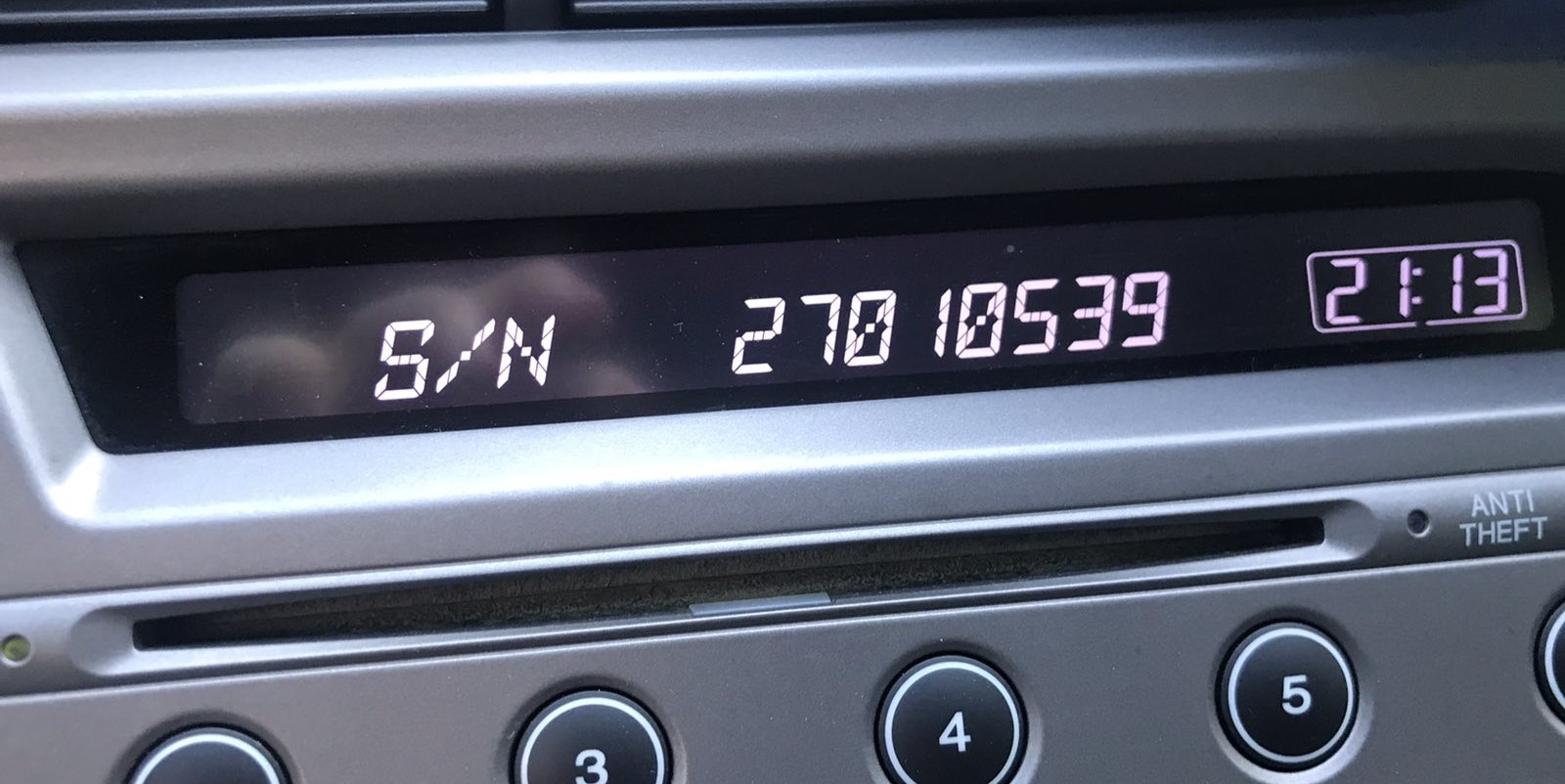
- The screen shows the serial number in two segments: first half (e.g.,
U3210) then second half (e.g.,L0482).
Note: On certain 2012 Accord radios with touchscreen nav, the serial may be visible in the Settings → System Information menu. Check this before using buttons if your vehicle has a touchscreen unit.
Honda Dealer-Mode Serial Display on the 2012 Accord
Honda factory radios in the 8th gen Accord have a documented dealer-mode procedure that displays the unit's serial number on the radio's own screen, without removing the head unit. On a 2012 Accord this is the fastest way to read the value when the radio still powers up to its CODE prompt.
Procedure (preset 1 + 6 hold). Turn the ignition off first. Press and hold preset buttons 1 and 6 simultaneously. While still holding both buttons, turn the ignition to the ON / RUN position so the radio powers up. After a moment the radio displays the serial number.
What you will see. On many 2012 Accord units the serial appears as two consecutive 4-character segments, each shown for roughly 3 seconds - write down both halves as they appear, combining them in order to form the full 8-character serial. Some units display the full string at once.
Capture tip. Set a phone camera in video mode before starting. Each segment may only be displayed briefly, and a short clip lets you scrub frame-by-frame to confirm characters that are easy to misread (zero vs letter O, one vs letter I).
If nothing appears. Release the buttons, turn the ignition off, wait a few seconds, and try again. Timing matters - both presets must be held before you turn the key. If the radio still shows only the CODE prompt with no serial, fall back on the chassis-label method described next.
Nav-equipped cars. On the EX-L Nav with the two-tier audio stack, the same preset 1 + 6 hold while powering up still applies, but the serial may appear on the audio control panel display rather than on the upper navigation screen.
Locate Serial on Accord's Radio Chassis
If the serial does not appear on screen, the next step is checking the radio itself.
Many Honda radios require physical access to the serial tag attached to the unit.
Common approach:
- Start by completely turning off the engine - pull the key out.
- Then lift the trim panel.
- Next, unscrew the mounting points and slide the radio forward.
- Look for a barcode label showing the serial number.
If the button method doesn't work on your 2012 Honda Accord:
- Power down the vehicle.
- Remove the dashboard surround with a trim removal tool. The 2012 Accord's larger radio sits within a bezel attached by snap clips.
- Unscrew the four Phillips-head screws fastening the radio to the dash.
- Ease the unit out to read the serial label on the chassis.
Note: The 2012 Accord's double-DIN radio weighs more than single-DIN units. Hold it with both hands when extracting it.
2012 Accord - Remove the Radio to Read the Chassis Label
If the dealer-mode preset 1+6 procedure does not yield a clean serial on your 2012 Accord, the chassis label on the radio itself is the authoritative source. The label is printed by the radio manufacturer and shows the 8-character serial that maps to your factory code.
Safety first. Turn the ignition fully off and remove the key. Disconnect the negative battery terminal and wait several minutes for SRS / airbag capacitors to discharge before working in the dash. Stay clear of yellow airbag wiring and always release a connector by its lock tab rather than tugging on the wires.
Tools to have on hand. A #2 Phillips screwdriver, a set of plastic pry/trim tools (or a flat-blade screwdriver wrapped in tape), a small parts tray, and a strip of painter's tape to protect the dash pad from accidental scuffs.
Open the glove box and pull the right-hand dash trim. On the 8th gen Accord (final year, 2012), open the glove box door first, then pull the right-hand dash trim strip toward the rear of the vehicle to release approximately eight clips. The piece comes off by hand once the clips let go.
Pry the left-hand dash trim. Use a plastic trim tool to release two clips on the left-hand dash trim strip and remove it the same way. Painter's tape on the dash edge gives the tool a non-marring contact surface.
Free the radio side trims and visible screws. With the dash strips off, unsnap and remove the two trim pieces on either side of the radio bezel - this exposes two Phillips screws that hold the radio to the dash subframe.
Find the hidden lower screws. Two additional Phillips screws are tucked under the radio in the pocket / storage area below it. Reach up under the radio (after pulling any storage bins) and feel for one screw on each side - they are difficult to see but easy to find by touch.
Slide the radio out and disconnect. With all four screws removed, pull the radio chassis straight forward, then release the antenna lead and the multi-pin electrical connector(s) at the back. For EX-L Nav cars the upper HVAC vent panel must also be removed (clip-retained) before the navigation head will release.
Locate the S/N label. The 8-character serial is printed on a manufacturer sticker on the top, side, or rear of the metal chassis, alongside a Honda part number and barcode. Photograph it for clarity and transcribe it carefully.
Reinstall tips. Reconnect the antenna and harness before sliding the unit back in; tighten the four screws snug but not over-torqued; align each trim piece and press around its perimeter until every clip seats; refit the glove box last.
Example: Honda Accord serial number label location
Standard Serial Number Patterns on This Radio
The 2012 Honda Accord radio serial number has the standard Honda OEM format:
U1234L5678– Standard Honda factory format – two halves displayed separately (U####thenL####), combined into a 10-character serial
Radio manufacturers for the 2012 Accord: Alpine (most common) or Panasonic. Nav models could use a separate module but usually use the same U/L two-part serial format.
Reminder Record the full serial exactly – a single wrong digit will generate an incorrect code.
Serial Number Format on 2012 Accord Factory Radios
Honda factory radio serials on the 2012 Accord (final year of the 8th gen) are typically 8 characters, alphanumeric, printed on the chassis label and also exposed via the preset 1 + 6 dealer-mode procedure on the radio's own display.
Common prefix patterns: Honda head units of this era frequently use a U-prefix - often shown as a 4-character first half (e.g. U1234) followed by a 4-character second half (e.g. L5678) - or an M-prefix on certain navigation / premium variants.
Two-segment display behaviour: when read via dealer mode, many 2012 Accord units show the serial as two consecutive 4-character segments displayed briefly in sequence. Combine them in the order they appear to form the contiguous 8-character serial.
What to ignore on the label: any S/N or SER prefix, dashes, spaces, or barcode markings are formatting only - the value to submit is the contiguous alphanumeric serial.
Important caveat: capitalisation matters and the prefix can vary between supplier batches and trim levels. Always verify the printed value against the chassis label rather than assuming a fixed prefix from another vehicle, and double-check zero vs letter O and one vs letter I when transcribing.
Fixing Common Code Entry Problems for 2012 Accord
If the radio powers on but skips the "CODE" screen, consider these causes:
- The unit might be unlocked — test normal operation to confirm.
- Some 2012 Accord radios show "ENTER CODE" rather than just "CODE" — both message means the same thing.
- On nav-equipped units: the navigation display may come up first the code screen. Wait a few seconds for the audio system to initialize separately.
Should no code screen ever show, verify the radio fuse — a failed radio fuse will prevent the unit from powering on.
The serial number format for the mid-generation Honda radio follows one of:
U####L####— the standard two-part Honda serial (first half starts with U, second with L).HBM####— used on navigation and some premium configurations.913A####— used by Alpine-manufactured units.
The part number printed alongside begin with 39100 or 39101 — never submit those. If uncertain, use the 1+6 button method to display the serial on the screen itself.
Code rejection on the double-DIN Honda is almost always traced back to a misread serial. The serial label on the back of the radio carries both the serial and the part number — make sure you submitted the serial (U####L####) and not the part number.
After a rejected attempt, do not entering more guesses — you only have 3 tries before a 60-minute lockout. Reach out to us with the serial for a no-charge reverification before retrying.
The mid-generation Honda radio uses an identical button layout as the older single-DIN platform:
- Preset buttons 1–5 — each press cycles through digits 0–9 to enter that digit of the code.
- Button 6 — press and hold for 2–3 seconds to confirm the full code.
For some 2012 Accord nav units, the preset buttons may be labeled differently or accompanied by menu buttons. In those cases, the confirmation button is still the rightmost preset or a dedicated ENTER button.
After 3 wrong entries, the mid-era Honda radio goes into lockout mode and displays an error or refuses input. To exit it:
- Keep the ignition in the ON position — do not switch it off.
- Allow the full 60 minutes to elapse. Turning the key to OFF at any point restarts the waiting period.
- Once 60 minutes have passed, the radio will display "CODE" again.
Navigation-equipped 2012 Accord units follow the same 60-minute lockout procedure. Should it remains locked after waiting, the unit may need a dealer diagnostic.
Why Is the Radio Asking for a Code?
Double-DIN Honda radios carry the same anti-theft system as earlier models: any interruption in battery power activates the code prompt on the next startup. Common causes include:
- Battery replacement or disconnect — by far the most common cause.
- Battery drain — a fully dead battery has the same effect.
- Fuse replacement — swapping the radio fuse block can momentarily cut power and activate the lock.
- Workshop electrical work — repairs that involves disconnecting power will cause this.
Supplying the correct code disables the lock and normal function is restored immediately. The lock only returns if power is cut once more.