
Radio Serial Number Explained - Finding It on Your Honda
The starting step is locating the radio S/N.
Most people assume the code depends on the Honda model or year, but in reality, the unlock process depends on the unique radio unit's serial number.
This number identifies the exact head unit installed in your Honda Accord.
This is actually better, because if you have bought an aftermarket radio, the VIN or other vehicle-specific data wouldn't be of much use.
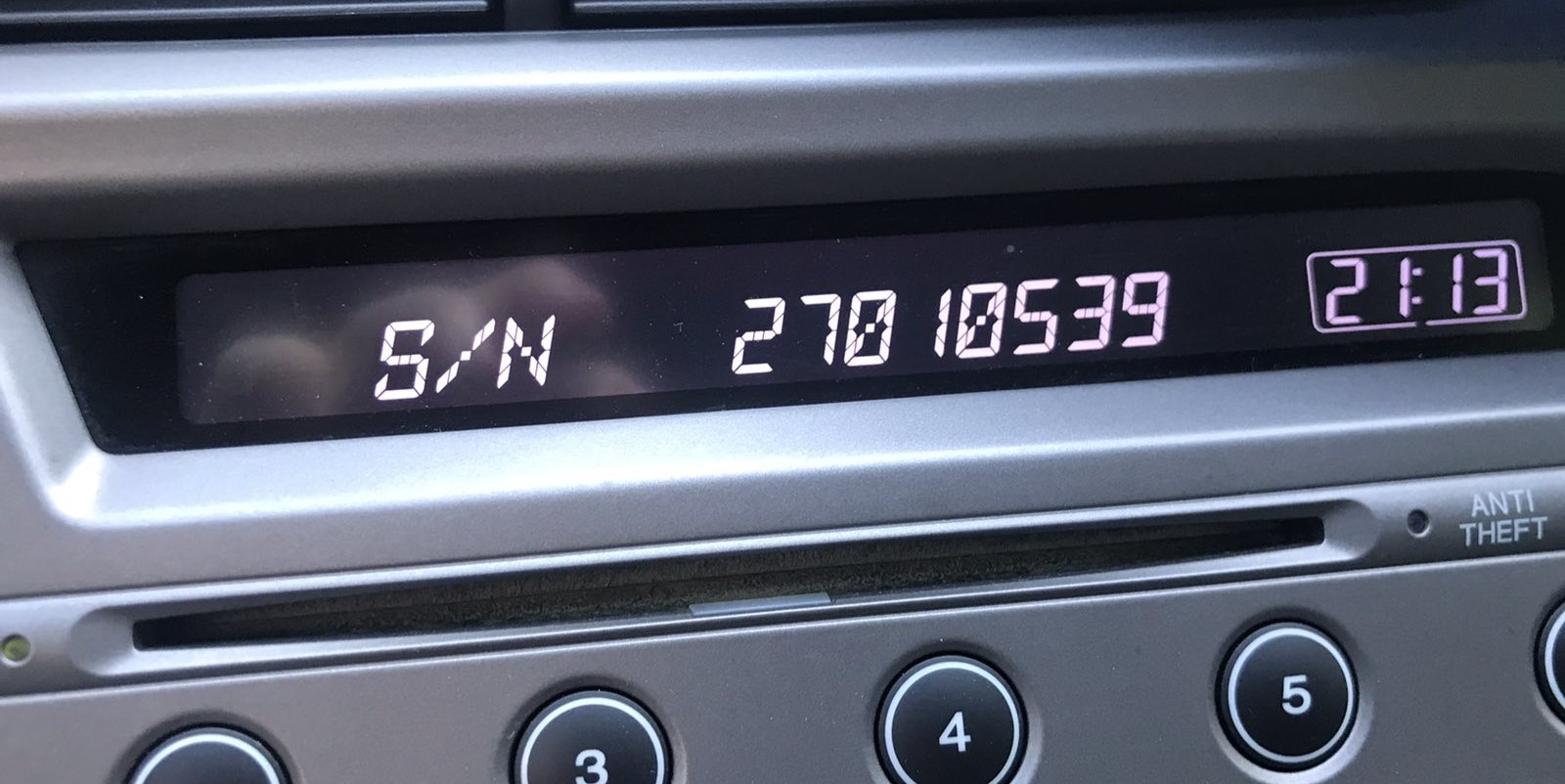
Depending on the radio version used, you may be able to retrieve the serial directly from the display or by checking the label on the radio chassis.
2006 Accord - Available Factory Radios
2006 is the mid-cycle refresh year for the 7th-gen (CL/CM) Accord, and Honda updated the satellite-linked navigation system to its 4th-generation interface. The audio side of the menu carries over largely unchanged. The same Honda 5-digit anti-theft architecture applies across the lineup.
- Single-CD AM/FM stereo (VP/LX/SE trim). Standard on entry trims (VP replaces DX as the lowest sedan trim from 2006). Visual ID: monochrome segmented display, hard preset 1-6 buttons, rotary volume/tune knobs, single in-dash CD slot, no cassette.
- 6-disc in-dash CD changer (EX trim). Standard on EX sedans and coupes. Visual ID: a wider faceplate with a 'CD 1-6' indicator strip, six-disc magazine loading via the front slot, the same preset 1-6 row, no trunk changer.
- Honda Satellite-Linked Navigation System with 4th-gen software (EX-L Navi). Available on EX-L sedans and coupes from MY2006. Visual ID: small color nav screen at the top of the center stack with a separate audio control panel below, voice-recognition button on the steering wheel, updated 4th-gen Honda nav splash and revised on-screen UI compared with 2003-2005 cars. DVD-based maps.
- Common ground. All three units use the same Honda 5-digit anti-theft code in the audio section. Navi cars also have a separate 5-digit code stored against the navigation screen, requested independently from the audio code after a battery disconnect.
Find Your S/N on the Radio Screen
These are the steps you should follow for 2006 Honda Accord:
The 2006 Honda Accord features a single-DIN CD radio made by Alpine or Panasonic for Honda. You can retrieve the serial number using the radio buttons:
- Turn the ignition to ON (or ACC). The radio displays "CODE" if the anti-theft is active.
- Press and hold preset buttons 1 and 6 together for approximately 3-5 seconds.
- The screen will show a 10-character serial number in two parts (e.g.,
U3210thenL0482).
Tip: Write down both parts accurately – the full serial is both codes combined, for example U3210L0482. Certain 2006 Accord radios may need multiple presses to reveal the second half.
How to Find S/N via the Radio Screen
On the 2006 Accord, Honda's on-screen serial readout is documented for both the standard audio head units and the EX-L Navi unit (with the navi-specific button combo).
- Turn the ignition to ON (II) and make sure the radio is OFF (display blank but unit powered).
- For non-navi audio units, press and hold preset 1 and preset 6 together.
- While still holding 1 and 6, press the power/volume knob to turn the radio ON.
- Two 4-character groups appear in sequence - first a
U-prefixed group such asU1234, then anL-prefixed group such asL5678. - Ignore the
UandLmarkers and write down the eight alphanumerics in order; that string is the serial Honda's online system uses. - For the EX-L Navi unit, hold the top of the SEEK/SKIP and CH/DISC buttons together (instead of presets 1 and 6) while powering on the radio - the same 4+4 readout appears on the audio screen.
Pulling Out the Unit to View the S/N on the Tag
If the serial number cannot be accessed through menu, use the pull-out method.
Most Honda Accord OEM radios include a sticker with the serial number printed on the chassis.
Step-by-Step Approach:
- Switch off the vehicle.
- Remove the dashboard frame surrounding the radio.
- Unscrew the mounting bolts.
- Move the unit slightly out to access the label.
The serial number is usually located near the printed code.
If the button method is unavailable on your 2006 Honda Accord, you can physically remove the radio to find the serial label:
- Turn off the vehicle and remove the key.
- Remove the dashboard trim panel using a trim removal tool. Honda bezels are typically held by snap clips.
- Unscrew the 4 Phillips screws holding the radio in place.
- Pull the radio forward and read the white sticker with the serial number on the side of the radio casing.
Note: Older Honda radios are easy to handle. The standard-sized unit comes out easily once the screws are removed.
Locating Serial on Accord 2006 Radio Chassis
If the 1+6+power on-screen trick does not respond on your 2006 unit - for example because the radio is locked at the CODE prompt and not accepting preset input - removing the head unit and reading the chassis label is the dependable fallback.
Safety first
- Turn the ignition fully off and remove the key.
- Disconnect the negative terminal of the 12V battery.
- Wait several minutes before reaching behind the dash so airbag circuits can fully discharge.
- Stay clear of yellow airbag-related harnesses while working around the bezel.
Tools to have ready
- Plastic trim/panel pry tools to release the bezel clips without marking the dash.
- A small right-angle pick for a hidden screw behind the clock.
- A Phillips screwdriver and an 8 mm socket for the radio retaining screws and underside bolts.
- A phone or camera to photograph the chassis label clearly.
Removal overview
- Pry off the small center trim ring around the shifter; on most 2006 Accords there are two screws on the radio side under this ring.
- Pop out the small pocket to the left of the cigarette lighter (clip-retained) and remove the two screws under the dash directly below the stereo plus one hidden screw behind the clock face.
- Pull the center bezel outward by the A/C vents and pocket area - the upper section with the vents is one piece held by additional clips.
- Undo the two 8 mm bolts below the radio and the three screws across the top of the chassis, then slide the head unit out and unplug the harness and antenna.
Where the serial sits
- Find the thermal-printed label on the top or side face of the metal chassis.
- Copy the alphanumeric string next to the barcode and double-check ambiguous characters (O vs 0, I vs 1).
- Photograph the label before refitting the unit so the serial is preserved as a permanent reference.
Example: Honda Accord serial number label location
S/N Patterns and Prefixes
The 2006 Honda Accord radio serial number follows the standard Honda OEM format:
U1234L5678– The standard Honda factory format – two halves displayed separately (U####thenL####), combined into a 10-character serial
The radio in the 2006 Accord is a single-DIN CD unit manufactured by Alpine or Panasonic under Honda's OEM contract.
Important The serial is 10 characters (U + 4 digits + L + 4 digits). Do not mistake it with the part number (usually starts with 39100, 39101, etc.).
Acceptable Serial Number Formats
2006 Accord radios use an 8-character alphanumeric serial that displays in two halves on the screen and prints as a single string on the chassis label.
- The most common factory pattern starts with a single-letter prefix - usually
Uon these Honda head units, with a smaller subset reported asM- followed by 4 digits. - The second half of the serial typically begins with an
Lmarker on the screen and continues with the remaining 4 characters. On the chassis label both halves print together, e.g. something resemblingU1234L5678. - When submitting the serial to a code-retrieval service, drop the
UandLmarkers if you read them on screen - the eight alphanumerics that sit between them are what actually identify the unit. - If the label string does not fit this rough pattern, recheck that you have copied the serial line and not the part number. The serial is normally the longest alphanumeric on the label and is the one tied to the barcode.
Code Entry Process for 2006 Accord
Once you receive the correct unlock code based on the S/N, you can restore default functionality by entering it into the unit.
The code entry process depends on the radio interface, but most 2006 Accord systems follow a similar structure using preset buttons, touch controls, or rotary knobs - depending on if it's a factory or an aftermarket unit.
You will typically see CODE displayed on screen.
Detailed Input Instructions for Accord 2006
To enter the unlock code on the 2006 Honda Accord:
- Turn ignition to ON. The radio displays "CODE".
- Use preset buttons 1 through 5 to enter your 5-digit code:
- Press button 1 multiple times until the 1st digit appears
- Press button 2 for the second digit, and so on
- Hold preset button 6 for a few seconds to confirm.
Lockout: After 3 incorrect attempts, the radio enters lockout. Leave the ignition ON for 60 minutes, then retry. Don't turn the key off or the timer restarts.
Step-by-Step Code Input on a 2006 Accord
Once you have the correct 5-digit anti-theft code for your 2006 Accord radio, the entry process is quick - but the radio will lock you out for an extended period if you keep guessing, so confirm the code matches the serial you actually read off this radio first.
Limited attempt warning
- After roughly ten consecutive wrong codes the radio shows
ERR(often displayed asERR 1on 7th-gen units) and stops accepting input. - To clear the lockout, leave the radio powered with the ignition in the ON position for around one hour of continuous run-time.
- Switching the ignition off does not shortcut the timer; disconnecting power resets the attempt count but the radio still demands the correct code.
Entering the code
- Turn the ignition to ON (II) so the radio powers up and shows the
CODEprompt. - Press preset 1 the number of times equal to the first digit of your code, preset 2 for the second digit, preset 3 for the third, preset 4 for the fourth, and preset 5 for the fifth.
- For example, a code of 33351 is entered as preset 3 three times, preset 5 once, then preset 1 once.
- After the fifth digit, press the right-hand tune/seek control (or the ENT/SEL-style confirm button on EX-L Navi units) to submit.
- If correct, the radio chimes once and returns to the normal AM/FM display; if wrong, the display reverts to
CODEready for the next attempt - stop after the second wrong attempt and re-verify the serial used.
How to Get Your 2006 Honda Accord Radio Code
Getting your radio code takes only a few easy steps.
- Locate your radio's serial number - this is the only info required to generate the correct unlock code.
Unlike dealership lookup, no VIN or paperwork is needed. - When you've found the S/N, type it into the form above.
The system checks it against a database of supported factory radios and automatically retrieves the matching anti-theft code. - In most cases, the code will appear instantly on the screen after payment and is also sent to your email for backup.
If manual verification is required (rare situations), you'll be notified before checkout. - Once you receive the code, just enter it into your radio to restore full functionality.
Fixing Common Code Entry Problems for 2006 Accord
The most likely reason a code is rejected is using a code based on the wrong serial number. On older Honda radios, the label on the radio chassis carries two items: the serial number (e.g., U1234L5678) and the part number (e.g., 39100-SCV-...). Confirm you submitted the serial, not the part number.
Additionally verify that you read the full 10-character serial correctly — the letter O and the digit zero look similar on these older labels. Reach out to us for a free reverification if the code was rejected.
If the radio shows a lockout state after three wrong entries, leave the ignition turned ON and stay for one full hour. Do not turn the key off during this period — doing so restarts the timer from zero.
After the hour has passed, the radio exits the lockout and display "CODE" again. Then you can try the correct code. If the radio shows "ERR" or remains locked after waiting, contact support — some older Honda units require a dealer service visit in extreme cases.
If the radio powers on but does not display the "CODE" prompt, several things could be happening:
- The radio may not be locked — check using it normally first.
- Some older Honda radios display "CODE E" instead of simply "CODE" — both mean the same thing and code entry proceeds identically.
- It could be in an error state from a previous lockout — leave ignition ON for one hour, then look again.
If the screen stays blank, check that the radio has power — the ignition fuse may have blown during the battery disconnect that triggered the code request.
The serial number and the part number are printed on the same label on the unit chassis. They are easy to mix up:
- Serial number: typically starts with
Ufollowed by digits, thenLand more digits — for exampleU1234L5678. This is the correct value to submit. - Part number: begins with
39100or39101— this is not the serial.
If the label is worn, use the 1+6 preset button method to display the serial on the radio screen instead. Refer to the serial display section above for step-by-step guidance.
On older Honda single-DIN radios, code entry uses the 6 preset buttons along the bottom of the faceplate:
- Buttons 1 through 5 — each one sets one digit of the five-digit code. Press a button multiple times cycles through digits 0–9.
- Button 6 — hold this for a few seconds to confirm the entered code.
A handful of early Honda models use a slightly alternate layout where buttons read 1–4 plus SCAN and RPT — in that case, use SCAN or RPT to confirm instead of button 6. Consult your owner's manual if unsure which button confirms.
Why Did the Radio Lock and Ask for a Code?
Honda's older radios include a built-in anti-theft system that triggers whenever the radio loses its battery connection. Frequent triggers include:
- Battery replacement — by far the most frequent cause; disconnecting the battery wipes the radio's memory.
- Dead battery — a drained battery can have the same effect as a disconnected one.
- Electrical repair work — service work that involves disconnecting the battery will trigger the lock.
This lock mechanism was designed to discourage theft by making the radio non-functional after removal. Once you enter the correct code, the radio stays unlocked until the next battery disconnect.