Serial Number Location Guide for Honda Accord 2000
Very useful thing to know is that factory radios use a unique S/N to identify each unitindividually.
The anti-theft system matches the code directly to the serial.
Unlike vehicle-specific data such as VIN or registration info, it is not determined by the model or production year, so you'll be able to generate it even if you have a radio that you bought afterwards.
Depending on the manufacturer and radio installed in your Honda Accord, the retrieval method varies.
Here are the best ways to locate it.
Factory Radios in the 2000 Honda Accord
The 2000 Accord is the second model year of the 6th-generation (CG) car, and the factory audio menu is short and easy to identify by sight. There was no factory navigation option on the 2000 Accord, so every head unit you see in this generation is an audio-only Honda radio with the anti-theft 5-digit code feature.
Single-CD AM/FM stereo (DX/LX trim). Standard on entry trims. Visual ID: a small segmented monochrome display, hard preset buttons numbered 1-6, rotary volume and tune controls, and a single in-dash CD slot. No cassette door, no changer controls, no DISP soft key.
Cassette + AM/FM stereo (LX trim alt configuration). A common factory choice for buyers who still relied on tapes. Visual ID: a horizontal cassette door across the face, the same preset 1-6 row, no CD slot in the head unit, and a separate trunk-mounted CD changer connector behind the unit on cars optioned that way.
EX premium AM/FM/cassette/CD combo. Standard on EX trims and many EX V6 cars. Visual ID: both a CD slot and a cassette door on the same faceplate, slightly more buttons across the bottom row, and the EX-spec speaker badging on door cards. This is the highest factory audio specification on the 2000 Accord.
All three units share the same Honda anti-theft architecture - a 5-digit numeric code, the same preset-button entry method, and the same serial-label location on the chassis once the unit is pulled.
Screen-Based Serial Lookup Method
The method for 2000 Honda Accord is this:
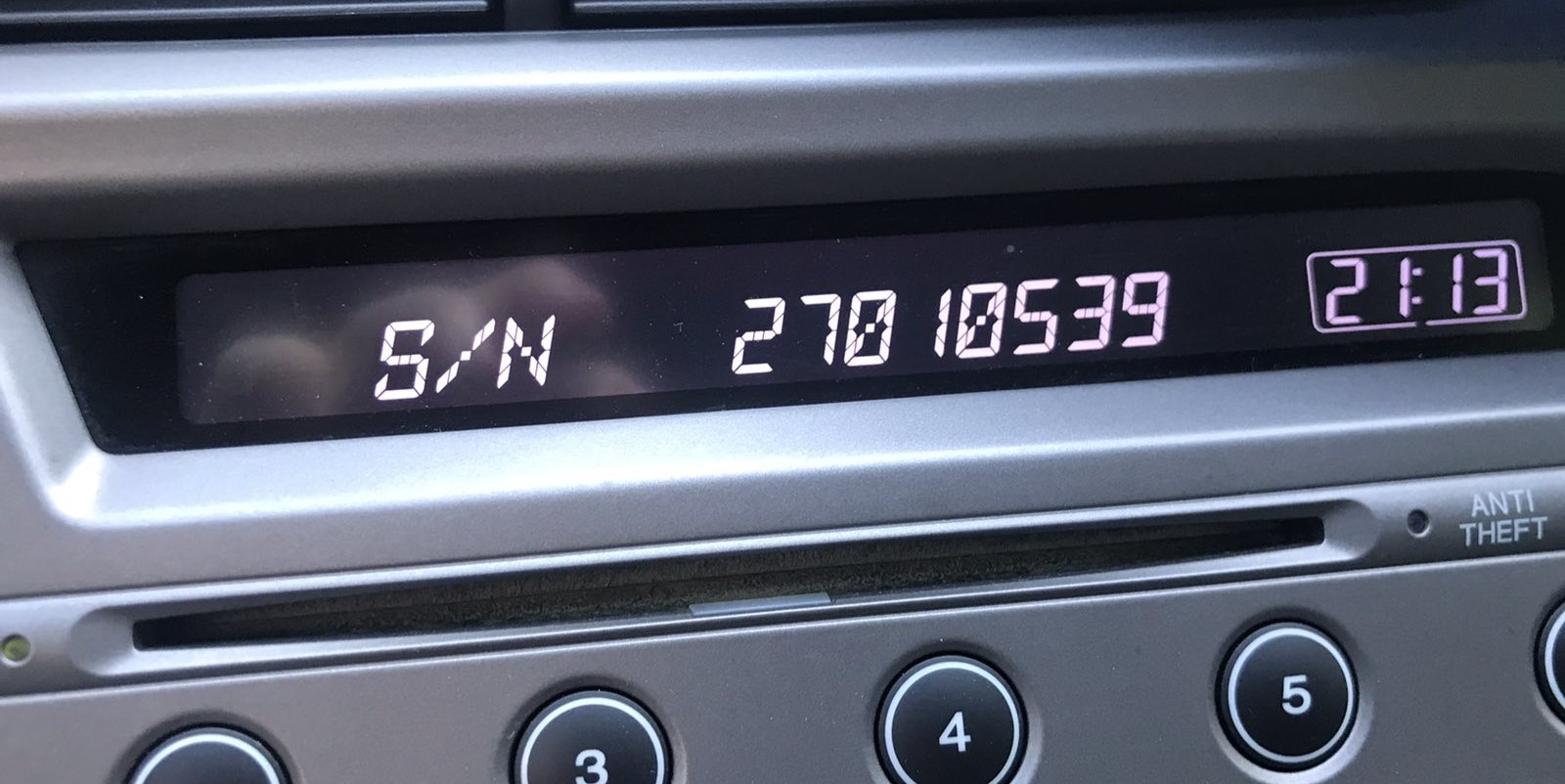
The 2000 Honda Accord comes with a single-DIN CD radio produced by Alpine or Panasonic for Honda. You can retrieve the serial number directly on the screen:
- Turn the ignition to ON (or ACC). The radio will display "CODE" if locked.
- Press and hold preset buttons 1 and 6 together for about 5 seconds.
- The display will show a 10-character serial number in two parts (e.g.,
U3210thenL0482).
Note: Write down both parts accurately – the complete serial is both codes combined, for example U3210L0482. Some 2000 Accord radios may need you to press 1+6 a second time to show the second half.
Serial Number on the Unit
If the serial does not appear on display, the next step is checking the radio itself.
Many Honda radios require physical access to the serial tag attached to the unit.
Common approach:
- Start by completely powering down the engine - pull the key out.
- Then detach the trim panel.
- Next, release the mounting points and slide the radio forward.
- Look for a factory sticker showing the serial number.
If the 1+6 method doesn't work on your 2000 Honda Accord, you can take out the radio to find the serial label:
- Power down the vehicle and remove the key.
- Pry off the center console trim using a trim removal tool. Honda trim pieces are usually held by friction clips.
- Remove the 4 Phillips-head screws fastening the radio to the dash bracket.
- Slide the radio forward and read the white sticker with the serial number on the back of the radio casing.
Tip: Earlier Honda radios are compact. The single-DIN unit comes out easily once the screws are removed.
Removing the 2000 Accord Radio to Read the Serial Label
On 6th-gen Accords there is no documented on-screen serial readout, so the dependable way to capture the serial on a 2000 car is to take the head unit out of the dash and read the printed label on its chassis.
Safety preparation
Turn the ignition fully off and remove the key from the cylinder. Disconnect the negative terminal of the 12V battery and wait several minutes before working near the dash so any airbag-related circuits can fully discharge. Avoid pulling on yellow airbag-related harnesses while moving panels around.
Tools to have ready
Plastic trim/panel pry tools to release clips without scratching the dash, a Phillips screwdriver for the radio retaining screws, and a phone or camera to photograph the chassis label clearly.
Removal overview
Begin by lifting the small storage tray or coin pocket below the radio so the lower edge of the center bezel is exposed. Pry the center dash bezel that surrounds the radio and HVAC controls outward, starting from a lower corner - on the 2000 Accord this bezel is held by retaining clips, so steady pressure releases each clip in turn. Work the tool around the perimeter, then pull the bezel forward and unplug the small connectors on its back (typically the hazard switch and any clock/illumination feeds). With the bezel out of the way, undo the four retaining screws at the corners of the radio chassis. Slide the head unit out toward you and unplug the wiring harnesses and antenna lead from the back.
Where the serial label sits
The serial is on a printed label on the metal housing - usually the top or one side face. Copy the alphanumeric string next to the barcode, taking care with similar characters such as O vs 0 and I vs 1. Photograph the label before reinstalling the radio so the serial is preserved as a permanent reference. Reassembly is the reverse of removal: connectors back on, four screws home, bezel pressed in until each clip seats, then reconnect the battery.
Example: Honda Accord serial number label location
What a Valid Serial Number Looks Like
The 2000 Honda Accord radio serial number follows the standard Honda OEM format:
U1234L5678– The typical Honda factory format – two halves displayed separately (U####thenL####), combined into a 10-character serial
The radio in the 2000 Accord is a single-DIN CD unit from Alpine or Panasonic under Honda's OEM contract.
Important The serial is 10 characters (U + 4 digits + L + 4 digits). Don't confuse it with the part number (usually starts with 39100, 39101, etc.).
What a Honda Accord 2000 Radio Serial Looks Like
Honda factory radios from this generation typically use an 8-character alphanumeric serial that is split across two display lines when read on later models, but on a 2000 Accord you will usually be reading it directly off the chassis label.
The most common factory pattern starts with a single letter prefix - usually U on these older Honda head units, with M reported on a smaller subset - followed by 4 digits, and then a second 4-character group on the next line of the label. When you combine the two halves you get an 8-character serial such as U1234567L-style strings (the leading U and any inline L separator on later screen readouts are markers, but the eight characters in the middle are what unlocks the radio).
If the label string you copied does not match this rough shape, double-check that you have the serial line and not the part number. The serial is normally the longest alphanumeric on the label and is the one tied directly to the barcode. When in doubt, photograph the entire label so the full chassis ID, part number, and serial line are all visible side by side.
Understanding the 2000 Honda Accord Radio Code Retrieval Process
Getting your radio code takes only a few simple steps.
- Locate your radio's serial - this is the only info required by our side.
Unlike dealership lookup, no VIN is needed. - When you've found the S/N, type it into the form above.
The system checks it against a database of supported radios and automatically catches the matching security code. - In most cases, the code appears instantly on the screen after you pay and is also sent to your email for backup.
If manual verification is required (rare situations), you'll be notified before checkout. - Once you receive it, just enter it into your radio to restore the functionality.
Radio Code Input Guide
Once the system gives you 2000 Honda Accord unlock code from the serial, you're ready to reactivate the radio.
Some drivers hesitate at this stage because input process can look different across radio versions, but it's usually simple.
When the radio shows ENTER CODE, it means the unit is waiting for the correct numbers.
Entering Process Explained
To enter the unlock code on the 2000 Honda Accord:
- Turn ignition to ON. The radio displays "CODE".
- Use preset buttons 1 through 5 to enter your 5-digit code:
- Press button 1 repeatedly until the 1st digit appears
- Press button 2 for the second digit, and so on
- Press and hold preset button 6 for a few seconds to confirm.
Lockout: After three incorrect entries, the radio locks out. Keep the ignition ON for 1 hour, then retry. Do not turn the key off or the timer restarts.
Entering the Anti-Theft Code on a 2000 Accord
Once you have the correct 5-digit anti-theft code for your 2000 Accord radio, the entry process itself is quick - but the radio gives you a limited number of attempts before locking itself for an extended period, so confirm the code matches the serial you actually read off this radio before you start.
Limited attempt warning. After roughly ten consecutive wrong codes the radio will display ERR (or CODE with no further input accepted) and lock itself out. To clear it, the radio must remain powered with the ignition in the ON position for around one hour of continuous run-time before you can try again. Switching the key off does not shortcut this timer, and disconnecting power resets the count but the radio will still demand the correct code afterwards.
Entering the code. Turn the ignition to ON (II) so the radio powers up and shows the CODE prompt. Enter each digit by pressing the matching preset button on the faceplate - presets 1 through 5 cover digits 1-5 of the code in numeric order. For example, a code of 33351 is entered as preset 3 three times, preset 5 once, then preset 1 once. After the fifth digit, press the tune/seek control or the right-hand SEL-style button to confirm. If the code is correct, the radio chimes once and returns to its normal AM/FM display. If the code is wrong, the display reverts to CODE ready for the next attempt - stop after the second wrong attempt and re-verify the serial you used.
What Caused the Radio to Lock?
Honda's older radios have a built-in anti-theft system that activates whenever the radio is cut off from its battery connection. Typical causes include:
- Battery replacement — the most common cause; disconnecting the battery wipes the radio's memory.
- Dead battery — a fully discharged battery can have the same effect as a disconnected one.
- Electrical repair work — service work that involves disconnecting the battery will trigger the lock.
This lock mechanism was designed to deter theft by making the radio useless after removal. As soon as you input the correct code, the radio stays unlocked until the next battery disconnect.
Understanding Unlock Issues with Your Accord
On older Honda single-DIN radios, code entry uses the 6 preset buttons along the bottom of the faceplate:
- Buttons 1 through 5 — each selects one digit of the five-digit code. Press a button multiple times cycles through digits 0–9.
- Button 6 — press and hold this button for a few seconds to confirm the entered code.
A handful of early Honda models use a slightly different layout where buttons are labeled 1–4 plus SCAN and RPT — in that case, use SCAN or RPT to confirm instead of button 6. Check your owner's manual if unsure which button confirms.
The most likely reason a code is rejected is using a code based on the wrong serial number. On older Honda radios, the label on the rear of the head unit carries both: the serial number (e.g., U1234L5678) and the part number (e.g., 39100-SCV-...). Confirm you submitted the serial, not the part number.
Also check that you copied the full 10-character serial correctly — the letter O and the digit zero look similar on these older labels. Reach out to us for a free reverification if the code was rejected.
When the radio displays a lockout state after 3 wrong attempts, keep the ignition turned ON and wait for one full hour. Do not turn the key to ACC or OFF during this period — doing so resets the timer from zero.
After the hour has passed, the radio exits the lockout and display "CODE" again. At that point you can try the correct code. Should the display show "ERR" or remains locked after waiting, reach out — some older Honda units require a dealer reset in extreme cases.
When the radio turns on but never shows the "CODE" prompt, several things could be happening:
- The unit may still be in an unlocked state — try using it normally first.
- Certain Honda radios display "CODE E" instead of simply "CODE" — both mean the same thing and code entry works the same way.
- The radio may be in an error state from a previous lockout — leave ignition ON for one hour, then check again.
If the screen shows nothing, check that the radio has power — the ignition radio fuse may have failed during the battery disconnect that triggered the code request.
The serial number and the part number sit on the same label on the back of the radio. Confusing them is common:
- Serial number: usually starts with
Ufollowed by digits, thenLand more digits — for exampleU1234L5678. This is the correct value to submit. - Part number: begins with
39100or39101— do not use this as the serial.
If the label is unreadable, try the 1+6 preset button method to display the serial on the radio screen as an alternative. Refer to the serial display section above for step-by-step guidance.