How the Code Retrieval Process Works for Dodge Durango 2016
Getting your radio code takes only 4 easy steps.
- Find the radio's serial - this is the only info required by our side.
Unlike dealership lookup, no VIN is needed. - When you've found the S/N, type it into the form above.
The system checks it against a database of supported factory radios and automatically catches the matching radio code. - In most cases, the code will appear instantly on the screen after you pay and is also sent to your email for backup.
If manual verification is required (rare situations), you'll be informed before checkout. - Once you get it, simply enter it into your radio to restore full functionality.
Code Entry Instructions
Now that you've generated 2016 Dodge Durango anti-theft code from the serial number, you're ready to reactivate the radio.
Some drivers get stuck at this stage because input process can look different across radio versions, but it's usually quick.
When the radio shows dashed lines, it means the unit is waiting for the correct numbers.
Step-by-Step Code Input Guide
Entering the unlock code on the 2016 Durango's Uconnect 8.4":
- With ignition ON, the screen displays "ENTER CODE".
- Use the touchscreen to enter each digit of your 4-digit code on the Durango's 8.4" display.
- The radio auto-unlocks after the 4th digit — nothing else is needed.
Lockout: 3 incorrect attempts = 60-minute lockout. Leave the Durango's ignition ON. Turning it off resets the timer.
Detailed Input Instructions for Durango 2016
Once the unlock code has been retrieved for a 2016 Durango radio, it can be entered straight at the head unit - no scan tool or dealer visit required.
Limited attempts. Mopar/Uconnect head units only accept three incorrect tries before going into a WAIT state, so confirm every digit before pressing it.
Entering the code. Place the ignition in RUN/ACC so the radio powers up but the engine stays off. Wait for the display to show CODE, Enter Anti-Theft Code, or a similar prompt. On the 8.4 Uconnect units (RA3/RA4), type each digit using the on-screen number pad; on the base Uconnect 5.0 (RA2), press the numbered preset buttons in sequence. Confirm the entry using the on-screen OK/Enter button or with the tune/menu knob on the RA2.
If a wrong code was entered. If WAIT appears after three incorrect attempts, leave the radio powered with the ignition in RUN for a continuous 30 minutes before trying the correct code again.
Radio Serial Number Explained - Finding It on Your Dodge
The useful fact to know is that factory radios use a unique serial number to identify each unitindividually.
The security system matches the code directly to the serial.
Unlike car-specific data like VIN or registration information, it is not determined by the model or production year, so you'll be able to get it even if you have an aftermarket radio.
Depending on the maker and radio installed in your Dodge Durango, the access method is different.
Here are the best ways to find it.
Identify Your 2016 Durango's Factory Radio
The 2016 Durango still ran the same three Harman head units, so the easiest visual checks are screen size and whether the home menu has a NAV tile.
Uconnect 5.0 (sales code RA2) is the base radio: a 5-inch colour screen flanked by hard buttons and tune/volume knobs, with no on-screen NAV. This was the most common factory option on 2016 SXT trims. Uconnect 8.4 (sales code RA3) is the mid-tier 8.4-inch touchscreen with no surrounding hard buttons and no NAV tile on the home menu. Uconnect 8.4N (sales code RA4) looks identical to the RA3 from the front, but the home menu shows a NAV tile and the FM screen carries an HD Radio logo; this was standard on the Citadel and less common overall than the RA3.
Check the Display First - Serial Retrieval Without Tools
Try the following for your 2016 Dodge Durango:
The 2016 Dodge Durango seats up to 7 passengers and comes with the Uconnect 8.4" (RA3) touchscreen elevated in the SUV's tall center stack. The serial number can be found directly on screen via Dealer Mode.
Climate Button Method:
- Turn the ignition to ACC or ON.
- In the Durango's upright center stack, find the Climate Up, Climate Down, and Front Defrost buttons below the 8.4" screen. Press and hold all three together for 5 seconds.
- Dealer Mode opens on screen.
- Navigate to: System Info → Radio Part Info → Serial Number.
Alternative: Hold Temperature Up (red) and Temperature Down (blue) simultaneously for 5 seconds to open Engineering Mode, then navigate as above.
Quick Method: Find the Serial Number on the Screen
The 2016 Durango's 8.4-inch Uconnect head units expose a hidden dealer/diagnostic menu that displays the radio serial number on screen, which means the unit usually does not have to come out of the dash. The base Uconnect 5.0 (RA2) does not offer a documented on-screen serial procedure.
Uconnect 8.4 (RA3) and Uconnect 8.4N (RA4)
Switch the ignition to RUN/ACC and wait for the Uconnect screen to finish booting. Press and hold the driver-side temperature UP, driver-side temperature DOWN, and front DEFROST buttons together for roughly 7-10 seconds until the dealer/diagnostic interface opens. Browse to the radio or system info section to view the serial on screen, and photograph it so the characters can be copied accurately.
Durango's Hardware Label Method
If the serial does not appear in menu, the next step is checking the radio itself.
Many Dodge radios require physical access to the ID label attached to the unit.
Common approach:
- Start by completely shutting off the engine - pull the key out.
- Then remove the dashboard bezel.
- Next, loosen the mounting points and pull the radio forward.
- Look for a printed tag showing the serial number.
If Dealer Mode is unavailable on your 2016 Durango, the RA3 radio needs to be removed to access the serial label. The Durango's elevated console makes the bezel easy to approach:
- Remove the center stack trim – The Durango's trim panel frames the 8.4" screen and climate controls. Using a plastic pry tool, start at the bottom to pop off the friction-clipped panel.
- Remove the 4 Torx T20 screws – These are at the corners of the radio frame.
- Slide the unit out – Pull the radio forward just enough to read the serial label on the side or top of the unit.
The serial is a 14-character code on a barcode label. Cables can stay connected while you note the serial.
Locate Serial on Durango's Radio Chassis
If the screen-based shortcut is unavailable - for instance on the base Uconnect 5.0 - the printed chassis label is the next reliable source for the serial on a 2016 Durango.
Safety first. Turn the ignition off, remove the key, disconnect the negative battery terminal, and wait a few minutes before touching wiring. Avoid the yellow airbag/SRS connectors entirely and use plastic trim tools so nothing shorts or breaks.
Tools you will need. Plastic trim removal kit, 7 mm socket with short extension, Phillips screwdriver, small Torx bit set, flashlight.
Removal overview. Pry the centre dash bezel free with a plastic trim tool, starting at the lower edge and working up the sides; the Durango bezel is held by hidden clip retainers, so no visible screws are involved at this stage. Once the bezel is loose, unplug the hazard switch and HVAC connectors before setting it aside. Remove the four 7 mm bolts (two upper, two lower) that hold the radio cage to the support bracket, then pull the unit straight back and disconnect the antenna and the multi-pin power/data harness on the rear.
Where the serial sits. The serial number is printed on a barcode/sticker label on the top or side of the radio chassis, next to the part number and supplier markings.
Tips. Photograph the label up close and double-check ambiguous characters such as 0/O and 1/I before transcribing the serial.
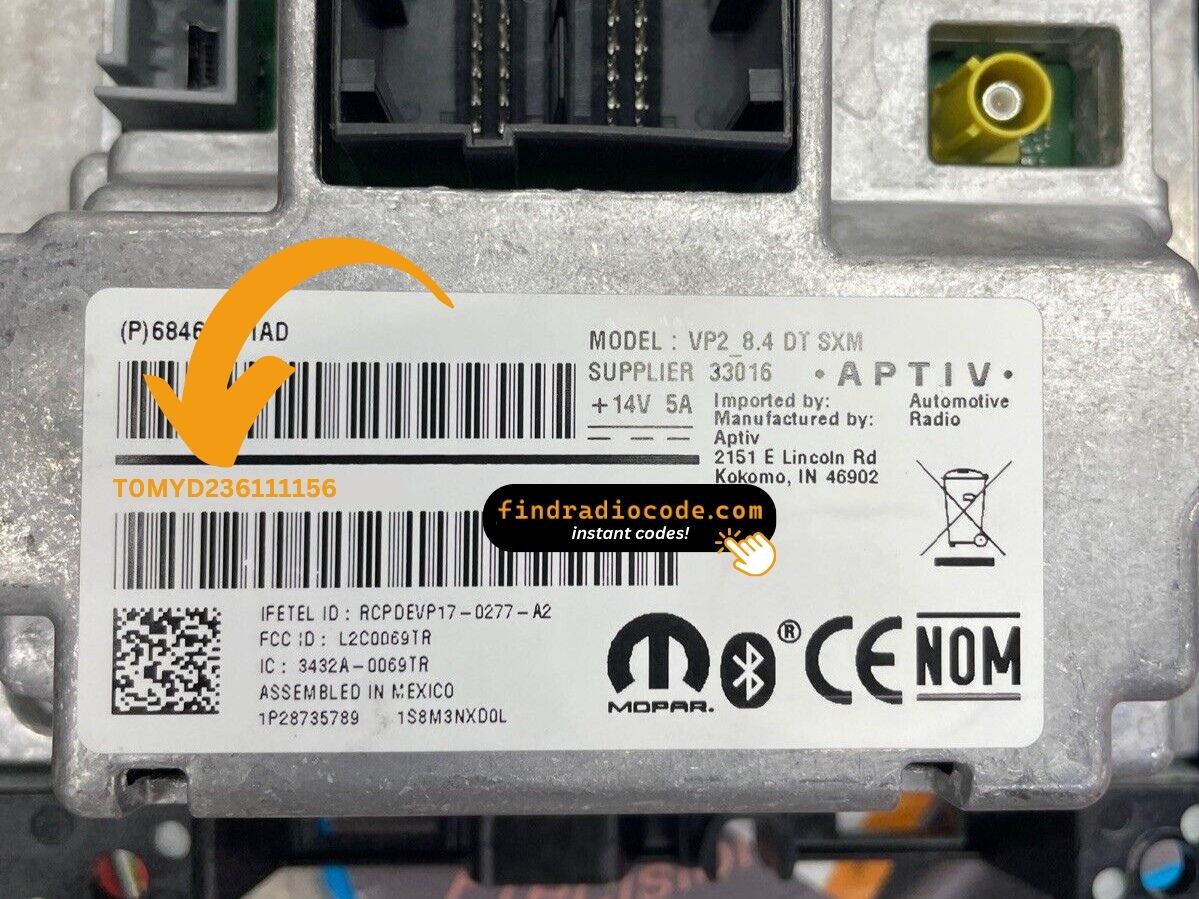
Example: Dodge Durango serial number label location
Common S/N Formats Used on 2016 Durango Units
The 2016 Dodge Durango's Uconnect 8.4" (RA3) is manufactured by Harman or Continental. Common serial prefixes for this SUV:
T00AM– Harman VP2 Uconnect (most common format)T00BE– Continental versionTM9– Older Harman production units
Radio designations on the Durango: RA3 (standard), VP2 (with Harman Kardon audio). Serial: 14 characters.
Important The Durango's radio label also contains a part number (P05064... or 68...). Only the serial number is needed to generate the unlock code.
Typical Serial Number Examples for 2016 Durango
The factory radios fitted to the 2016 Durango use the standard Mopar/Continental head-unit serial style; the prefix depends on which Uconnect tier and which supplier built the unit.
Uconnect 8.4 (RA3) and Uconnect 8.4N (RA4)
The serial is typically a 14-character alphanumeric string printed on the chassis label. It commonly begins with T - frequent prefixes include T00AM, TM9, and TQ1 - or with A2C on Continental-built variants. The serial is usually a continuous run of letters and digits with no dashes or spaces.
Uconnect 5.0 (RA2)
The base Uconnect 5.0 typically carries a Mopar/Harman-style serial on the chassis sticker; the label printed on the unit itself is the authoritative reference. Copy the serial exactly as printed and avoid guessing unclear characters.
Why Is the Radio Asking for a Code?
Owners of this full-size SUV face this primarily because of:
- Towing-related electrical work — Durango owners who add trailer wiring or work on the electrical system for trailer setups trigger the lock.
- Battery replacement — larger SUVs can wear batteries faster, making replacements more frequent, and each one locks the radio.
- Long periods unused — SUVs used seasonally can drain enough to lock the radio.
- Used purchase — second-hand purchase without the original unlock code requires the code immediately.
The unlock code is permanently assigned to the RA3 serial number and never changes.
Durango 2016 Common Radio Problems
A rejected code on the Durango's Uconnect 8.4" almost always means a serial number error. The label shows both the serial (14 chars, starts with T00AM, T00BE, or TM9) and the part number (P... or 68...) — submit only the serial.
Double-check the serial on the Durango's display or the label and contact support for a free re-check if needed.
If the Durango's radio screen doesn't show a code prompt after a battery event:
- Ensure the ignition is fully in ON (not ACC) and give the system a moment to initialize.
- Check the radio fuse in the Durango under the hood or under the dash. A blown fuse prevents any radio power.
- Tapping the display may activate the code prompt on some Durango units.
Should nothing appear, a blown fuse is the most probable cause.
Three wrong code entries on the Durango's Uconnect cause a 60-minute lockout, displaying "WAIT" on screen:
- Leave the ignition ON in the Durango — engine off is fine but ignition must stay in ON.
- Wait for the full 60 minutes.
- Turning the Durango off restarts the lockout.
Once the 60 minutes are up, try again with the verified code.
The RA3 label in the Durango shows multiple identifiers:
- Serial number — 14 alphanumeric characters, prefixed by
T00AM,T00BE, orTM9. Use this. - Part number — begins with
P05064or68. Not needed.
For this SUV, Dealer Mode is the quickest way: System Info → Radio Part Info → Serial Number. No tools required.
In the 2016 Durango, all code entry is via the 8.4" touchscreen — no physical buttons are involved. When the locked screen appears:
- Tap each digit on the touchscreen number pad.
- The radio auto-confirms after the final number — no extra step is needed.
If the Durango's touchscreen is unresponsive, restart the system by turning the ignition off and back on.