
Serial Number Location Guide for Dodge Dart 2013
The first part is to find the radio's serial number.
Based on the head unit type fitted in your 2013 Dart, the S/N can usually be accessed either through the screen menu or by checking the label on the radio itself.
Below are the most common methods to identify your S/N quickly.
Factory Radios on the 2013 Dodge Dart
Identifying which head unit shipped in your 2013 Dart helps you locate the correct serial number and enter the unlock code in the right field sequence. Three factory radios were offered, easily distinguished by screen size and the presence of a NAV button.
- Uconnect 200 (sales code RAE) - Standard on the SE and base SXT trims. Compact head unit with a small monochrome dot-matrix display, AM/FM, single-CD slot, and a row of physical hard buttons (tune knob, presets, MENU). No touchscreen and, on the very basic version, no Bluetooth. This is the most common factory radio in 2013 Darts because it shipped on entry-level cars.
- Uconnect Touch 8.4 (sales code RE2) - Optional on SXT/Rallye and standard on Limited and GT-bound trims. Large 8.4-inch color touchscreen mounted high on the center stack, with no NAV tile on the home screen and no "Garmin" branding at boot. Features CD, USB, SiriusXM, Bluetooth, and voice command, but no built-in navigation.
- Uconnect Touch 8.4N (sales code RB5) - Optional upgrade on higher trims. Visually identical to the RE2 from the outside (same 8.4-inch screen and bezel), but the home screen shows a Nav tile and the system boots with a Garmin splash. Includes everything in RE2 plus integrated GPS navigation and SiriusXM Travel Link.
Quickest visual check: small screen with a CD slot and hard buttons = Uconnect 200; big 8.4-inch glass screen with no Nav icon = RE2; big 8.4-inch screen with a Nav icon = RB5.
Using Hidden Radio Menus to Find the Serial
The method for 2013 Dodge Dart is this:
The 2013 Dodge Dart may have either the Uconnect 5.0" (standard trim) or Uconnect 8.4" (higher trims). If equipped with the 8.4" screen, you can access Dealer Mode:
- Turn ignition to ACC or ON.
- Press and hold Climate Up + Climate Down + Front Defrost for 5 seconds.
- Go to: System Info → Radio Part Info → Serial Number.
On lower trims, Dealer Mode is not supported. The radio must be pulled out to read the serial label.
Accessing the Serial Number Through the Radio Menu
The 2013 Dodge Dart's 8.4-inch Uconnect units expose a built-in dealer/diagnostic menu that displays the radio's serial number on screen, so the unit does not have to come out of the dash to read it. The base Uconnect 200 head unit does not offer a documented on-screen serial routine.
Uconnect 8.4 (RE2) and Uconnect 8.4N (RB5)
- Turn the ignition to RUN/ACC and let the touchscreen finish booting.
- Press and hold the driver-side temperature UP, driver-side temperature DOWN, and front DEFROST buttons together.
- Keep the three buttons pressed for roughly 7-10 seconds until the dealer/diagnostic screen opens.
- Open the radio or system information section to view the serial number printed on screen.
- Photograph the screen so the digits can be transcribed without typos.
Check it by Pulling Out the Unit
If the serial does not appear on display, the next step is checking the radio itself.
Many Dodge radios require physical access to the serial tag attached to the unit.
Typical approach:
- Start by completely turning off the engine - pull the key out.
- Then remove the trim panel.
- Next, loosen the mounting points and pull the radio forward.
- Look for a printed tag showing the serial number.
To remove the radio from the 2013 Dodge Dart:
- Turn off the vehicle.
- Gently remove the trim panel around the radio. The Dart uses snap-fit clips.
- Unscrew the four mounting screws (Phillips).
- Ease the radio forward to access the serial label.
The Dart's center stack is easy to work on. The bezel clips usually pop off without much force with a plastic pry tool.
View the S/N by Pulling Out the Radio Unit
If the on-screen menu is unavailable or the radio is the base Uconnect 200, the serial label on the chassis can still be reached by carefully removing the head unit from the centre stack of the 2013 Dart.
- Safety first: switch the ignition off, take out the key, disconnect the negative battery terminal, and wait several minutes before touching wiring; avoid the yellow airbag/SRS connectors entirely and use plastic trim tools to prevent shorts and dash damage.
- Tools you will need: a plastic trim removal kit, a Phillips screwdriver, a small Torx bit set, and a flashlight.
- Removal overview: on the 2013 Dart the centre dash bezel is one piece; pop it free with a plastic pry tool starting at the bottom edge, work up the sides, then unclip and disconnect the hazard/HVAC harnesses if needed.
- Releasing the radio: once the bezel is out, remove the four Phillips screws (two top, two bottom) holding the radio cage to the support bracket and pull the unit straight back.
- Disconnect carefully: release the antenna lead and the multi-pin connectors on the rear of the radio before fully extracting it.
- Find the label: the serial number sits on a printed barcode/sticker on the top or side of the radio housing along with the part number.
- Tips: photograph the label up close, and double-check easily confused characters such as 0/O and 1/I before submitting the serial.
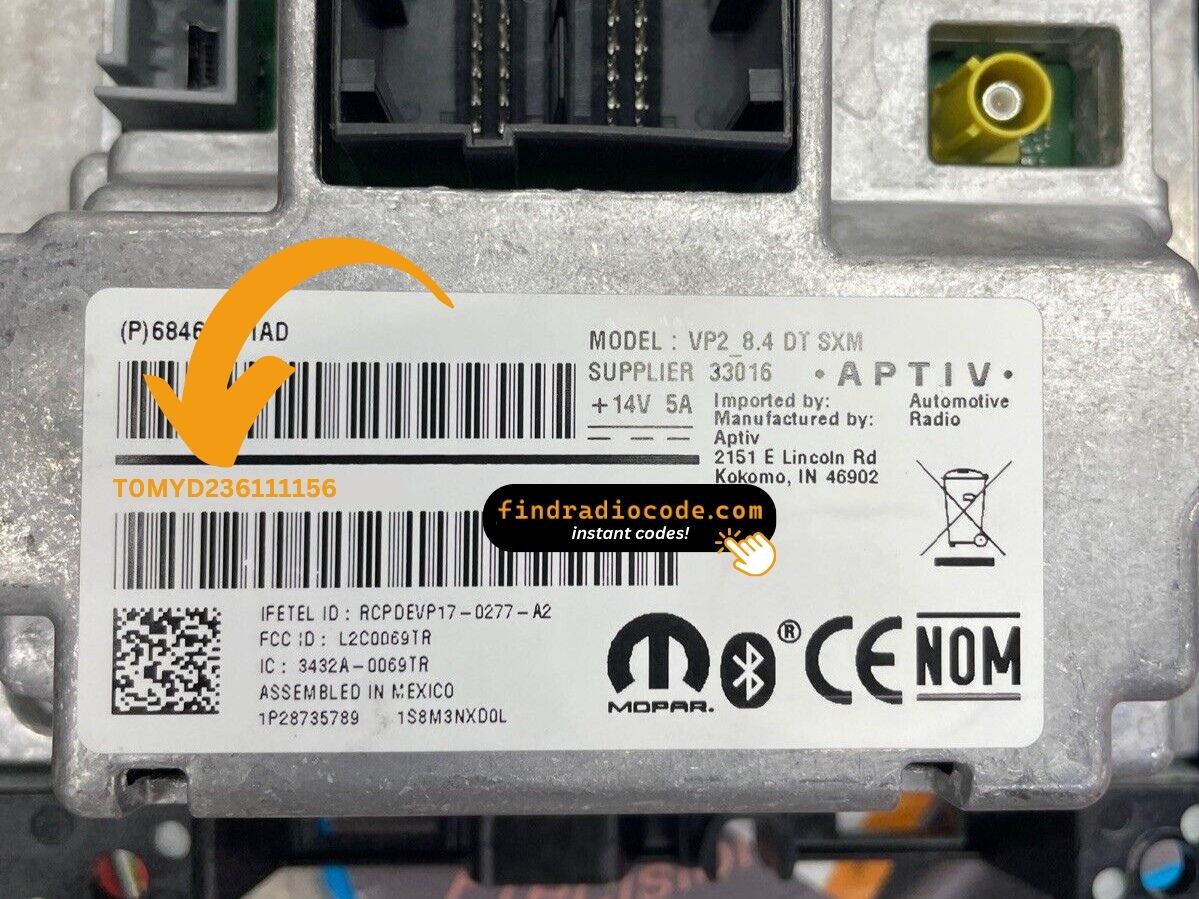
Example: Dodge Dart serial number label location
These are the Common Serial Formats
The 2013 Dodge Dart uses Uconnect radios with these common serial formats:
T00AM– Harman Uconnect (8.4") unitsT00BE– Continental versionsTM9– Earlier production units
Radio models: RA1 (5.0" base), RA3 (8.4" with nav option). The Dart was built from 2013-2016 exclusively and used the Fiat-derived platform, but the Uconnect system is the identical as other Dodge vehicles.
Typical Serial Number Formats for 2013 Dart Radios
The 2013 Dart's factory units carry the standard Mopar/Continental head-unit serial style. The exact prefix depends on which Uconnect tier was fitted to the car.
Uconnect 8.4 (RE2) and Uconnect 8.4N (RB5)
- Typically a 14-character alphanumeric string printed on the chassis label.
- Commonly begins with
T(for exampleT00AM,TM9,TQ1) or withA2Con Continental-built variants. - Often consists of letters followed by digits, with no spaces or dashes on the printed sticker.
Uconnect 200 (Base CD)
- Usually carries a Mopar/Harman-style serial on a chassis label; treat the printed sticker on the unit as the authoritative reference.
- Always copy the serial exactly as printed and avoid guessing missing characters.
Steps to Unlock Your 2013 Dodge Dart Radio
Vehicle radios use anti-theft codes dependent on the radio unit itself rather than the model or production year.
- Our lookup service works by matching your Dodge Dart radio's serial number.
- After entering the serial into the form above, the system identifies the radio unit and retrieves the corresponding code.
- Simply input the digits into the Dart stereo.
- The online process is quicker and more accessible than visiting the Dodge dealer.
Radio Code Input Guide
Now that you've found the radio serial and received the unlock code, the last part is entering it into your radio.
Dodge factory radios display a ENTER CODE message when ready for input.
The process is quick, but button layouts and confirmation methods may differ slightly depending on the radio version installed in your Dart.
Step-by-Step Code Input Guide
To enter the code on the 2013 Dodge Dart's Uconnect:
- Ignition ON. Screen displays "ENTER CODE".
- Use the touchscreen keypad to enter each digit of the 4-digit code.
- Radio unlocks automatically after the 4th digit.
Lockout: 3 wrong attempts = 60-minute lockout. Keep ignition ON during the full wait period.
The Correct Way to Enter It
Once the unlock code has been retrieved, the 2013 Dart radio is unlocked directly from the head unit - no scan tool or dealer visit is needed.
- Limited attempts: Mopar/Uconnect units only accept a small number of incorrect tries (commonly three) before going into a WAIT/LOCK state, so confirm every digit before entering anything.
- Place the ignition in RUN/ACC so the radio powers up but the engine stays off.
- Wait for the display to show
CODE,Enter Anti-Theft Code, or a similar prompt. - On 8.4 Uconnect units, tap the on-screen number pad to enter each digit; on the base Uconnect 200, use the numbered preset buttons to key in the code in sequence.
- Confirm the entry with the on-screen OK/Enter button or the tune/menu knob, depending on the radio variant.
- If
WAITappears after wrong attempts, leave the radio powered with the ignition in RUN for the documented cool-down period (usually around 30 minutes) before trying the correct code again.
What Caused the Radio to Lock?
This vehicle sees radio lockouts primarily because of:
- Battery disconnect or replacement — the primary trigger on all Uconnect-equipped vehicles including the Dart.
- Young used-car buyers — first-time buyers frequently purchased Darts, meaning many change hands without the code.
- Dead battery — compact cars like the Dart with aging batteries can drain enough to lock the radio.
- Blown fuse — a fuse failure also triggers the lock.
Regardless of the trigger, the unlock code is permanently tied to the radio serial and never changes.
Dart 2013 Common Radio Problems
Both Uconnect trims in the Dart use the touchscreen exclusively for code entry. The 5.0" base and the 8.4" both use digital number pads — no hardware buttons are used during code entry.
- Touch each digit on the on-screen pad.
- The radio unlocks automatically after all four digits are entered.
Should taps not register, restart by turning the ignition off and back on for the system to reload.
The Dart was a popular first car, meaning many owners acquired theirs used and may have submitted incorrect information. If the code is rejected, the standard cause is a serial number mismatch. The Dart's Uconnect serial is 14 characters, prefixed by T00AM, T00BE, or TM9. The part number (P... or 68...) sits nearby and should not be submitted.
Should the code fail, re-verify the serial and contact support for a complimentary re-check.
If your Dart has the larger screen, Dealer Mode is available to retrieve the serial: press and hold Climate Up + Climate Down + Front Defrost for 5 seconds, then go to System Info → Serial Number. For 5.0" base models, physical removal is required to see the label.
- Serial number — 14 characters, starting with
T00AM,TM9, orT00BE. - Part number — begins with
Por68. Do not use this.
Despite being Fiat-platform-based, the Uconnect serial format is standard as all other Dodge vehicles.
When no code prompt appears after a battery disconnect:
- Confirm the ignition is in the ON position — not just ACC.
- Check the radio fuse — fuse failure prevents the display from activating.
- Allow the system 10–20 seconds to start before expecting the "ENTER CODE" screen.
On the 5.0" base Uconnect, the display is smaller but the screen behavior is the same.
After 3 failed code attempts on the Dart's Uconnect causes a 60-minute lockout. The display shows "WAIT". To resolve it:
- Keep the ignition ON for the full 60 minutes — do not turn the car off.
- Switching off the key extends the wait.
Dart note: Young drivers who are unfamiliar with the lockout rule accidentally restart the timer. Don't do this — just be patient.