Understanding the 2024 Dodge Charger Radio Code Retrieval Process
To get the code, you'll take only 4 simple steps.
- Find the radio's serial - this is the only info required by our side.
Unlike dealership lookup, no VIN or paperwork is needed. - Enter the serial number into our generator above.
Our system checks it against a database of supported factory radios and automatically catches the matching radio code. - In most cases, the code will appear instantly on the screen after you pay and is also sent to your email , just in case.
If we need to check it manually, you'll be informed before checkout. - When you get it, simply enter it into the radio to restore full functionality.
Entering the Radio Security Code
Now that you've generated 2024 Dodge Charger unlock code from the serial number, you're ready to reactivate the radio.
Some drivers hesitate at this stage because input methods can look different across radio versions, but it's usually simple.
When the radio shows CODE, it means the unit is waiting for the correct numbers.
Correct Entering Process
Code entry on the 2024 Charger's Uconnect 4C:
- With ignition ON, the screen displays "ENTER CODE" with an on-screen keypad.
- Tap each digit of your 4-digit code on the Charger's 8.4" touchscreen.
- The radio confirms automatically after the 4th digit — no separate confirm.
Lockout Warning: 3 wrong attempts = 60-minute lockout. Leave the Charger's ignition ON. Turning it off restarts the countdown.
Can't Locate Your Unit's Serial Number? Follow These Steps for Dodge Charger 2024
The starting step is locating the radio S/N.
Many drivers assume the code depends on the Dodge model or year, but in reality, the unlock process relies on the unique radio unit's serial number.
This number identifies the exact head unit installed in your Dodge Charger.
This is actually better, because if you have bought a used radio, the VIN or other vehicle-specific data wouldn't help.
Depending on the radio used, you may be able to retrieve the serial directly from the screen or by looking at the label on the radio chassis.
Factory Radios on the 2024 Dodge Charger
The 2024 Charger is an all-new car: the LD-platform V8 Charger ended in December 2023, and the 2024 model is the eighth-generation Charger Daytona, an all-electric coupe. As a result the radio line-up is completely different from 2019-2023 - one head unit only, on a brand-new Uconnect 5 platform.
- Uconnect 5 (12.3-inch floating touchscreen) - standard on both 2024 Charger Daytona R/T and Daytona Scat Pack. Visual ID: very large 12.3-inch landscape touchscreen mounted as a "floating" tablet-style screen on top of the centre dash, paired with a 12.3-inch digital instrument cluster ahead of the driver. Wireless Apple CarPlay and wireless Android Auto, built-in GPS navigation, Amazon Alexa, four USB-C ports, voice recognition and Uconnect 5 connected services are all standard. SRT/Performance Pages and EV-specific energy/range pages are accessible from the home screen.
- Audio system - a 9-speaker Alpine system is standard; an 18-speaker Alpine premium system is optional on Scat Pack.
Because every 2024 Charger Daytona ships with the same Uconnect 5 12.3-inch unit, identification is straightforward: if you see the large 12.3-inch landscape touchscreen with the matching 12.3-inch digital cluster, you have the factory Uconnect 5 head unit. There is no smaller 7-inch alternative on the 2024 Charger - the older UAG/UAS/UAQ Uconnect 4 codes do not apply to this generation.
Access Your S/N via the Radio Screen
The method for 2024 Dodge Charger is this:
The 2024 Dodge Charger's last-run Uconnect 4C (RA4) 8.4" touchscreen is mounted in the performance sedan's center stack. The serial number is accessible directly on screen via Dealer Mode:
- Turn ignition to ACC or ON.
- Press the bottom-left and bottom-right corners of the physical screen bezel (the plastic frame, not the glass) at the same time for 5 seconds.
- Dealer Mode opens on the display.
- Select: System Info → Radio Part Info → Serial Number.
Note Some 2024 Charger units may have Dealer Mode restricted after a software update. If the bezel press fails, physical radio removal is required.
Serial Number on the Unit
If the serial number cannot be accessed on-screen, use the hardware method.
Most Dodge Charger original radios include a sticker with the serial number printed on the casing.
Step-by-Step Approach:
- Power down the vehicle.
- Lift the trim surrounding the radio.
- Unscrew the fasteners.
- Move the unit slightly out to access the label.
The serial number is usually located near the barcode.
If Dealer Mode is blocked on your 2024 Charger, the RA4 radio must be removed to read the serial label. The Charger's cockpit-style center stack makes the procedure manageable:
- Remove the center stack bezel – The Charger's trim surround covers the 8.4" display. Work a plastic trim tool at the lower edge to pop off the friction-clipped panel.
- Remove the 4 Torx T20 screws – Holding the radio frame to the dash structure.
- Pull the unit forward – Slide the radio out enough to see the serial label on the top or side.
The 14-character serial is on a barcode sticker. Wiring can remain connected.
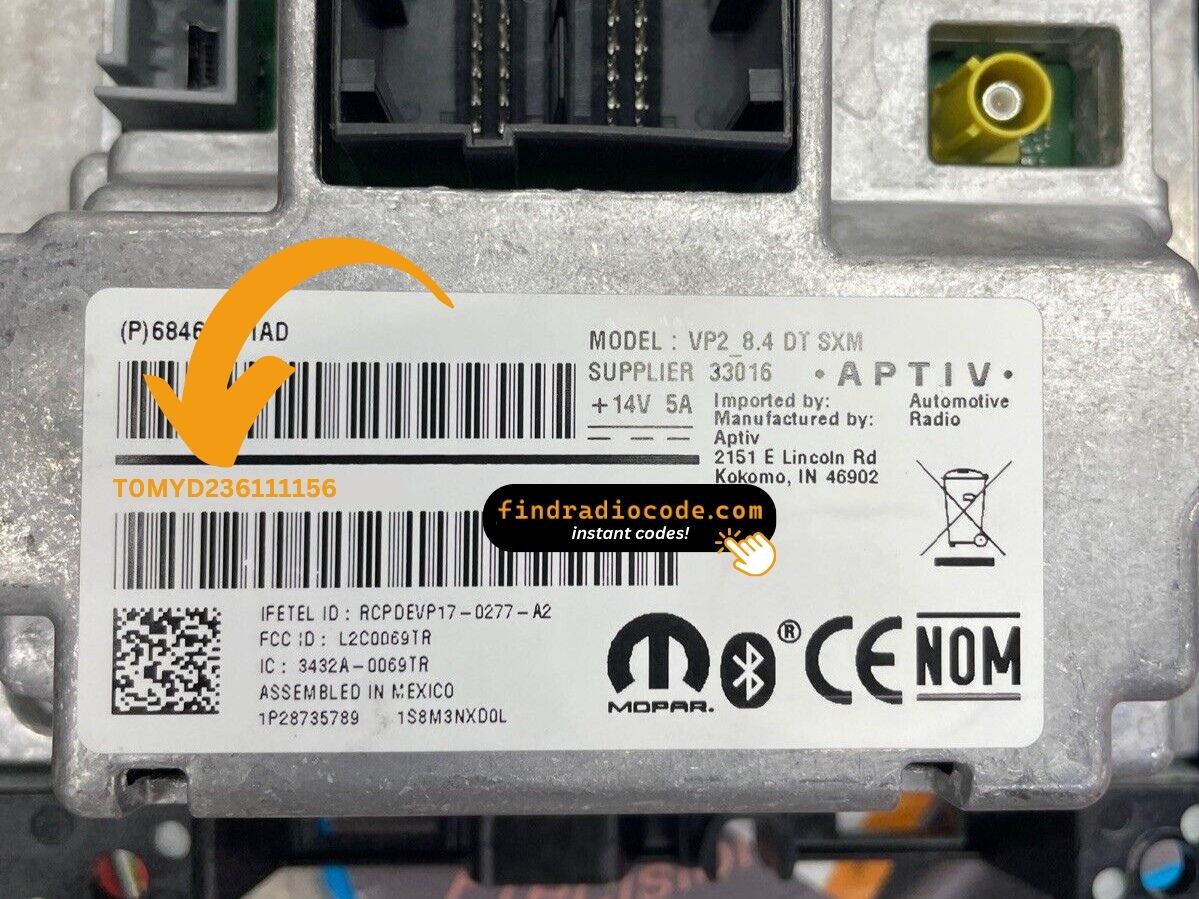
Example: Dodge Charger serial number label location
Typical Radio Serial Prefixes and Formats
Year Dodge Charger Uconnect 4C (RA4) serial number formats:
T00AM– Standard Harman prefix for Uconnect 4C unitsT00BE– Continental-sourced variant
Radio designation: RA4 (Uconnect 4C, 8.4"). Serial: 14 characters (e.g., T00AM5028A1842). The final-generation Charger ran this platform through its last model year in 2024.
Important: The serial number is not the same as the part number (begins with P or 68). The serial alone generates the unlock code.
Charger 2024 Common Radio Problems
Three wrong entries on the Charger's Uconnect 4C trigger a 60-minute lockout, displaying "WAIT":
- Leave the ignition in the ON position — doesn't need to run but key cannot be cycled.
- Wait the full 60 minutes.
- Cycling the ignition resets the timer.
Once clear, try the verified code again.
A rejected code on the Charger's RA4 typically points to the serial was misread. The label shows both the serial (14-char code beginning with T00AM or T00BE) and the part number (P... or 68...) — the serial alone generates a code.
Re-verify via Dealer Mode and reach out for a free re-check if needed.
The Charger's Uconnect 4C uses touchscreen-only input for code entry — no hardware keys are involved. When the locked screen appears:
- Tap each digit on the virtual keypad.
- The Charger's Uconnect unlocks after the 4th digit — no confirm button needed.
Should the screen not respond, turn the ignition off and on, then allow the system to restart.
When no code prompt appears after a battery event:
- Ensure the ignition is fully ON (not ACC) and allow 15–20 seconds to boot.
- Check the radio fuse — fuse failure prevents the display from powering.
- On some 2024 Charger units, a OTA update may suppress the code prompt — tap the screen once to trigger it.
Should nothing appear, a blown fuse is the most likely cause.
The RA4 label in the 2024 Charger shows two distinct identifiers:
- Serial number — 14 characters, starting with
T00AMorT00BE. Submit this. - Part number — begins with
P05or68. Not the serial.
Dealer Mode via bezel corner press is most reliable way: System Info → Radio Part Info → Serial Number. No tools required.
Why Did the Radio Lock and Ask for a Code?
Charger owners face this primarily due to:
- Battery replacement — routine battery service causes the code prompt on any Uconnect-equipped vehicle including the Charger.
- Seasonal storage and battery drain — Chargers used as weekend or summer cars deplete the charge and lock the radio.
- Performance electrical work — Charger enthusiasts who disconnect the battery for mods will trigger the lock.
- Used purchase — second-hand purchase without the prior code means the radio is locked on arrival.
The unlock code is tied to the serial number and remains valid indefinitely.