
Can't Locate Your Unit's S/N? Follow The Steps Below for Dodge Caravan 2012
The first step is writing down the radio S/N.
Many people assume the code depends on the Dodge model or year, but actually, the whole process depends on the unique radio unit's serial number.
This number identifies the exact head unit installed in your Dodge Caravan.
This is actually better, because if you have bought an aftermarket radio, the VIN or other vehicle-specific data wouldn't be of much use.
Depending on the radio version used, you may be able to retrieve the serial directly from the screen or by checking the label on the radio chassis.
2012 Grand Caravan - Which Radio Did You Get?
The 2012 Grand Caravan carried over the same three-tier MyGIG/RES factory radio lineup from 2011 with no significant hardware changes. Look at the lower right corner of the faceplate, near the AUX jack - the three-letter sales code (RES, RBZ or RHB) is printed there.
- RES - Media Center 130 (CD/MP3): Standard on AVP/SE trims. Single-DIN non-touchscreen unit with twin rotary knobs, monochrome segment display, CD slot, front
AUXinput and SiriusXM-ready tuner. No screen, no Bluetooth from the factory. The most common 2012 Caravan radio. - RBZ - Media Center 430 (MyGIG, non-nav): Optional on SXT, standard on Crew. 6.5" color resistive touchscreen, CD/DVD slot, 30 GB internal hard drive with ~6,700 song capacity, integrated Bluetooth and SiriusXM. No NAV button on the bezel. Mitsubishi-built head unit on the low-speed CAN bus. Dominant premium non-nav option.
- RHB - Media Center 430N (MyGIG with Garmin Navigation): Optional on Crew, standard on R/T. Identical 6.5" touchscreen layout to the RBZ but with a dedicated NAV hard key on the bezel and a GPS antenna lead on the back. Mapping powered by Garmin (USA, Canada, Puerto Rico, US Virgin Islands). Nav-equipped vans only.
From the 2012 model year onward, MyGIG units (RBZ/RHB) require a security/anti-theft code to operate when moved into a donor vehicle - the prompt screen also displays the radio serial number used to retrieve that code.
View Your S/N via the Radio Display
These are the steps you should follow for 2012 Dodge Caravan:
The 2012 Dodge Caravan family minivan from this era comes with the Uconnect 4.3" or 5.0" touchscreen (base infotainment). These compact Uconnect systems do not support the Dealer Mode diagnostic menu available on the larger 8.4" units.
As a result you will need to pull out the radio to read the serial number from the manufacturer label on the radio chassis. On the Caravan, the radio is accessible from the driver's seat once the center stack bezel is removed.
Serial Number on the Unit
If the serial number cannot be accessed on-screen, use the pull-out method.
Most Dodge Caravan factory radios include a tag with the serial number printed on the chassis.
Process details:
- Remove key from ignition.
- Gently detach surrounding dashboard trim.
- Remove fasteners holding the radio.
- Pull forward to inspect the label.
To remove the base Uconnect radio from the 2012 Dodge Caravan:
- Power off the vehicle.
- Pry off the dashboard bezel using a plastic trim tool. The Caravan's minivan console bezel is held by friction clips – work from the lower edge.
- Unscrew the 4 Torx T20 mounting screws.
- Pull the radio out to access the serial number label on the side of the unit.
The serial is on a label near the barcode. Wiring can stay plugged in while you note it.
Find the S/N by Pulling Out the 2012 Grand Caravan Radio
The 2012 Grand Caravan continues with the simplified one-piece dash introduced in 2011, so the radio comes out cleanly with a bezel pry and four Phillips screws. The factory head units for this year are the RES base single-disc CD radio and the RBZ 430 MyGIG 6.5-inch touchscreen, both Mopar/Harman-supplied. The serial number lives on a white printed label on the radio chassis - removing the unit is the dependable way to read it.
Safety Notice
- Turn the ignition fully off, pull out the key, and let the vehicle sit for a moment so accessory circuits power down.
- Disconnect the negative battery terminal and wait at least a couple of minutes before touching anything in the dash - this lets the SRS capacitors discharge.
- Avoid all yellow-jacketed wiring and yellow connectors; those carry airbag circuits and must not be probed or pulled.
- Use plastic trim tools instead of metal blades against the bezel so you do not gouge the soft-touch dash.
Tools Required
- A #2 Phillips screwdriver for the four radio mounting screws.
- A plastic dash trim removal tool or wide nylon pry wedge for the centre bezel clips.
- A small flat-blade trim tool as a backup for stubborn clips.
- A soft cloth to protect the centre console while you work.
Removal Sequence
- Starting at one of the upper corners of the radio bezel, push the trim tool behind the panel and gently work it outwards to release the spring clips.
- Walk the tool around the perimeter so the bezel pops free a section at a time, then tilt it forward and unplug any switch harness on its back.
- Set the bezel face-down on the cloth and locate the four Phillips screws around the radio face that hold the chassis to the dash cage.
- Loosen and remove all four screws, then pull the radio outwards a few inches.
- Disconnect the antenna lead and the rectangular multi-pin harnesses at the rear, and lift the unit clear of the dash.
Reading the Label
- Inspect the top, side, and rear of the chassis until you find a white printed sticker bearing a barcode.
- The serial number sits next to or directly below the barcode and is the longer alphanumeric string - not the part number.
- The Mopar part number on the same label will start with
P(typicallyP05091on RES,P0506xon RBZ) - that is not what you want. - Photograph the label so you have a permanent reference, then proceed with code retrieval.
Reassembly Tips
- Reconnect each plug fully and route the wiring so nothing is pinched against the dash cage.
- Slide the radio back into the cage, start all four Phillips screws by hand, and tighten them snug but not over-torqued.
- Reseat the bezel until every clip clicks home, reconnect the battery, and cycle the ignition - on 2012 units the CODE prompt should appear immediately because anti-theft is active by default.
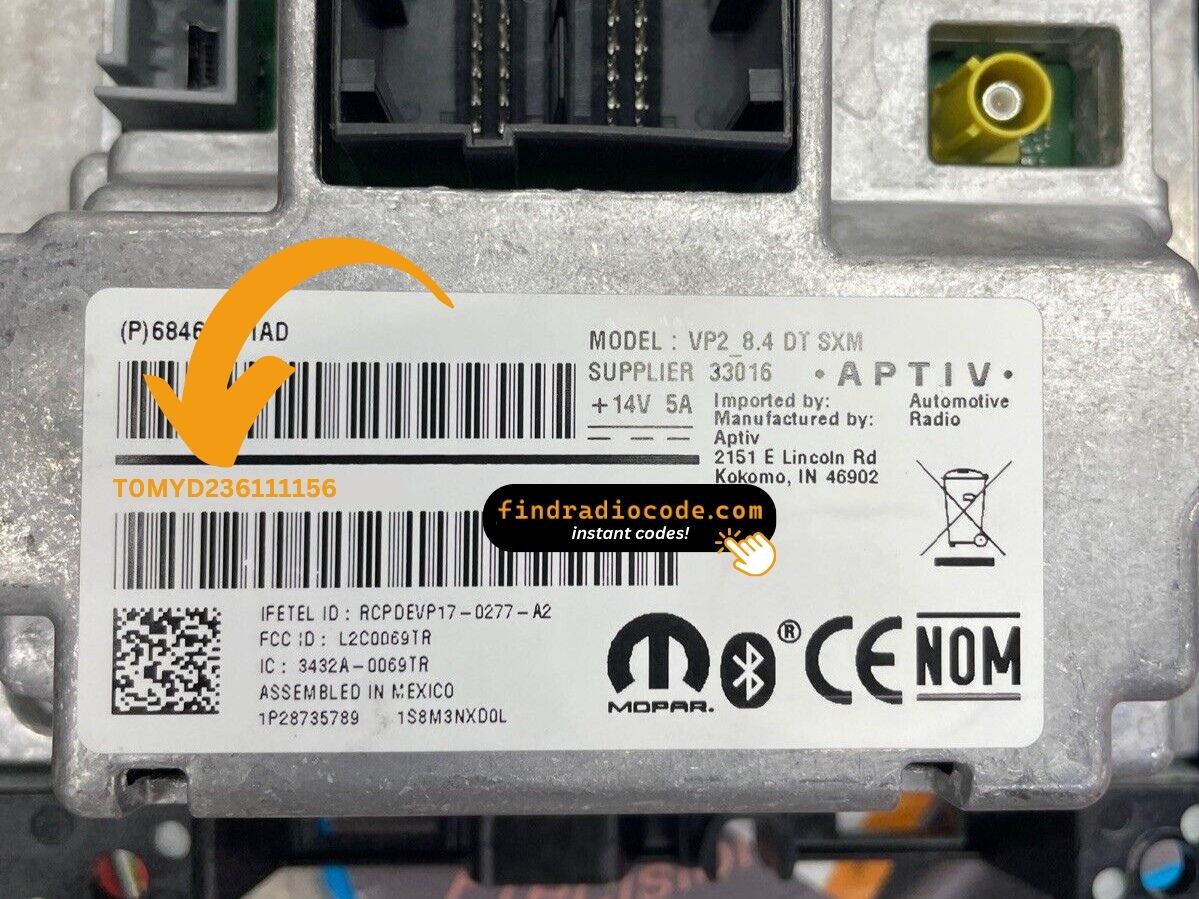
Example: Dodge Caravan serial number label location
Typical Serial Number Examples for 2012 Caravan
The 2012 Dodge Caravan base Uconnect commonly features:
T00AMprefix – Standard Harman formatTM9prefix – Used by older production unitsT00BEprefix – Continental-manufactured versions
Radio designations: RA2 (4.3"), RA1/VP1 (5.0"). Serial numbers are 14 characters, alphanumeric. The Caravan received the 8.4" Uconnect for the 2013 model year.
Common S/N Formats Used on 2012 Caravan Units
The 2012 Grand Caravan uses the same Mopar/Harman radio family as 2011, so the serial number conventions are essentially identical. Serials are alphanumeric, normally start with the letter T, and run roughly 12 to 14 characters long on the chassis label.
RBZ 430 MyGIG (Touchscreen)
- Most RBZ 430 serials begin with prefixes such as
T00AMorT00BE. - The remainder of the string is typically a mix of digits and letters, e.g. something resembling
T00AM1114T0023orT00AM2232T0229. - The Mopar part number printed beside the serial commonly starts with
P0506for these touchscreen units.
RES Single-Disc CD Radio
- RES serials likewise tend to start with
Tand follow a similar character mix on the white chassis label. - The accompanying Mopar part number on RES units in the 2012 Grand Caravan is typically in the
P05091xxxAxfamily. - Treat any string clearly separated from the part number, near or below the barcode, as the serial.
Reading the Label Correctly
- Anything that begins with
Pis a part number and is not the serial. - Anything that starts with
Tis typically the serial - copy every character exactly as printed. - Watch the digit
0versus the letterO, and capture every leading zero - a single wrong character produces a wrong unlock code.
Steps to Unlock Your 2012 Dodge Caravan Radio
To get the code, you'll take only a few simple steps.
- Locate the radio's serial - this is the only info required to generate the correct unlock code.
Unlike when contacting the dealer, no VIN or paperwork is needed. - Enter the serial number into our generator above.
Our system checks it against a database of supported radios and automatically retrieves the matching security code. - In most cases, the code appears instantly on the screen after you pay and is also sent to your email for backup.
If manual verification is required (rare situations), you'll be notified before checkout. - When you receive it, just enter it into the radio to restore full functionality.
Entering the Radio Security Code
After locating the S/N and generated the unlock code, the next step is entering it into your radio.
Dodge original head units display a locked screen when ready for input.
The process is straightforward, but button layouts and confirmation methods may vary depending on the radio version installed in your Caravan.
Correct Entering Process
To input the code on the 2012 Caravan's base Uconnect radio:
- Turn ignition ON. Screen shows "ENTER CODE" or "----".
- Tap the touchscreen keypad to enter each digit of your 4-digit code on the Caravan's 5.0" screen.
- The radio auto-confirms after the 4th digit — no confirm needed.
Lockout: 3 wrong attempts = 60-minute lockout. Keep ignition ON during the wait. Turning it off restarts the countdown.
Step-by-Step Correct Entering Process
From the 2012 model year onward, Mopar factory radios on the Grand Caravan ship with the anti-theft feature active out of the gate, so any battery disconnect or radio swap will trigger the CODE prompt on the next power-up. Type the code carefully - attempts are limited.
Limited Attempt Warning
- The radio allows roughly three consecutive wrong attempts before it enters a timed
WAITstate. - To clear the wait, the radio must remain powered with the ignition in the RUN position for approximately 30 minutes; do not pull the key or disconnect the battery during this window.
- Verify each digit on the screen against your written code before submitting; do not guess any digit.
Code Entry Steps
- Turn the ignition to the ACC or RUN position so the radio powers on and shows the
CODEprompt. - Press preset button 1 the required number of times to set the first digit of the five-digit code.
- Use preset button 2 for the second digit, button 3 for the third, button 4 for the fourth, and button 5 for the fifth.
- Confirm the displayed digits match your code exactly.
- Press and hold the OK/ENTER control - or the rightmost on-screen preset on RBZ touchscreen variants - for two to five seconds to validate.
If the Code Is Rejected
- Wait for any countdown shown on the screen to fully clear before retrying.
- Re-check each digit on your code sheet against the chassis-label serial, then re-enter exactly as written.
- If the radio remains locked after the cool-down, stop and contact the code provider rather than attempting more guesses.
Fixing Common Code Entry Problems for 2012 Caravan
The Caravan's base Uconnect (4.3" or 5.0") uses only the touchscreen for code entry — no physical preset buttons are used. When the code screen appears:
- Touch each number on the touchscreen keypad.
- The radio confirms automatically after the 4th digit.
If the touchscreen is sluggish, turn the ignition off and on and wait before retrying.
Three wrong entries on the Caravan's base Uconnect trigger a 60-minute lockout. The screen may display "WAIT":
- Leave the key in the ON position for the entire 60 minutes.
- Cycling the ignition resets the timer.
After 60 minutes, the "ENTER CODE" prompt returns. Try again carefully.
If the code entry screen doesn't appear on the Caravan after a battery event:
- Verify the ignition is fully in the ON position — not ACC.
- Inspect the radio fuse — fuse failure stops any display.
- Wait 15–20 seconds for the system to start before looking for the code prompt.
If the screen stays blank, power issue is the primary thing to check.
A code rejection on the Caravan's base Uconnect (RA1/RA2) typically indicates a serial number error. The label shows the serial number (T00AM, T00BE, or TM9 prefix, 14 characters) and the part number (P... or 68...) — only the serial is used.
Re-read the serial from the label and contact support for a free re-check if needed.
Locating the serial number on the Caravan's base Uconnect is done by pulling the unit since the RA1/RA2 units do not support Dealer Mode. On the label:
- Serial number — 14 alphanumeric characters, starting with
T00AM,T00BE, orTM9. Use this. - Part number — begins with
P05or68. Ignore this.
Carefully transcribe all 14 characters — digits like 0/O or 1/I can cause a wrong code.
What Caused the Radio to Lock?
Caravan owners from this era encounter radio lockouts most often because of:
- Heavy family use battery wear — Caravans with heavy accessory loads drain batteries faster, making replacements more frequent, and each one locks the radio.
- Battery disconnect or replacement — the primary cause on these older base-trim minivans.
- Blown fuse — fuse failure interrupts power.
- Used purchase — Caravans are popular used family purchases, so many buyers find the radio locked on purchase.
The code is linked to the serial number and never changes.