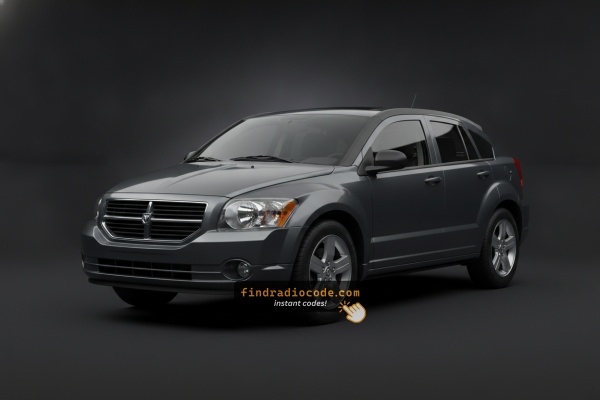
What Caused the Radio to Lock?
The Caliber is among the Dodge models where the anti-theft trigger is especially common. Reasons include:
- Battery failure or disconnect — Older Calibers frequently need battery replacements, and every disconnect triggers the radio lock.
- Dead battery from sitting — Calibers left parked for weeks often lose enough charge to trigger the anti-theft.
- Blown fuse — fuse replacement also triggers the lock.
- Used purchase — Calibers are popular used buys, so many owners encounter the lock immediately.
Regardless of why it locked, the unlock code is permanently tied to the serial number and is always recoverable.
How Our Radio Code Generator Works for 2012 Dodge Caliber
- Rather than relying on Dodge dealership lookup or online threads you can retrieve the code online with the radio serial number.
- Identify your radio's serial. It is always present on the unit itself, and sometimes you can see it on the Caliber's radio screen.
- Enter it into the form above, and the system will calculate the correct 2012 Caliber unlock code.
- After getting it, type it in using Caliber's radio controls to release the blockade fully.
- The entire process takes only a few minutes and requires zero paperwork and no dealer visit.
How to Find the Serial Number on Your 2012 Dodge Caliber Radio?
The starting step is writing down the radio serial.
Many drivers assume the code depends on the Dodge model or year, but actually, the whole process depends on the unique radio's serial number.
The serial is the key used to calculate the correct unlock code.
This is even better, because if you have a used radio, the VIN or other vehicle-specific data wouldn't help.
Depending on the radio used, you may be able to see the serial directly from the display or by looking at the label on the radio chassis.
Factory Radios on the 2012 Dodge Caliber
The final-year Caliber kept the same two-radio menu it had in 2011. Trim names changed to SE, SXT and SXT Plus, but the underlying head units carried over. As always, the sales code is printed on the lower right of the radio face.
- RES - Media Center 130 (AM/FM/CD/MP3 with Aux). Standard radio on SE and most SXT cars and the most common unit on 2012 Calibers. Single-DIN deck with monochrome two-line display, ON/VOLUME knob on the left, TUNE/SCROLL knob on the right, six numbered presets, and dedicated
SEEKandAUXhard buttons. Voice command and Uconnect Bluetooth available with the factory UConnect module. - RBZ - MyGIG Media Center 430 (CD/DVD/HDD touchscreen, no nav). Step-up option, typically bundled on SXT Plus. Recognizable by its 6.5-inch color touchscreen, the cluster of hard buttons (BROWSE, RADIO, MEDIA, MENU) around the screen, integrated 30 GB hard drive, Sirius satellite tuner and voice command. The dash bezel for an RBZ car is taller and more squared off than the small-display RES bezel. No on-screen navigation menu.
Note: The Caliber was not commonly ordered with factory MyGIG navigation (RHB) - if the screen shows a navigation menu it was added aftermarket.
Find the S/N on the Radio Display
Try the following for your 2012 Dodge Caliber:
The 2012 Dodge Caliber may be equipped with the REF (AM/FM CD player), RES 130 (Media Center), or RAQ (base 6-disc CD) radio. These older systems have on-screen serial number display.
The serial number is accessed by pulling the unit out and checking the label on the housing. Check for a white label on the back or side of the radio unit.
Locate Serial on Caliber's Radio Chassis
If the serial number cannot be accessed through menu, use the pull-out method.
Most Dodge Caliber factory radios include a sticker with the serial number printed on the chassis.
Steps:
- Turn off the vehicle.
- Detach the dashboard frame surrounding the radio.
- Release the clips.
- Pull the unit slightly out to access the label.
The serial number is usually located near the manufacturer sticker.
The 2012 Caliber's radio is located in the center of the center stack. To extract it:
- Turn off the vehicle.
- Remove the trim panel surrounding the head unit. The Caliber uses snap-fit clips – start from the top and pry along the edges with a trim tool.
- Unscrew the four Phillips screws holding the radio.
- Slide the radio out and read the serial number on the side or rear label.
Note: The Caliber's center trim also covers the climate controls. Take care to avoid breaking the plastic clips.
Pulling Out the Radio Unit to See the S/N on the Tag
2012 was the final model year of the Dodge Caliber, and its factory radios continued the late-PM mix - typically the RES Media Center 130 deck or the MyGIG RBZ touchscreen. On both, the serial number is printed on a chassis label rather than shown on a screen, so to read it cleanly you have to release the radio from the dash.
Safety first:
- Turn the ignition off and remove the key.
- Disconnect the negative battery terminal.
- Wait at least 10-15 minutes for the airbag/SRS capacitors to discharge.
- Avoid yellow airbag-related connectors and harnesses behind the dash.
- Stick to plastic trim tools - metal screwdrivers will scratch the soft-touch dash plastics.
Tools to have ready:
- A plastic trim/pry tool set.
- A 7 mm socket and a Phillips screwdriver.
- Soft cloth or painter's tape to protect the bezel edges.
- A small cup or magnetic tray for the four radio bracket screws.
Removal sequence (2012 Caliber):
- Pull the shift knob straight up off its threaded shaft and lift off the shift bezel collar around the shifter base.
- Slip a plastic trim tool behind the bottom edge of the center radio bezel and pry it forward, moving side to side and bottom to top until the clips along each side release.
- Tilt the bezel forward and disconnect the switch and HVAC connectors behind it. Release the white HVAC cable retainers with a small flat tool if needed.
- Remove the four screws securing the radio chassis to its mounting bracket.
- Slide the head unit straight out of the dash and unplug the wiring harness and antenna lead. Always pull the antenna by the connector, never by the cable.
Reading the serial:
- Look at the top, sides and rear of the metal chassis for a printed label with a barcode.
- The label also shows the Mopar part number and the radio model code (RES, RBZ, etc.) - useful for confirming the unit.
- The long alphanumeric serial on that label is what the code calculator needs.
- Photograph the label, copy the serial exactly as printed (leading letters included), and double-check any ambiguous characters (0 vs O, 1 vs I) before reinstalling the radio in reverse order.
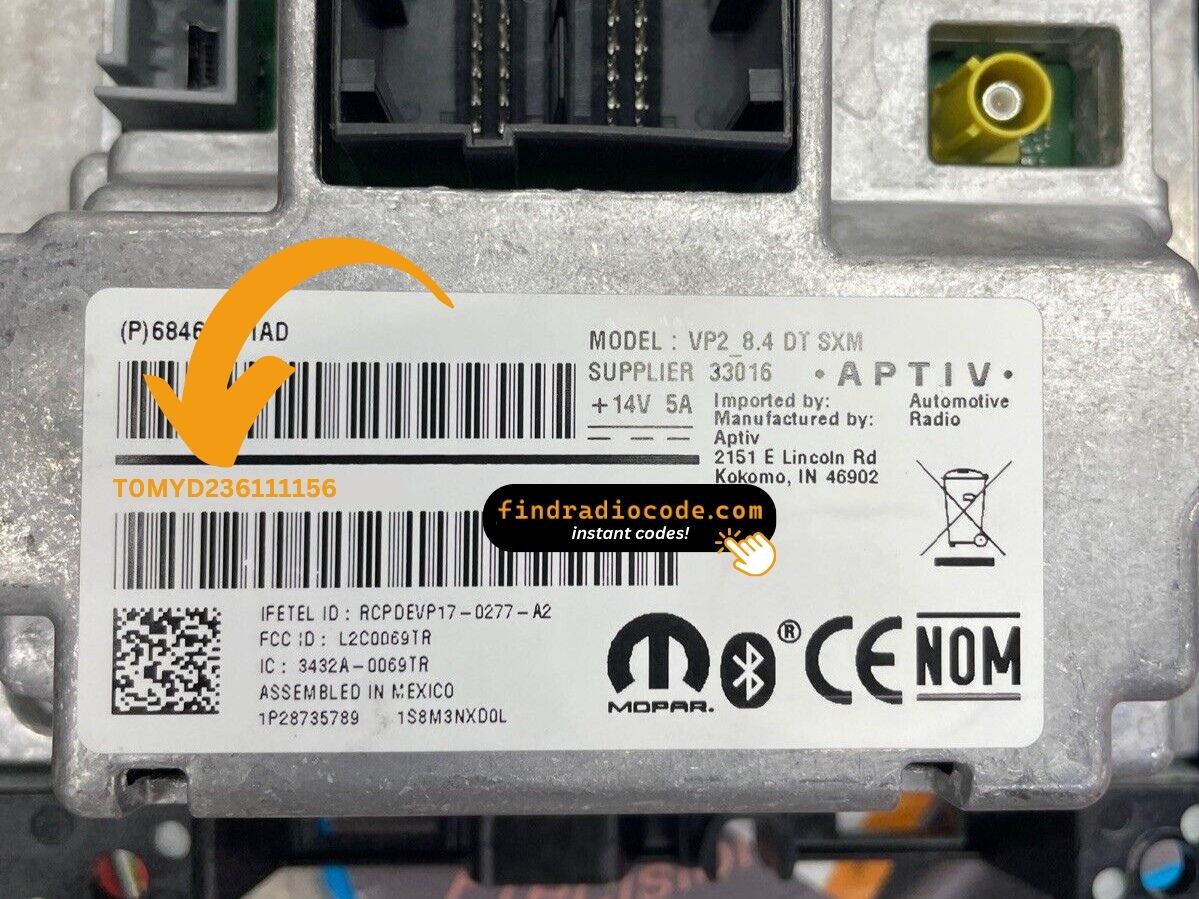
Example: Dodge Caliber serial number label location
Typical Serial Number Formats for 2012 Caliber Radios
Common radio models in the 2012 Caliber:
- REF (AM/FM CD, 66W) – Serial prefix:
TM9 - RES 130 (Media Center 130, CD/MP3) – Serial prefix:
TM9orT00AM - RAQ (base 6-disc AM/FM/CD) – Serial prefix:
TM9 - MyGIG REP/RBZ 430 (if equipped) – Serial prefix:
TM9
All serial numbers are 14 characters. The Caliber shared its head unit platform with the Jeep Compass and Patriot of the same era.
Serial Number Format Guide for 2012 Dodge Caliber
The 2012 Caliber's two common factory head units - the legacy RES Media Center 130 and the MyGIG RBZ touchscreen - both follow the broad Chrysler/Dodge serial-number convention of that era. The string printed on the chassis label generally:
- opens with the letter T, often followed by a short letter/number group such as a TM- or T00-style prefix;
- continues with a longer unit-unique alphanumeric block that uniquely identifies the radio;
- appears on a thermal/barcode label alongside the Mopar part number and the radio model code (RES, RBZ).
Treat any specific prefix you have seen mentioned online as a typical example rather than a guarantee - Chrysler used more than one supplier and the Caliber's radio fleet evolved across its run. The reliable approach is to copy the full string exactly as printed on the chassis label and let the calculator validate the format. There is no factory display menu on this generation that exposes a different internal serial, so the chassis label is the authoritative source on the 2012 Caliber.
Entering the Radio Security Code
Now that you've found the serial number and retrieved the unlock code, the final part is entering it into your radio.
Dodge original head units display a ENTER CODE message when ready for input.
The process is usually straightforward, but button layouts and confirmation methods may vary depending on the radio version installed in your Caliber.
Step-by-Step - Correct Entering Process
To enter the radio code on your 2012 Dodge Caliber:
- Turn ignition ON. The radio displays "CODE".
- Non-touchscreen (REF/RES/RAQ): Press preset button 1 multiple times to select the first digit. Repeat with buttons 2, 3, 4. Press and hold Enter/OK to confirm.
- Touchscreen (MyGIG 430): Use the on-screen keypad to enter all 4 digits.
Lockout: Multiple incorrect attempts activate a lockout. Keep the radio on for about 60 minutes to reset.
Correct Entering Process
For the 2012 Dodge Caliber the unlock procedure follows the standard Mopar pattern: power the radio with the ignition, wait for the anti-theft prompt, and enter the digits with the radio's controls. The keypad differs between the legacy RES deck and the MyGIG RBZ touchscreen, but the limits and the recovery process are the same.
Limited Attempts Warning: Mopar anti-theft logic on this generation typically allows only three consecutive wrong code entries. After the third miss the display switches to WAIT and the keypad is locked. The accepted recovery is to leave the ignition in the RUN position for a continuous 30 minutes - the radio powered, key in RUN, engine running or not - until the timer clears. Pulling the radio fuse or disconnecting the battery will not shortcut the cooldown, so verify every digit carefully before pressing it.
Step-by-step entry:
- Turn the key to the RUN or ACC position so the radio powers up. The display should show a
CODEor Please enter Anti-Theft Code prompt. - On a legacy RES head unit, use preset buttons 1 through 6 on the faceplate to enter each digit of the code in order - preset 1 for a 1, preset 2 for a 2, and so on.
- On a MyGIG RBZ touchscreen, use the on-screen number pad shown by the anti-theft prompt to tap each digit of the code.
- If the radio shows an explicit Enter or OK soft key after the last digit, press it. On simpler decks the radio accepts the code automatically once the full sequence is in.
- When the code is correct the prompt clears and the radio returns to normal operation. If WAIT appears, leave the ignition in RUN, let the 30-minute cooldown finish, and re-verify the serial and the code before re-entering them.
Caliber 2012 Common Radio Problems
The Caliber's radio enters a lockout after too many failed entries. The display will show "WAIT" or just stops responding. To wait it out:
- Keep the key in the ON position for about 60 minutes.
- Turning the key off resets the wait.
The Caliber frequently experiences battery issues which cause this more often than on newer vehicles. Once the 60 minutes are up, re-enter carefully using the preset buttons or touchscreen.
When no code prompt appears after a power event:
- Confirm the ignition is in ON — not just ACC to show the code screen.
- Check the radio fuse in the fuse panel — the Caliber's fuse box is under the hood. A blown fuse prevents any display.
- Attempt pressing the power button on the radio front panel to wake the code prompt.
Aging Calibers can develop fuse box corrosion that cause similar symptoms to a dead radio.
The entry method on the Caliber varies with which radio is fitted:
- REF, RES 130, RAQ (non-touchscreen) — Press preset button 1 repeatedly to reach the first digit, button 2 for digit two, button 3 for digit three, button 4 for digit four. After that, press and hold Enter/OK to submit.
- MyGIG REP/RBZ 430 (touchscreen) — Enter digits directly on the touchscreen. No hold-confirm step required.
If unsure which radio type you have, check the screen — a glass display you can tap means touchscreen entry; a black physical display means preset button entry.
The Caliber's radio needs to be pulled to access the serial label, as none of the Caliber's radios support on-screen serial display. On the label:
- Serial number — 14 characters, starting with
TM9orT00AM. Use this. - Part number — commonly
P05064...or68.... Skip.
On older Caliber labels, the print may have faded. Use a flashlight and take a photo before putting the radio back.
In this era of Dodge vehicles, a rejected code usually means a serial number mismatch. Multiple numbers appear on the radio label — look for the one that starts with TM9 or T00AM and is exactly 14 characters. The part number (P05064...) looks similar but will not generate a code.
Should it not work, re-read the label after removing the radio and contact support if anything is unclear.