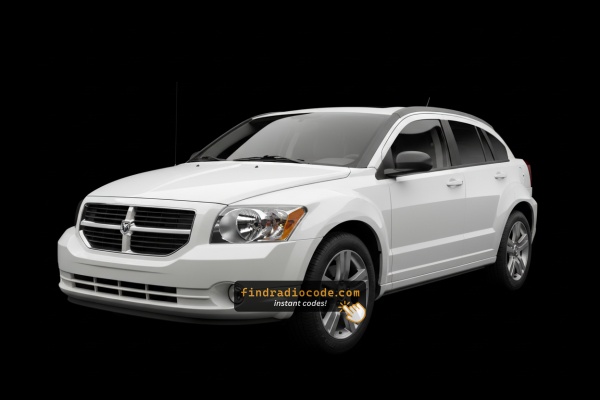
How to Get Your 2011 Dodge Caliber Radio Code
Car radios use security codes tied to the radio unit itself rather than the model or production year.
- Our lookup service works by matching your Dodge Caliber radio's serial number.
- After entering the serial into the form above, the system identifies the radio family and generates the code that you need.
- Use the code to unlock the radio immediately.
- The online process is quicker and more accessible than visiting the Dodge dealer.
How Code Entry Works on Your Dodge Radio
After receiving 2011 Dodge Caliber unlock code from the serial, you're ready to reactivate the radio.
Many drivers get stuck at this stage because input methods can look different across radio versions, but it's usually quick.
When the radio shows dashed lines, it means the unit is waiting for the correct numbers.
In-depth Entering Instructions for Caliber 2011
To enter the radio code on your 2011 Dodge Caliber:
- Turn ignition ON. The radio displays "CODE".
- Non-touchscreen (REF/RES/RAQ): Press preset button 1 repeatedly to select the first digit. Repeat with buttons 2, 3, 4. Hold Enter/OK to confirm.
- Touchscreen (MyGIG 430): Tap the on-screen keypad to enter all 4 digits.
Lockout: Too many incorrect attempts trigger a lockout. Keep the radio powered for about 60 minutes to reset.
In-depth Entering Instructions for Caliber 2011
The 2011 Caliber's factory radios use the standard Mopar anti-theft routine: ignition on, code prompt appears, digits entered through the radio's controls. With either the legacy RES deck or the MyGIG RBZ touchscreen, the keypad changes but the limits do not.
Limited Attempts Warning: Mopar's anti-theft logic on this generation typically tolerates only three consecutive wrong code attempts. After the third bad entry the display switches to WAIT and the keypad is locked. The accepted recovery is to leave the ignition in the RUN position for a continuous 30 minutes - the radio powered, key in RUN, engine running or not - until the timer clears. Pulling the radio fuse or disconnecting the battery will not shortcut the lockout, so always double-check the serial and each digit of the code before pressing it.
To enter the code, first turn the key to the RUN or ACC position so the radio powers up. The display should show a CODE or Please enter Anti-Theft Code prompt. On a legacy RES head unit, use preset buttons 1 through 6 on the faceplate to enter each digit in order - preset 1 for a 1, preset 2 for a 2, and so on. On a MyGIG RBZ touchscreen, the anti-theft prompt presents an on-screen number pad; tap each digit of the code in turn. If the radio shows an explicit Enter or OK soft key after the last digit, press it; on simpler decks the radio accepts the code automatically once the full sequence is in. When the code is correct the prompt clears and the radio returns to normal operation. If WAIT appears, leave the ignition in RUN and let the cooldown finish, then re-verify the serial and the code carefully before re-entering them.
How to Find the Serial Number on Your 2011 Dodge Caliber Radio?
Very important fact to know is that factory radios use a unique serial number to identify each unitindividually.
Your security system links the code directly to the serial.
Different from vehicle-specific data such as VIN or registration info, it is not determined by the model or production year, so you'll be able to generate it even if you have a radio that you installed afterwards.
Depending on the maker and radio installed in your Dodge Caliber, the access method is different.
These are the best ways to locate it.
Which Head Unit Is in Your 2011 Caliber?
By 2011 the Caliber's radio menu had narrowed to two factory choices, both with the sales code printed on the lower right of the faceplate.
- RES - Media Center 130 (AM/FM/CD/MP3 with Aux). Standard radio across SE, Mainstreet/Heat and most SXT cars. Single-DIN deck with a monochrome two-line display, twin rotary knobs (ON/VOLUME left, TUNE/SCROLL right), six numbered presets and dedicated
SEEKandAUXhard keys. Voice command and Uconnect Bluetooth/audio jack available with the optional UConnect module. Highest take rate by far. - RBZ - MyGIG Media Center 430 (CD/DVD/HDD touchscreen, no nav). Optional upgrade ordered with the higher trim packages. Identified by its 6.5-inch color touchscreen, hard buttons (BROWSE, RADIO, MEDIA, MENU) ranged around the display, a 30 GB hard drive (advertised as 6,700-song capacity), Sirius satellite tuner and integrated voice command. No on-screen navigation. Lower take rate than RES.
Note: Factory in-dash navigation was not a typical 2011 Caliber order; the legacy REC was no longer cataloged and the nav-equipped MyGIG (RHB) was not commonly fitted to the Caliber from the factory.
Access Your S/N on the Radio Screen
The method for 2011 Dodge Caliber is this:
The 2011 Dodge Caliber may be equipped with the REF (AM/FM CD player), RES 130 (Media Center), or RAQ (base 6-disc CD) radio. None of these include on-screen serial number display.
The serial number can only be located by pulling the unit out and checking the label on the chassis. Look for a printed sticker on the top, side, or back of the radio unit.
Taking Out the Unit to Access the S/N on the Tag
If the serial number cannot be accessed through menu, use the removal method.
Most Dodge Caliber OEM radios include a label with the serial number printed on the housing.
Basic process:
- Remove key from ignition.
- Gently detach surrounding mounting frame.
- Remove fasteners holding the radio.
- Move slightly to inspect the label.
The 2011 Caliber's radio is positioned in the center of the dashboard. To remove it:
- Turn off the vehicle.
- Pry off the center bezel around the radio. The Caliber uses plastic clips – begin from the top and work around the edges with a trim tool.
- Remove the 4 mounting screws securing the radio.
- Pull the radio out and read the serial number on the rear or side label.
Note: The Caliber's center trim also covers the climate controls. Take care to avoid breaking the plastic clips.
Caliber's Hardware Label Method
By 2011 the Dodge Caliber's radio range was largely settled - the older RES Media Center 130 deck on most cars, with the MyGIG RBZ touchscreen as the upmarket option. On every one of these head units the serial number is printed on a chassis label rather than shown on a screen, so the only reliable way to read it is to take the radio out of the dash.
Start with safety. Turn the ignition off and remove the key, disconnect the negative battery terminal, and let the vehicle sit for at least 10-15 minutes so the airbag/SRS capacitors fully de-energize. While you work, keep clear of any yellow airbag-related connectors you can see behind the dash and use plastic trim tools instead of metal screwdrivers - the Caliber's center stack scratches very easily.
You will want a small kit of plastic pry/trim tools, a 7 mm socket and a Phillips screwdriver, a soft cloth or painter's tape to protect the bezel edges, and a small cup or magnetic tray for the four bracket screws so you do not lose them inside the dash.
The 2011 Caliber's center stack comes apart in a familiar Mopar sequence. Pull the shift knob straight up off its threaded shaft and lift off the shift bezel collar. Slip a plastic trim tool behind the bottom edge of the center radio bezel and pry it forward, working side to side and bottom to top until the side clips release. Tilt the bezel forward, disconnect the switch and HVAC connectors behind it (release the white retainers on the HVAC cables with a small flat tool), and set it aside. Remove the four screws holding the radio chassis to its mounting bracket, slide the head unit straight forward out of the opening, and unplug the main wiring harness and antenna lead. Always pull the antenna by the connector, not by the cable, to avoid damaging it.
With the radio in hand, look at the top, side and rear of the metal chassis. You will find a printed label that includes a barcode, the Mopar part number, the radio model code (RES, RBZ, etc.) and the long alphanumeric serial number. Copy that serial exactly as it appears - leading letters included - and photograph the label so you can double-check any ambiguous characters (0 vs O, 1 vs I) before reinstalling the radio in the reverse order. A clean photo at this stage is worth far more than rushing to type the serial from memory.
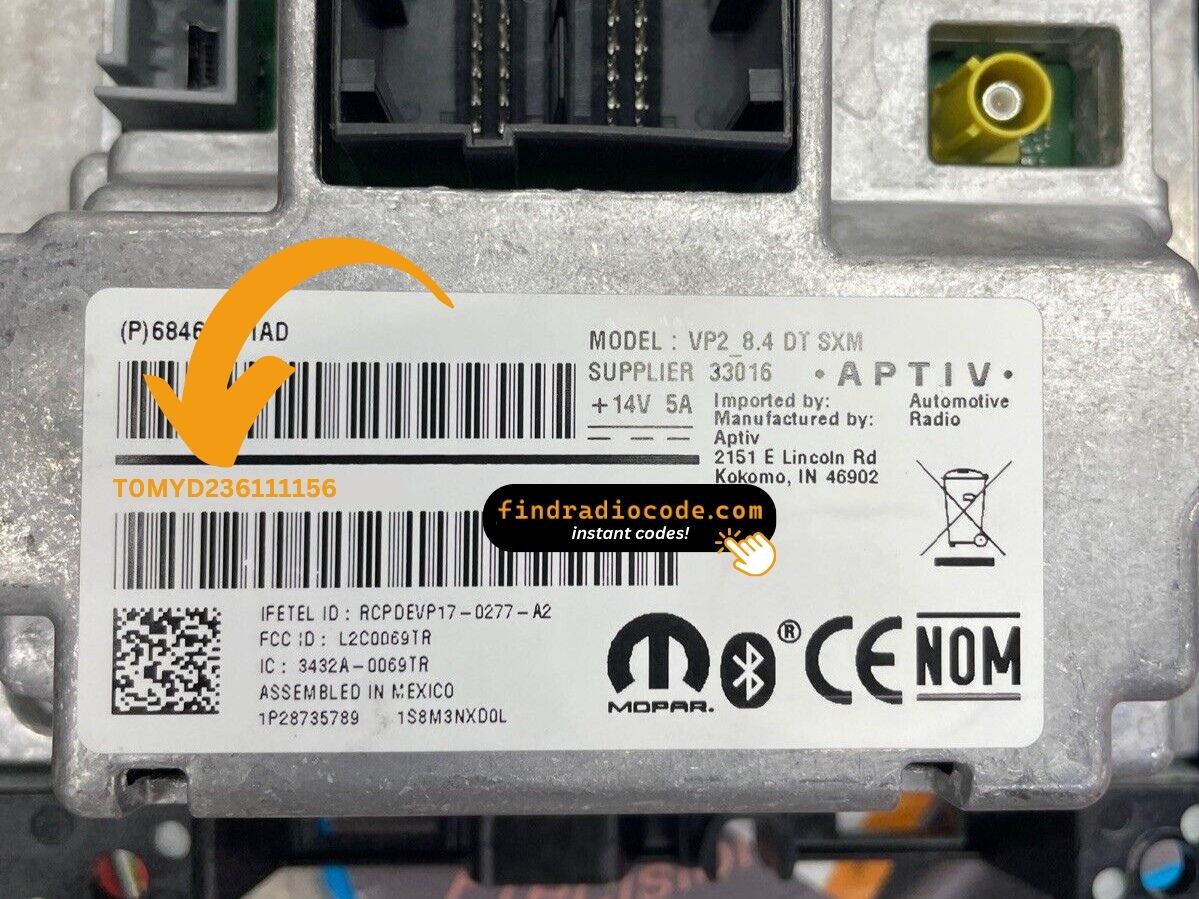
Example: Dodge Caliber serial number label location
S/N Patterns and Prefixes
Typical radio models in the 2011 Caliber:
- REF (AM/FM CD, 66W) – Serial prefix:
TM9 - RES 130 (Media Center 130, CD/MP3) – Serial prefix:
TM9orT00AM - RAQ (base 6-disc AM/FM/CD) – Serial prefix:
TM9 - MyGIG REP/RBZ 430 (on higher trims) – Serial prefix:
TM9
All serial numbers are 14 characters. The Caliber shared its radio platform with the Jeep Patriot and Jeep Compass of the same era.
S/N Patterns and Prefixes
For the 2011 Caliber's two main radios - the legacy RES Media Center 130 and the MyGIG RBZ - the serial number printed on the chassis label generally follows the same Chrysler/Dodge convention seen elsewhere in the lineup of that era. The string usually begins with the letter T, continues with a short letter/number group, and ends with a longer unique identifier. The label also shows a barcode, the Mopar part number and the radio model code, which together make it easy to confirm exactly which unit you are looking at.
Specific prefixes such as TM- or T00-style openers turn up frequently on Mopar units of this era, but it is best to treat any particular pattern as a typical example rather than a hard rule, since Chrysler used more than one supplier across the Caliber's radio lineup. The most reliable approach is to copy the entire serial exactly as printed on the chassis label - leading letters included - and let the calculator validate the format. There is no display-based menu on the 2011 Caliber that exposes a different internal serial value, so the chassis label is the authoritative source.
Understanding Unlock Issues with Your Caliber
The Caliber's radio needs to be pulled to access the serial label, as none of the Caliber's radios support on-screen serial display. On the label:
- Serial number — 14 characters, starting with
TM9orT00AM. Use this. - Part number — usually
P05064...or68.... Skip.
These stickers can age, the print might be worn. Good lighting and take a photo before putting the radio back.
How you enter the code on the Caliber varies with which radio is fitted:
- REF, RES 130, RAQ (non-touchscreen) — Press preset button 1 repeatedly to select the first digit, button 2 for digit two, button 3 for digit three, button 4 for digit four. After that, press and hold Enter/OK to confirm.
- MyGIG REP/RBZ 430 (touchscreen) — Enter digits directly on the touchscreen. No hold-confirm step required.
Not sure of your radio model, look at the display — a touchscreen means MyGIG 430; a non-touch face means preset button entry.
On the Caliber, a rejected code almost always traces back to a serial number mismatch. Several numbers appear on the radio label — look for the one that begins with TM9 or T00AM and is exactly 14 characters. The part number (P05064...) looks similar but is the wrong one.
If the code was rejected, re-read the label after removing the radio and reach out to us if you want a free re-check.
Should the display stay blank after a power event:
- Confirm the ignition is in ON — the radio needs full power to show the code screen.
- Check the fuse in the fuse panel — it is located in the engine bay and under the dash. A blown fuse prevents any display.
- Try pressing the power button on the radio front panel to wake the code prompt.
Older Calibers with high mileage can develop corroded fuse contacts that cause similar symptoms to a blown fuse.
The Caliber's radio locks out after 3 wrong attempts. The screen shows "WAIT" or just goes quiet. To wait it out:
- Leave the ignition ON for about 60 minutes.
- Cycling the ignition restarts the timer from scratch.
Calibers are particularly prone to battery issues which cause this more often than on newer vehicles. After the lockout clears, re-enter carefully using the preset buttons or touchscreen.
Why Did the Radio Lock and Ask for a Code?
The Caliber is among the Dodge models where the anti-theft trigger is particularly frequent. Reasons include:
- Battery failure or disconnect — Caliber batteries from this era age badly, and each replacement triggers the radio lock.
- Dead battery from sitting — Calibers left parked for weeks often lose enough charge to lock the radio.
- Blown fuse — a fuse failure also counts as power loss.
- Used purchase — These are affordable used cars, so a lot of buyers find the radio locked when they buy one.
Whatever triggered it, the unlock code is permanently tied to the serial number and does not change.