Radio code for Chrysler Uconnect 3 VP1 RJ1 UA1 RA1
Instant Radio Code Generation ⚡
Also compatible with: Dodge, Jeep, and RAM.
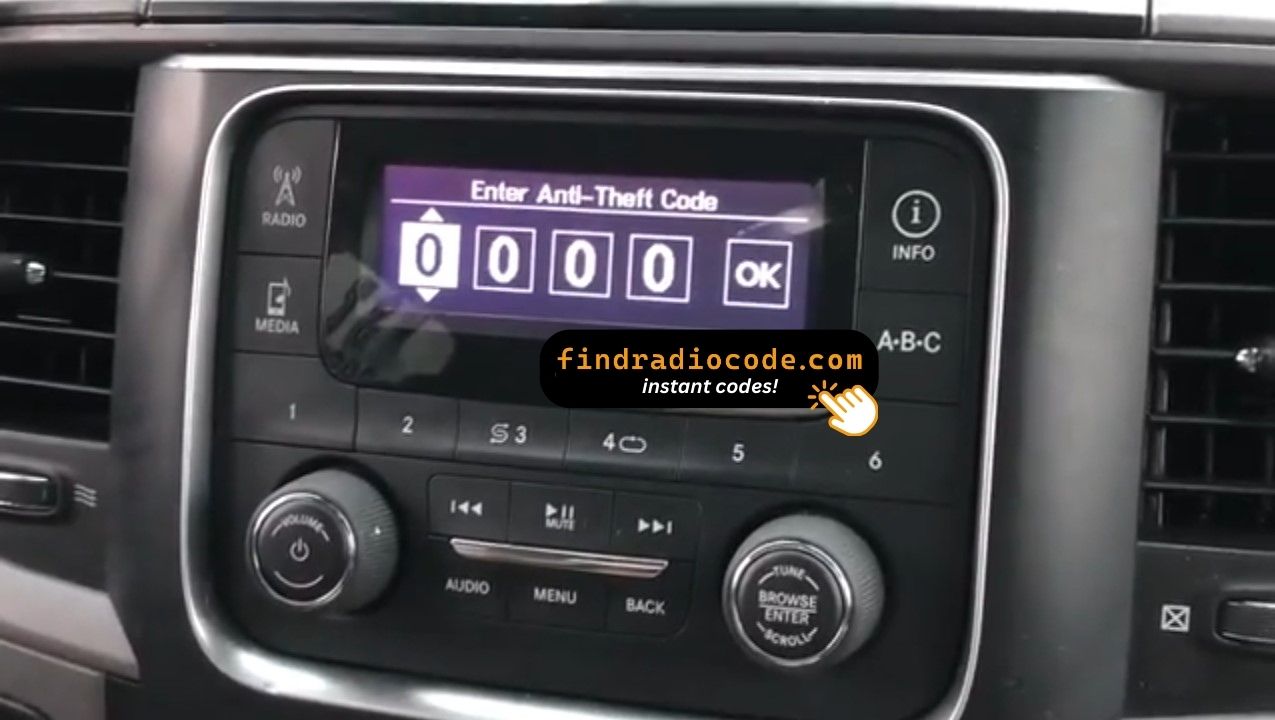
We're available round the clock.
Simply send us a video that shows both the code entry and serial number together.
View our complete Refund Policy.
1. Check out our service explanation video.
2. Browse through our customer reviews.
3. Explore our blog for verification, proof, and detailed information.
Access steps:
1. Remove radio from dashboard (may require panel removal)
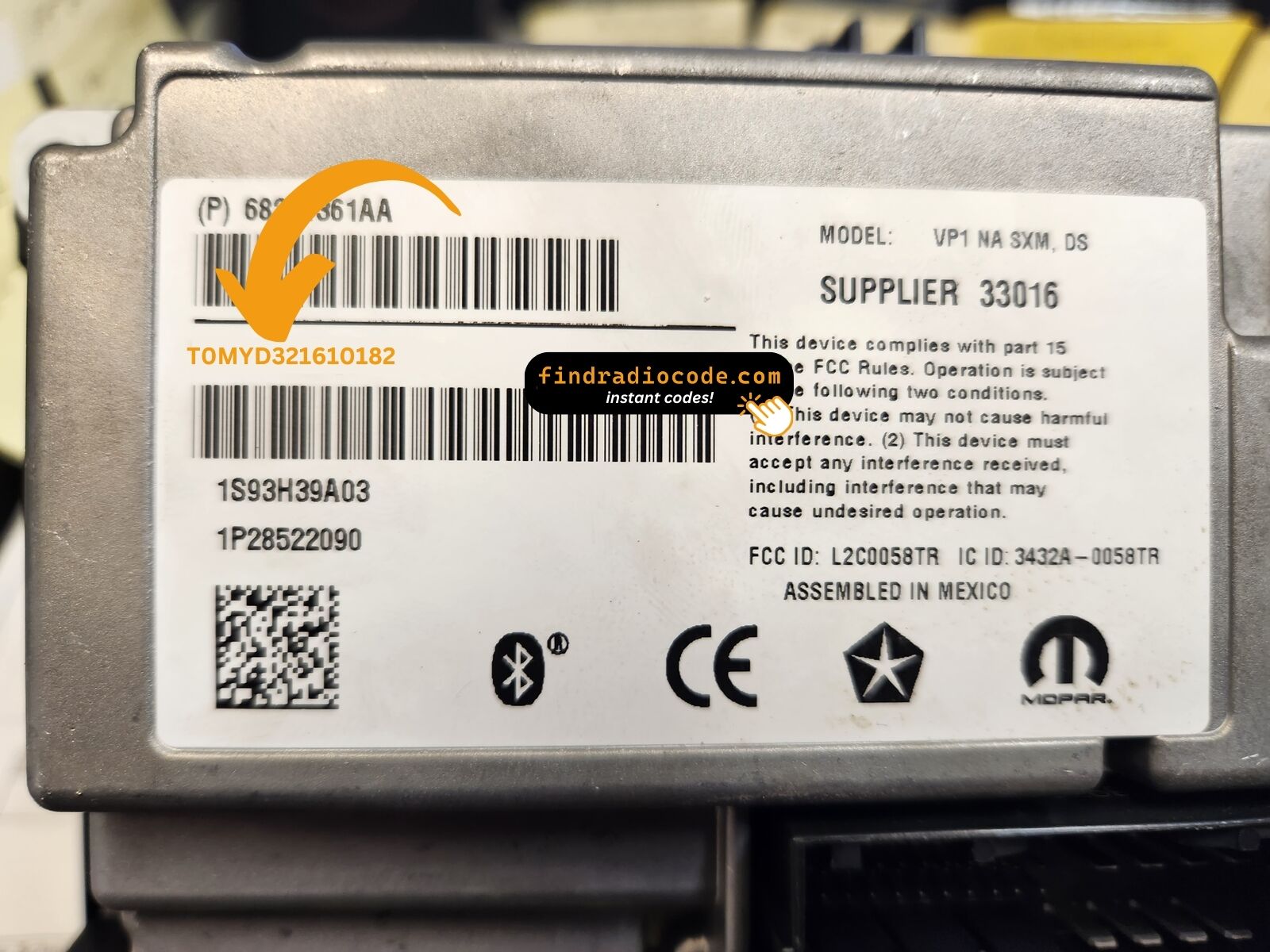
2. Look for white/silver label on back or side
3. Record complete serial number exactly as shown
Note: In RAM trucks, radio removal often requires removing center stack panels. Consider professional help if uncomfortable with disassembly.
Timeline:
• 2013-2016: Delphi manufactures Uconnect 3/5/7
• 2016: Company splits, automotive division becomes Aptiv
• 2017+: Panasonic and Harman take over Uconnect production
Delphi radios use different codes than Panasonic/Harman units. Always verify manufacturer on radio label.
Why codes are frequently needed:
• RAM trucks commonly need battery replacement (work trucks)
• Used radios often swapped between RAM trucks
• Aftermarket stereo upgrades common
• Electrical repairs trigger code requests
This is the most common Delphi radio model requiring unlock codes.
How to get your Chrysler Uconnect 3 VP1 RJ1 UA1 RA1 radio code?
1. Find the serial number on the label at the back of your radio. No VIN required.
2. Enter your serial number in the field provided.
3. Proceed to checkout to instantly receive your unlock code on screen and via email.
Supported partnumbers for model Chrysler Uconnect 3 VP1 RJ1 UA1 RA1
:
PARTNUMBERS
68356524AA
68356524AB
68356524AC
68356525AA
68356525AB
68356525AC
68271362AA
68271362AB
68271362AC
68271362AD
68271361AA
68271361AB
68271361AC
68271361AD
68356517AA
68356517AB
68356517AC
Technical Specifications - Delphi Uconnect 3 VP1
System Details:
- Manufacturer: Delphi (Aptiv)
- Platform: VP1 (1st gen Uconnect 3)
- Screen Size: 3-inch display
- Market: North America (NA)
- Code Format: 4-digit PIN
- Production Years: 2013-2016
Features:
- AM/FM radio
- SiriusXM satellite radio (RJ1/SXM models)
- Bluetooth phone/audio
- USB and auxiliary inputs
- Steering wheel controls
- Voice commands (select models)
Serial Number Information:
Delphi Uconnect 3 serial numbers are located on a label affixed to the radio housing:
- Label Location: Back or side of radio unit
- Access: Radio must be removed from dashboard
- Label Color: Usually white or silver sticker
- Serial Format: Alphanumeric sequence (format varies by model)
Model Variant Guide:
| Variant | Features | Common In |
|---|---|---|
| RA1 | Basic Uconnect 3 | Base model RAM, Chrysler |
| RJ1 NA DS | With SiriusXM Digital | Mid-trim RAM trucks |
| UA1 | Premium audio package | Higher trim levels |
| NA SXM DS | SXM with digital audio | Most common variant |
Compatible Part Numbers:
Supported partnumbers for model Chrysler Uconnect 3 VP1 RJ1 UA1 RA1
:
PARTNUMBERS
68356524AA
68356524AB
68356524AC
68356525AA
68356525AB
68356525AC
68271362AA
68271362AB
68271362AC
68271362AD
68271361AA
68271361AB
68271361AC
68271361AD
68356517AA
68356517AB
68356517AC
Compatible Vehicles for Delphi Uconnect 3 VP1/RJ1
The Delphi Uconnect 3 system (VP1 platform with variants RA1, RJ1, UA1) is installed in North American market Chrysler Group vehicles from 2013-2016 model years. Delphi (later Aptiv) manufactured these systems before Panasonic and Harman took over production.
Dodge Models:
- Dodge RAM 1500 (2013-2016)
- Dodge RAM 2500 (2013-2016)
- Dodge RAM 3500 (2013-2016)
- Dodge Durango (2014-2015)
- Dodge Journey (2014-2015)
Jeep Models:
- Jeep Grand Cherokee (2014-2015)
- Jeep Wrangler (2014-2015)
- Jeep Compass (2014-2015)
- Jeep Patriot (2014-2015)
Chrysler Models:
- Chrysler 300 (2013-2015)
- Chrysler Town & Country (2013-2015)
Model Variants:
- RA1: Basic Uconnect 3 (no SXM)
- RJ1 NA DS: With SiriusXM satellite
- UA1: Premium audio variant
- NA SXM DS: North America SXM Digital
How to Enter Delphi Uconnect 3 Unlock Code
Step-by-Step Code Entry Instructions:
- Turn ignition to RUN (don't start engine)
- Power on the radio
- Screen displays "Enter Unlock Code" or "CODE"
- Enter 4-digit code using one of these methods:
- Preset Buttons: Press numbered buttons 1-6 in sequence
- Touchscreen: Some models have on-screen keypad (tap digits)
- Example: Code 3789 = press/tap 3, 7, 8, 9
- Radio unlocks and resumes operation
⚠️ Delphi WAIT State Lockout
After 3 failed attempts, Delphi systems display "WAIT" and lock for 30 minutes.
Resolution: Keep ignition in RUN position for full 30 minutes continuously. Do NOT turn off ignition or timer resets. You may drive during wait period.
Delphi-Specific Troubleshooting:
- Battery disconnection or replacement
- Radio removal for service/upgrade
- Jump-starting dead battery
- Fuse replacement or electrical work
- Installing used Delphi radio
- Long-term battery drain
Some Delphi VP1 models have touchscreen keypads while others use physical preset buttons. Try both methods if one doesn't respond. The code is the same regardless of entry method.
Yes, but you'll need the unlock code. Delphi radios from 2013-2016 RAM trucks are often swapped between vehicles. The code is tied to the radio serial number, not the VIN, so the same radio keeps the same code.
Is this your radio?
Uconnect 3 RJ1 VP1 NA DS is the entry-level Delphi-built 5-inch touchscreen Uconnect for North American Jeep applications - small recessed display sitting between the climate vents, AM/FM, Bluetooth phone, USB, no built-in maps. The "DS" suffix denotes the display-smaller hardware revision shipped with later JK builds.
Vehicles with Chrysler Uconnect 3 VP1 RJ1 UA1 RA1
- 2017-2018: Jeep Wrangler JK (final build years, base trim)
- 2017-2020: Jeep Compass MP, Renegade BU (USA, base trims)
- 2017-2019: Dodge Grand Caravan (USA, base trim)
If your screen is 5 inches and the home screen shows four large tiles with no NAV option, you have a Uconnect 3. If the screen is 7 inches with rounded tiles, you have a Uconnect 7 (UAG/UKG/L). The RJ1 chassis part numbers are in the 68356517-68356525 and 68271361-68271362 ranges.
Where to find your serial number
Printed on a white label on the top surface of the radio chassis, near the rear-right corner. The radio must come out of the dash to read it - the VP1 platform exposes no serial in any settings menu while the unit is locked. Three Phillips screws hold the trim bezel; the chassis releases on two side clips.
Format on the label: T0MYD##### (5 digits after the prefix). Example: T0MYD42118.
How to enter the code once you receive it
On the locked 5-inch screen a four-digit keypad fills the lower half of the display. Tap the digits in sequence; the radio auto-verifies on the fourth digit and unlocks immediately if correct. There is no separate OK or Enter button on the VP1 lock interface.
Why your radio is locked
Loss of 12V power for more than about a minute - dead battery, battery replacement, alternator service, or removal of the head unit during dash work. The VP1 platform does not enter lock mode while it has uninterrupted power.
If you entered the wrong code
After three wrong codes the screen shows "INCORRECT CODE - WAIT" with a 30-minute countdown. Keep the ignition in RUN or ACC for the timer to count down - cutting power restarts the 30 minutes. The radio never permanently locks; the correct code always works once the timer expires.