Chrysler Chrysler RB1 Alpine Unlock Code⚡
Alpine | Chrysler | Instant Retrieval
We're available round the clock.
Simply send us a video that shows both the code entry and serial number together.
View our complete Refund Policy.
How to get your code?
1. Find your radio serial number
Usually displayed on screen or on a label on the radio unit
2. Enter serial number in the form (left)
3. Get your code instantly!
Serial Number Location:
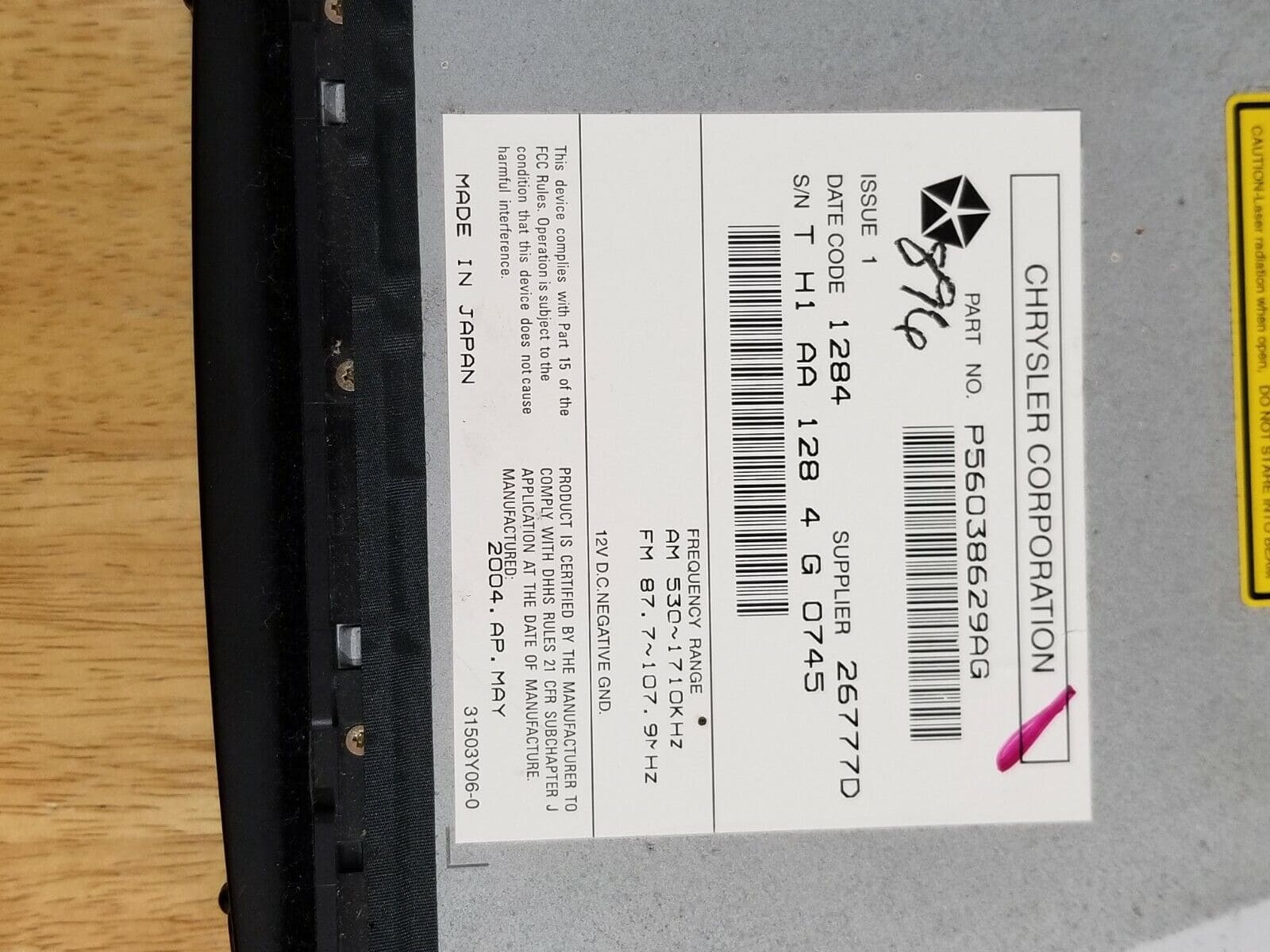
Serial Number Examples:
Examples of serial numbers for Chrysler vehicles:
TQ1AA067945500
(prefix: TQ1AA)
TT1AA2179M3571
(prefix: TT1AA)
TH1AA1366J4777
(prefix: TH1AA)
THAAA1357K1794
(prefix: THAAA)
TCAAA1544K0931
(prefix: TCAAA)
Common prefixes: TQ1AA, TT1AA, TH1AA, THAAA, TCAAA
Supported Part Numbers 15 for Chrysler RB1 Alpine:
P56038629AB P56038629AE P56038629AG P56038629AH P56038629AI P82206406 P82206406AB P82206406AC P82206406AD P82208715AB P82208715AC P82208715AD P82208715AE P82208715AF P82208715AG
Is this your radio?
RB1 is the early Alpine-audio MyGIG-precursor head unit - it is a double-DIN with an integrated CD player and an early monochrome navigation display option (REC RB1 nav variant). The face has a wider screen than RAE/RAD but no touchscreen; navigation is operated with hard buttons around the screen.
Chrysler vehicles with Chrysler RB1 Alpine
- 2004-2007: Chrysler 300, 300C (early premium nav)
- 2004-2007: Dodge Magnum, Charger (premium nav)
- 2004-2007: Jeep Grand Cherokee WK, Commander (premium nav)
RB1 has hard buttons around a narrow nav display - no touchscreen. If your screen accepts taps, you have a MyGIG REC/REJ/REL/REQ instead. RB1 part numbers use the P56038629, P82206406 and P82208715 blocks.
Where to find your serial number
Top of the chassis on a white sticker, toward the rear-right corner. The radio is held by two T20 Torx screws on each side rail; once the bezel is off, the unit slides forward. No on-screen display of the serial.
Format on the label: TQ1AA / TT1AA / T**AA (10-character T-prefix). Example: TQ1AA8821037.
How to enter the code once you receive it
On power-up the screen shows "CODE" with four dashes. Use preset buttons 1-4 to step each digit, then press preset 5 (or the small OK/ENTER button below the screen on later builds) to verify.
Why your radio is locked
Battery disconnect, jump-start failure, or removal of the head unit during dash repair.
If you entered the wrong code
Three wrong entries triggers a 60-minute "WAIT" lockout. The timer counts down only while the radio has continuous 12V applied.